IPSec Diagnosis
This section describes the IPSec diagnosis methods.
You can apply the following method for IPSec faults.
- Choose .
- Click IPSec Diagnosis.
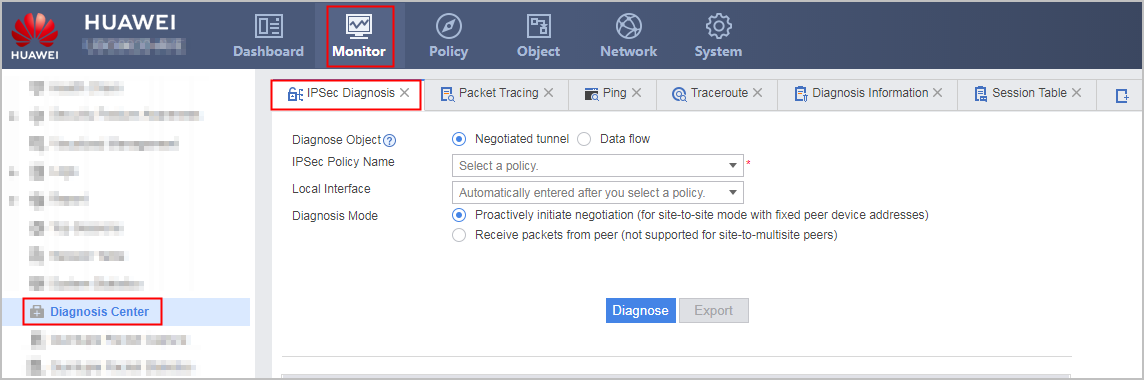
- Configure IPSec diagnosis.Based on the fault symptom, IPSec faults can be divided into the following types:
- The IPSec tunnel fails to be established (tunnel negotiation fails).
- The service is abnormal after the IPSec tunnel is successfully established (encrypted data flows fail to be forwarded).
Accordingly, in , both Negotiate Tunnel and Data-Flow can be the diagnosis object.- If the IPSec tunnel fails to be established, select Negotiate Tunnel as the diagnosis object.
- If the service is abnormal after the IPSec tunnel is successfully established, select Data-Flow as the diagnosis object.
Table 1 IPSec diagnosis configuration item Diagnose Object
Configuration Item
Note
Negotiate Tunnel
IPSec Policy Name
Name of an existing IPSec policy, based on which diagnosis is performed.
Local Interface
Local Interface is automatically filled in with the name of the interface on which the IPSec policy selected in IPSec Policy Name is applied. If the IPSec policy is applied on multiple interfaces, you can select one interface for diagnosis in the drop-down list.
NOTE:Diagnosis of the IPSec policy with the local interface being the tunnel interface is not supported.
Diagnosis Mode
Diagnosis mode, which can be Proactively Initiate Negotiation and Receive Packets from Peer.
Details are as follows:- Proactively Initiate Negotiation: Applicable in local point-to-point scenarios where the IPSec policy has the peer address configured.
- Receive Packets from Peer: Not applicable in scenarios where the IPSec policy of the peer device is configured in point-to-multipoint mode (template mode).
Peer Address
Peer address, which can be the interface address used for IPSec tunnel negotiation at the peer end if the local IPSec policy does not have the peer address configured.
Data-Flow
Source IP Address
Source IP address. Encrypted data flows matching this source IP address are diagnosed.
Destination IP Address
Destination IP address. Encrypted data flows matching this destination IP address are diagnosed.
Protocol
Protocol type, which can be TCP or UDP.
After you specify a protocol type, you can diagnose encrypted data flows matching this protocol type.
Source Port
Source port. Encrypted data flows matching this source port are diagnosed.
Destination Port
Destination port. Encrypted data flows matching this destination port are diagnosed.
- Click Diagnose to obtain the diagnosis information.
- Optional: Click Export to export the diagnosis information to the default path.
Follow-Up Procedure
Check the IPSec diagnosis information and troubleshoot the identified faults.
According to different diagnose modes, the system can provide different diagnose items. A fault-free item is marked with  , and a faulty item is marked with
  with a reference solution in the Diagnosis Result column.
The different diagnose results maybe diagnosed by different IPSec diagnose modes are shown in Table 2.
Diagnose Mode |
Diagnose Item |
Diagnose Result |
|---|---|---|
Negotiate Tunnel |
Security Policy |
In the P2P scenario, when the local device proactively initiates a tunnel negotiation packet, the diagnose result only includes the name of the security policy that the packet matches and the action. You can click the security policy name to display the security policy configuration page. A maximum of five security policies that the packet matches can be displayed. |
NAT Policy |
In the P2P scenario, when the local device proactively initiates a tunnel negotiation packet, the diagnose result only includes the name of the NAT policy that the packet matches and the translation mode. You can click the NAT policy name to display the NAT policy configuration page. A maximum of five NAT policies that the packet matches can be displayed. |
|
IPSec Policy on an interface |
|
|
Negotiation Mode |
|
|
An IPSec sub-policy that can initiate negotiation is configured on the interface: |
|
|
IPSec Policy Configuration Completeness |
|
|
Negotiation Result in Phase 1 |
NOTE:
Only four possible diagnose results are displayed here. Please solve the specific troubles according to the actual diagnose results together with the references. |
|
Negotiation Result in Phase 2 |
NOTE:
Only four possible diagnose results are displayed here. Please solve the specific troubles according to the actual diagnose results together with the references. |
|
Data-Flow |
Security Policy |
The diagnose result includes the name of the security policy that data flows to be encrypted matches by 5-tuple and the action. You can click the security policy name to display the security policy configuration page. A maximum of five security policies that data flows to be encrypted matches can be displayed. |
NAT Policy |
The diagnose result includes the name of the NAT policy that data flows to be encrypted matches by 5-tuple and the translation mode. You can click the NAT policy name to display the NAT policy configuration page. A maximum of five NAT policies that data flows to be encrypted matches can be displayed. |
|
Interface Status |
|
|
IPSec Policy on an interface |
|
|
IPSec Policy Matching Data Flow |
|