Packet Tracing
This section describes the packet tracing diagnosis methods.
- Choose .
- Click Packet Tracing.
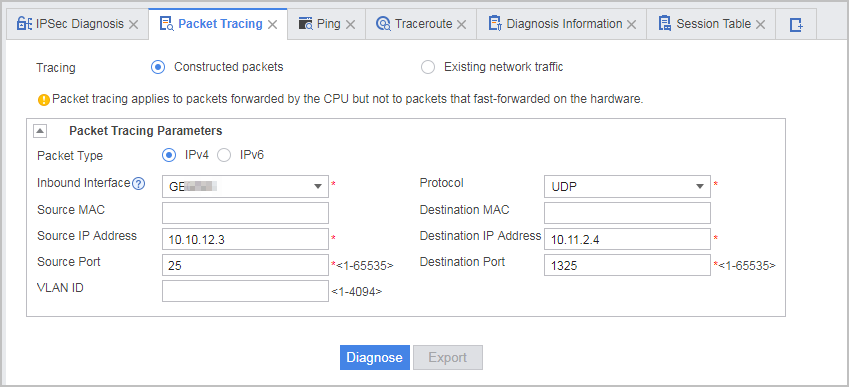
- Configure packet tracing.
Parameter Description Tracing - Constructed packets
- Existing network traffic
Enter parameter values for packet tracing. Packet Type - IPv4
- IPv6
Inbound Interface Incoming interface of the packets to be diagnosed Protocol Protocol of the packets to be diagnosed Source MAC Source MAC address of the packets to be diagnosed Destination MAC Destination MAC address of the packets to be diagnosed Source IP Address Source IP address of the packets to be diagnosed Destination Address Destination IP address of the packets to be diagnosed Source Port Source port of the packets to be diagnosed Destination Port Destination port of the packets to be diagnosed VLAN ID VLAN ID of the packets to be diagnosed  After the packet tracing function is enabled, certain CPU resources are occupied. Configure diagnosis parameters based on actual fault locating requirements to prevent excessive CPU resource occupation and unstable device running due to an overly large diagnosis scope.
 - Click Diagnose to obtain the diagnosis information.
- Layer 3 packet tracing diagnosis is supported. This function does not apply to Layer 2 packets.
- The web UI supports a maximum of 10 flows. The diagnosis result of up to 10 packets for each flow can be displayed.
- When the packet tracing function is enabled on the web UI, the last operation is used as the diagnosis result.
- Optional: Click Export to export the diagnosis information to the default path.
Check the packet tracing diagnosis information and troubleshoot the identified faults.
A fault-free item is marked with  , and a faulty
item is marked with
, and a faulty
item is marked with  .
.
Click View Flowchart next to the diagnosis result of a packet to view the whole service processing flowchart of the packet. Based on this flowchart, you can view the processing result of the packet in each phase. The green box indicates that the packet is properly processed, and the red box indicates that the packet processing is abnormal.
If you move the cursor to the corresponding node box, the system displays key information about the service flow involved in the current node. When an exception occurs, you can locate and rectify the fault as prompted.
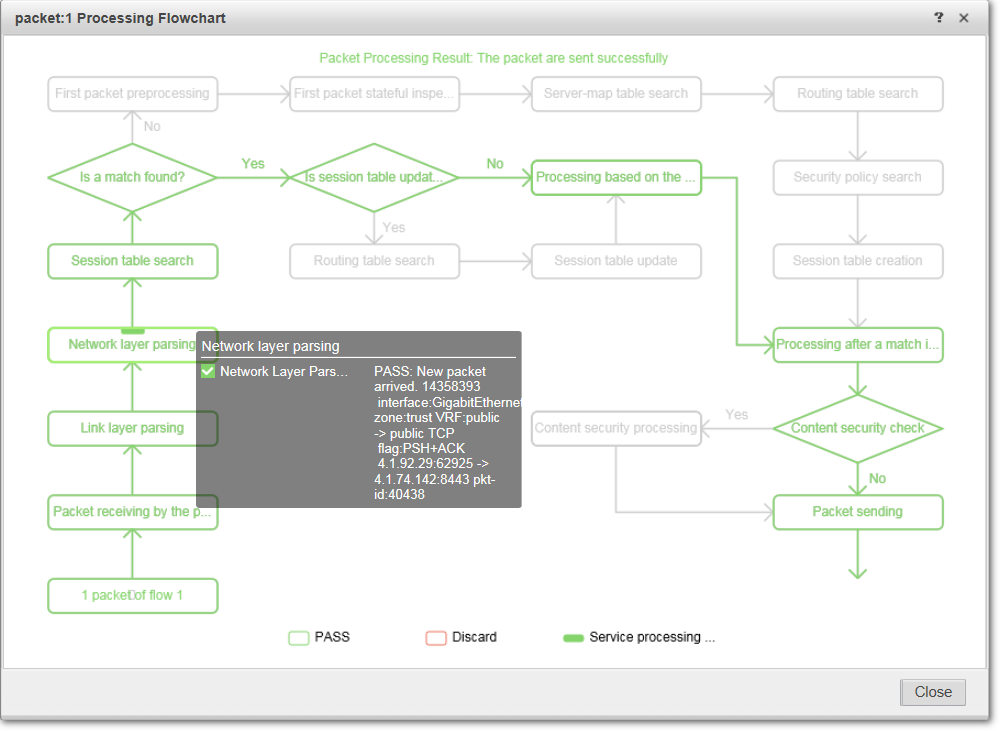
| Node | Subnode | Action on the Subnode |
|---|---|---|
| Network layer parsing | Network layer parsing | Parses network layer information of packets. |
| After "Network layer parsing" | IPSec | Transmits DHCP packets over IPSec tunnels. |
| DHCP | Functions as the DHCP server or DHCP relay to process DHCP packets. | |
| Before "First packet preprocessing" | Blacklist | Performs blacklist matching during the session establishment of the first packet. |
| Attack Defense | Performs DDoS detection, single-packet attack detection, address scanning, and port scanning. | |
| After "Server-map table search" | Destination NAT | Looks up the NAT Servermap table and stores the destination NAT information into the sessions for subsequent address translation. |
| Source NAT | Looks up the NAT Servermap table and stores the source NAT information into the sessions for subsequent address translation. This process also applies to the scenario in which the NAT server initiates the access. | |
| Before "Routing table search" | Routing | Performs routing table lookup to forward packets for the root firewall and packets between virtual systems. |
| IPSec | Transmits IPSec encrypted packets and protocol packets. | |
| L2TP | Checks whether packets are L2TP packets and sets the fwd_type field in sessions on the firewall to L2TP for L2TP packets so that they can be delivered to the L2TP processing module. | |
| After "Routing table search" | User Management | Redirects users to the portal authentication page. |
| Security Policy Configuration | Performs septet policy matching (source address, source port, destination address, destination port, protocol, user, and application). | |
| NAT | Looks for IPv6 routes based on the IPv6 addresses of CPE. | |
| NAT64 | Looks for IPv4 routes in the IPv6 forwarding process. | |
| IPSec | Delivers plaintext traffic to the IPSec module for encryption if the traffic matches the session (the forwarding type is ipsec) or delivers ciphertext traffic to the IPSec module for decryption if the traffic matches the session (the forwarding type is ours-ipsec). | |
| Attack Defense | Performs DDoS attack detection. | |
| Bandwidth Management | Restricts the bandwidth of virtual systems | |
| Before "Packet sending" | Bandwidth Management | Restricts interface bandwidth for sending packets. |
| After session update | Blacklist | Performs blacklist matching upon session updates |
| NAT | Looks for IPv6 routes based on the IPv6 addresses of CPE. | |
| Bandwidth Management | Looks for bandwidth policies upon session updates | |
| IPSec | Transmits IPSec encrypted packets and protocol packets. | |
| Before "Content security processing" | Reassemble IP fragments. | - |
| TCP Flow Reassembly | - | |
| Service Awareness | Identifies applications based on packet characteristics. | |
| Content Security Processing | Policy Re-lookup | Re-performs security policy lookup upon changes in application identification. |
| Intrusion Prevention | Analyzes network traffic, detects intrusions, and performs actions (permit, alert, or block) based on the detection result. | |
| URL | Extracts the URL addresses in HTTP or HTTPS packet headers, compares the URLs against RUL rules, and performs the action (permit, alert, or block) based on the detection result. | |
| DNS | Extracts the domain names in HTTP or HTTPS packet headers, compares the domain names against domain name rules, and performs the action (permit, alert, or block) based on the detection result. | |
| Antivirus | Computes the hash value of suspicious files, compares the hash values against the virus signature database, and performs the action (permit, alert, or block) based on the detection result. | |
| File Blocking | Identifies the types of files being transmitted, and performs the block or alert action on specified types of files based on configured rules. | |
| Data Filtering | Identifies the content in traffic performs the block or alert action on traffic containing specified keywords based on configured rules. |