Diagnosis Information
This section describes the diagnosis Information methods.
The diagnosis information includes the operating status and configurations of each module on the FW. When a fault occurs, export the diagnosis information and send it to Huawei technical support personnel for fault location.
- Choose .
- Click Diagnosis Information.
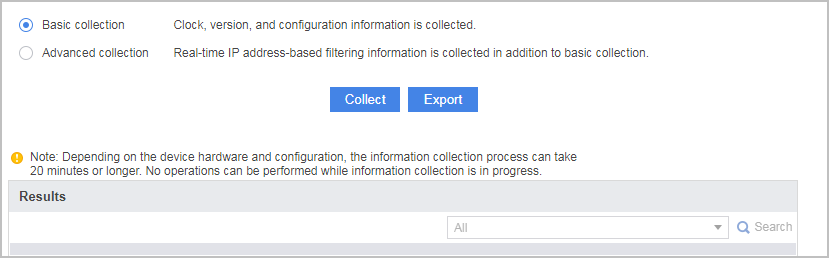
- Select Basic collection or Advanced collection.
- Basic collection: collects the basic information, such as the clock, version, and configuration information of the device.
- Advanced collection: is an extension to basic collection and collects the IP address-based session table, server map table, routing table, ARP table, and packet statistics.
You must configure a destination address for each collection item. Session and server map tables can be collected by source addresses, whereas the routing table, ARP table, and packet statistics cannot be collected by source addresses.
- Click Collect.
- In the dialog box that is displayed, click OK.
- After the collection is complete, the diagnosis information is displayed. Select a keyword from the search box and click Search.
- Optional: Click Export to save the collected information to the default path.
The basic statistics collection function exports information into .zip files. Table 1 lists the files contained in .zip files. The USG6510E/6510E-POE/6530E storage space is limited and does not support the cpu.log, ic.log, interface.log, cpu.zip, ic.zip, and interface.zip files.
Table 1 Files contained in the .zip package File Name
Description
Single File Storage Path
Query Command
diagnose.txt
One-click diagnosis log file.
None
log.log
User log file.
hda1:/log/
log.zip
Package of a compressed log.log file after the size of the log.log file exceeds a preset value. The device can collect the five last generated log.zip files.
hda1:/log/
cpu.log
Log file that contain information such as the CPU and memory usage of a device.
hda1:/log/kpi_log/
- Component status information: display device
- CPU usage, memory usage, and remaining system memory space: display health
- Session information: display firewall session statistics
- Other information: display firewall statistics system
ic.log
Log file that contains information, such as user-configured operation commands.
hda1:/log/kpi_log/
-
interface.log
Log file that contains information about an inbound or outbound interface.
hda1:/log/kpi_log/
display interface
cpu.zip
Package of a compressed cpu.log file when the size of the cpu.log file exceeds a preset value. The device can collect the five last generated cpu.zip files at most.
hda1:/log/kpi_log/
-
ic.zip
Package of a compressed ic.log file when the size of the ic.log file exceeds a preset value. The device can collect the five last generated ic.zip files at most.
hda1:/log/kpi_log/
-
interface.zip
Package of a compressed interface.log file when the size of the interface.log file exceeds a preset value. The device can collect the five last generated interface.zip files at most.
hda1:/log/kpi_log/
-
log.dblg
Detailed diagnosis log file.
hda1:/log/
display diag-logfile
dblg.zip
Package of a compressed log.dblg file when the size of a log.dblg file exceeds a preset value. The device can collect the two last generated dblg.zip files at most.
hda1:/log/
display diag-logfile

If Failed to export the file is displayed after Export is clicked, the memory space or CF card space is insufficient. If the memory space is insufficient, the exported .zip package contains only diagnosis log files.
During information collection, the CPU usage may increase, which may affect the use of services. Therefore, analyze the necessity of this operation.