Report Scheduling
With the report scheduling function, the FW can generate reports for the logs of different modules in the storage media.
Context
With the report scheduling function, you can determine the type of report that is periodically generated within a specified period. A mail server will send the report periodically to specified users.
Procedure
- Choose .
- Click Add.
- Define a report.
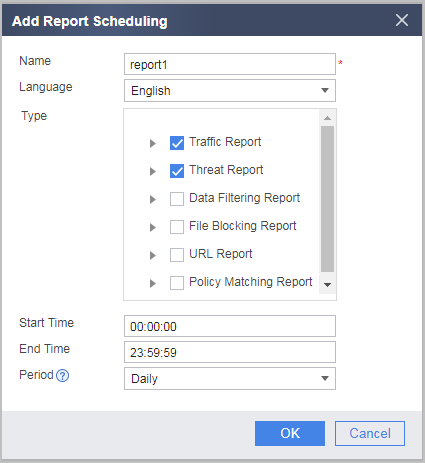
Parameter Description Name Enter a report name. Language Select the report language from the drop-down list. Type Select the type of report from the drop-down list. Start Time Enter the start time of the report. The start time and end time determine the time range during which the log data used by the system to generate a report is generated.
End Time Enter the end time of the report. Period Select the report schedule from the drop-down list. - Daily: The report of a day is generated after 00:30:00 a.m. of the next day.
- Weekly: The report of a week is generated after 00:30:00 a.m. of the next Monday.
- Monthly: The report of a month is generated after 00:30:00 a.m. of the first day of the next month.

If the device encoding format is UTF-8, the name of a user-defined report can contain only ASCII characters, such as letters, digits, and special characters. In addition, the language must be English.
For example, if the traffic and threat data reports generated in the time range of 00:00:00 to 23:59:59 are scheduled, the system uses the log data generated in the time range of 00:00:00 to 23:59:59 in the previous day to generate reports at 00:30:00 every day.
- Click OK.
- Click View to view the scheduled reports in the Report list.
You can select a scheduled report and click Download to export the report in PDF and save it to the management PC.