Viewing Bandwidth Management Reports in the Traffic Policy Dimension
This topic describes how to view traffic reports in the traffic policy dimension.
You can monitor traffic before and after rate limiting in real time in the bandwidth management reports in the traffic policy dimension.
To view real-time traffic statistics before rate limiting, you can select the traffic policy and click the corresponding real-time monitoring icon.
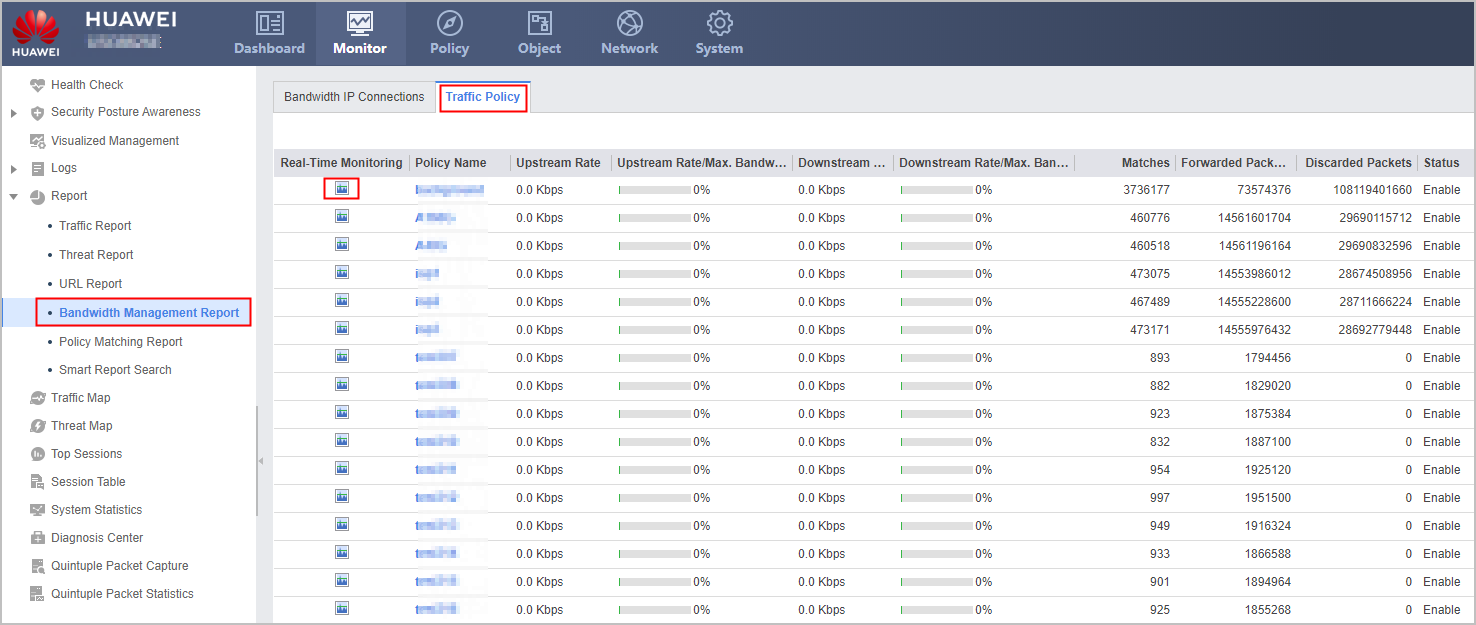

If rate limiting is not enabled in the traffic policy, the screen displays the real-time traffic information under the current traffic policy based on the traffic policy levels in sequence.
If the system time is changed when you query the traffic policy real-time monitoring function, the time on the page does not change accordingly. The page time updates only when you close the page and open it again.
If the time zone of the system time is changed when you query the traffic policy real-time monitoring function, the time on the page changes accordingly.
All models except USG6680E and USG6712E/6716E support this function.
The traffic reports based on the bandwidth policies are independent of the hard disk.
If the traffic status after rate limiting does not meet expectations, you can adjust the rate limiting conditions in the traffic policy.
In addition, you can click Search to query the following information in the traffic policy:
- Proportions of upstream and downstream traffic
- Traffic policy matching situations
- Number of passed and dropped packets
- Traffic policy enabling state