Manually Adding Assets
This section describes how to manually add assets.
Procedure
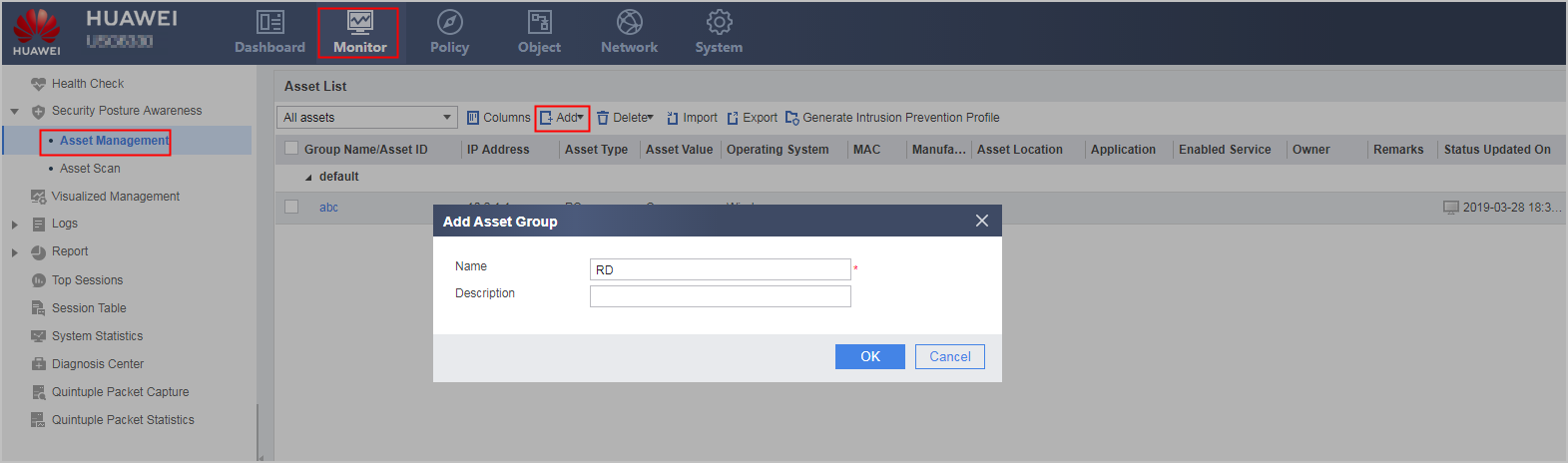
- Choose .
- Optional: Click Add and
select Add Asset Group to create an asset group.
Click OK.
By default, a default asset group exists in the system. You can create an asset group based on the asset department and asset type.
A created asset group does not have assets. Empty asset groups are not displayed. After assets are added to an empty asset group, the asset group is listed.
- Click Add and select Add Asset to record intranet asset information. Click OK.
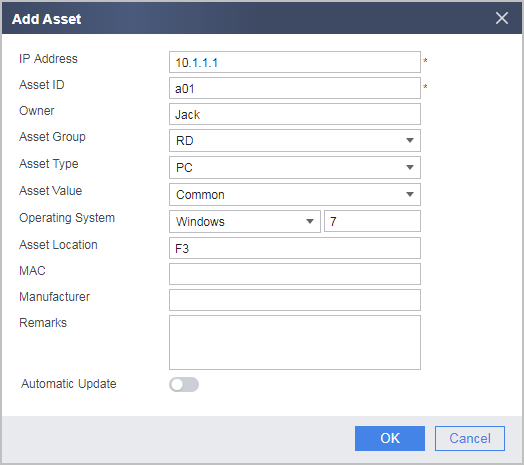

To ensure the effectiveness of the intrusion prevention configuration file, enter the asset information truthfully.
Parameter Description IP Address
IP address of an asset. Each IP address must be unique.
Asset ID
Unique identifier of the asset in the enterprise. The value is a string of 1 to 31 case-sensitive characters that cannot contain spaces, hyphens (-), asterisks (*), commas (,), double quotation marks ("") or question marks (?).
Owner
Owner of the asset. The value cannot contain commas (,), double quotation marks ("") or question marks (?).
Asset Group
Group to which the asset belongs to.
If you do not specify the asset group, the asset belongs to the default group by default.
Asset Type
Firewall, router, switch, PC, server, printer, mobile device, IP camera, network video recorder, or other types.
If you do not specify the asset type, the asset type belongs to the PC by default.
Asset Value
Significance level, including minor, common, medium, important, and core assets
If you do not specify the asset value, the asset value belongs to the Common by default.
Operating System
Operating system used on the asset. Select the operating system type, such as Windows, Linux, or iOS. Determine whether to enter the operating system version number as required.
If you do not specify the operating system, the operating system belongs to the Windows by default.
Asset Location
Location of the asset.
MAC
MAC address of the asset.
Manufacturer
Vendor information of the asset.
Remarks
Remarks of the asset.
Automatic Update
Whether the asset information created or modified by the administrator can be overwritten by the asset information automatically obtained by proactive scanning or passive traffic learning.
By default, the automatic asset update function is disabled. That is, the asset information manually created or modified locally is preferred and cannot be overwritten by the asset information automatically obtained by proactive scanning or passive traffic learning.
The FW can automatically obtain assets through proactive scanning or passive traffic learning. However, the obtained asset information may be different from the actual asset information. The administrator can manually correct the asset information. In this case, you do not need to enable the automatic asset update function so that the modified information will not be updated by subsequent asset scanning tasks. When asset information changes greatly and asset information needs to be updated through asset scanning or passive traffic scanning, you can enable the automatic asset update function.
NOTE:The function of obtaining assets through passive traffic learning applies to the camera security management solution. When camera traffic passes through the FW, the FW obtains camera asset information through in-depth traffic learning. In this case, the FW sends the asset information to the video security management platform. Only the assets that are admitted by the administrator on the video security management platform can be delivered to the asset list of the FW.
Application
Applications used by the asset.
This parameter can be set only when asset information is modified.
Enabled Service
Service used by the asset.
This parameter can be set only when asset information is modified.
VLAN-ID
VLAN ID of the asset.
This parameter can be set only when asset information is modified.
- After configuring the asset information, click Generate Intrusion Prevention Profile under Asset List. Select the application and operating system
as required.
View the generated intrusion prevention profile in . Apply the profile in a specified security policy.
Follow-up Procedure
Import or export assets
The FW allows importing or exporting asset information in a batch through a CSV file. Note the following precautions during import and export:- The name of a CSV file must end with the extension .csv.
- During import, if the number of assets reaches the upper limit or the attribute of an asset in the CSV file is invalid, the import terminates. Imported asset information is not affected, but excess or subsequent asset information cannot be imported.
Filter asset information
You can filter asset information by selecting an asset group from the drop-down list.
Delete assets
You can delete all or selected assets. Note that if you delete an asset group, all assets in the group are deleted as well.