LDP Sessions
LDP Discovery Mechanism
The LDP discovery mechanism is used by an LSR to discover potential LDP peers. LDP discovery mechanisms are classified into the following two types:
Basic discovery mechanism: used to discover directly connected LSR peers on a link.
An LSR periodically sends LDP Hello messages to implement the basic discovery mechanism and establish a local LDP session.
A Hello message contains an LDP identifier and other information, such as the hold time and transport address. If the LSR receives an LDP Hello message on an interface, an LDP peer is connected to the interface.
Extended discovery mechanism: used to discover indirectly connected LSR peers on a link.
An LSR periodically sends Targeted Hello messages to a specified address to implement the extended discovery mechanism and establish a remote LDP session.
The Targeted Hello message, which is a UDP message, is sent to the specified address to LDP port 646. The Targeted message contains an LDP identifier and other information, such as the transport address and hold time. If the LSR receives a Targeted Hello message on an interface, an LDP peer is connected to the interface.
Procedures for Establishing an LDP Session
Two LSRs send Hello messages to each other to trigger the establishment of an LDP session.
Figure 1 shows the procedures for establishing an LDP session.
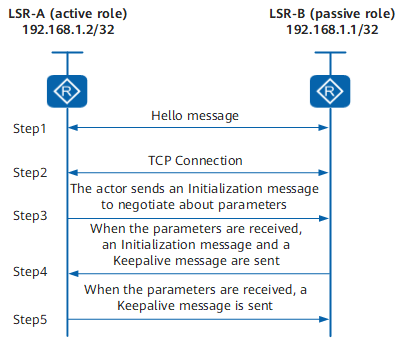
The procedure for establishing an LDP session is as follows:
Two LSRs send a Hello message to each other. The Hello message contains the transport address that the two parties use to establish an LDP session. The LSR with the larger transport address initiates a TCP connection and functions as the active role. As shown in Figure 1, LSRA starts to establish a TCP connection and functions as the active role, and LSRB waits for the TCP connection request and functions as the passive role.
After the TCP connection is successfully established, LSRA sends an Initialization message to negotiate parameters used for establishing the LDP session with LSRB. These parameters include the LDP version, label distribution mode, value of the Keepalive timer, maximum length of PDUs, and label space.
- After receiving the Initialization message, either of the following situations occurs:
- If LSRB rejects some parameters, it sends a Notification message to instruct LSRA to terminate the establishment of the LDP session.
- If LSRB accepts all parameters, it sends an Initialization message and a Keepalive message to LSRA.
- After receiving the Initialization message, either of the following situations occurs:
- If the active role LSRA cannot accept certain parameters, it sends a Notification message to LSRB to terminate the establishment of the LDP session.
- If LSRA accepts all parameters, it sends a Keepalive message to LSRB.
After both LSRs receive the Keepalive messages from each other, the LDP session is successfully established.