IGMP Policy Control
This section describes the definitions and implementation processes of IGMP-Limit, Static-Group, and Group-Policy.
Controllable multicast refers to a particular function that restricts or extends IGMP actions, without affecting the IGMP implementation. Controllable multicast provides three functions: IGMP-Limit, Static-Group, and Group-Policy.
IGMP-Limit
IGMP-Limit limits the number of multicast groups or source/group by setting entry limits on interfaces, a single instance, and all instances.
Static-Group
Static-Group, configured on an interface, fastens the response to user's request, forwards multicast data to receivers, and shortens the channel switchover period.
Group-Policy
Group-Policy, as a multicast-group-filtering policy configured on a FW interface, ensures that the FW sets restrictions on specific multicast groups, without creating entries for them.
IGMP-Limit
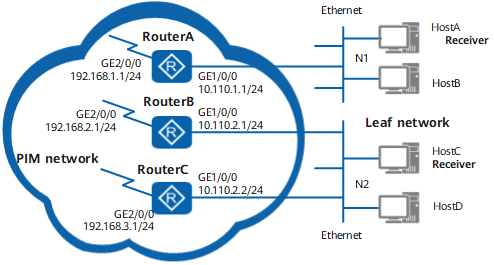
When too many users watch multiple programs simultaneously, great router bandwidth is consumed, leading to degraded router performance. To avoid this, the number of IGMP interfaces and globally joinable multicast groups must be limited. In this manner, the number of joined multicast groups is restricted, and users joining multicast groups can watch clearer and more stable programs.
IGMP entry limit on an interface
You can set an IGMP entry limit on an interface. After an interface receives an IGMP Join message, the interface can create an entry based on whether the IGMP entry limit on the interface is crossed.
You can remove the entry limit for the groups or source/groups falling in a specified range by configuring the IGMP entry limit.
IGMP entry limit on a router
You can set the IGMP entry limit on a router. That is, you can limit the number of IGMP entries on the interfaces belonging to all instances on a router.After an interface receives an IGMP Join message, the interface determines whether to create an entry according to whether the number of the IGMP entries on the whole router reaches the configured limit.
When an interface deletes (*, G) and (S, G) entries, the interface decreases the IGMP entries on the router correspondingly.
A (*, G) entry or an (S, G) entry is counted as one entry.
A (*, G) entry used in SSM mapping is counted as one entry; however, the (S, G) entry mapped by the (*, G) entry is not counted as an entry.
Static-Group
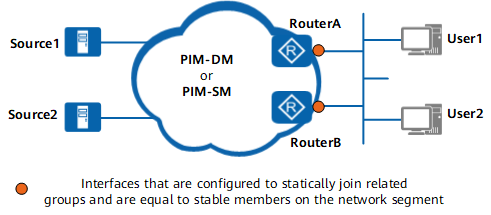
Static-Group is implemented by configuring the static multicast group on the designated interface. After Static-Group is configured, the entries created on the router have no timer and never expire. Therefore, the router continuously forwards data to receivers in the static multicast group. When the receivers do not need the forwarded multicast data, the multicast data cannot be automatically deleted through entry expiration, but through the manual deletion of the static multicast group.
In real-world situations, Static-Group is configured on the router interface that is connected to the host. This configuration facilitates multicast data forwarding to the router. When the host or router that is directly connected to the router has receivers that want to receive the multicast data, the router can fast forward the multicast data. This step shortens the channel switchover period.
IGMP Group-Policy
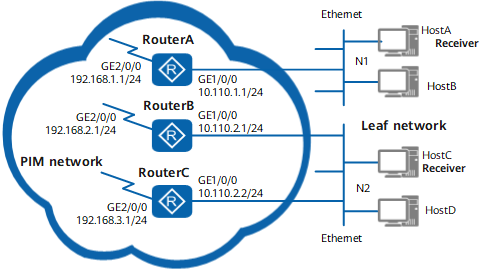
Group-Policy refers to a filtering policy configured on the router interface. After Group-Policy is configured, the router can set restrictions on certain multicast groups, and establish no entries for these multicast groups.
When too many users watch multiple programs simultaneously, great router bandwidth is consumed, leading to degraded router performance. To avoid this degradation, you can use Group-Policy to set restrictions on certain multicast groups and limit the number of multicast groups. In addition, for network security or expedient management, you can also use Group-Policy to prevent receiving IGMP Report messages from certain multicast groups and prohibit forwarding data of these multicast groups.
Group-Policy is configured through ACL.