Example for Configuring Basic IGMP Functions
After basic IGMP functions are configured in the multicast network, user hosts can stably receive multicast data from multicast sources for a long period of time.
Networking Requirements
In the IPv4 network shown in Figure 1, unicast routes work properly. Multicast must be implemented in the network to enable hosts to receive the Video On Demand (VoD) information.
When the host connected to a certain interface of a FW needs to receive a popular program for a long time, you can add the interface to a multicast group statically. As shown in the following network, if Host A and Host B need to receive the multicast data of multicast group 225.1.1.1 for a long time, add GE 1/0/1 of the FW_A to multicast group 225.1.1.1 statically.
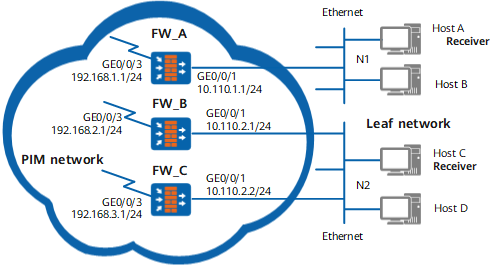
Configuration Roadmap
The configuration roadmap is as follows:
Enable multicast on all FWs because multicast is a prerequisite to IGMP.
Enable PIM-SM on all interfaces.
Enable IGMP on the interface connected to hosts.
Add GE 1/0/1 on FW_A to multicast group 225.1.1.1 statically. In this manner, hosts can steadily receive the multicast data of multicast group 225.1.1.1 for a long period of time.
Procedure
- Enable multicast on each FW, and configure
IGMP and PIM-SM on the interface connected to hosts.
Enable multicast on FW_A; enable IGMP and PIM-SM on Gigabit Ethernet 1/0/1; configure the IGMP version to 2. The configurations of FW_B and FW_C are the same as the configuration of FW_A, and are not provided here.
[FW_A] multicast routing-enable
[FW_A] interface GigabitEthernet 0/0/1
[FW_A-GigabitEthernet0/0/1] pim sm
[FW_A-GigabitEthernet0/0/1] igmp enable
[FW_A-GigabitEthernet0/0/1] quit
[FW_A] pim
[FW_A-pim] static-rp 192.168.4.1
[FW_A-pim] quit
- Add GE 1/0/1 on FW_A to multicast
group 225.1.1.1 statically. In this manner, the hosts connected to
GE 1/0/1 can steadily receive the multicast data sent to multicast
group 225.1.1.1.
[FW_A] interface GigabitEthernet 0/0/1
[FW_A-GigabitEthernet0/0/1] igmp static-group 225.1.1.1
- Verify the configuration.
# Run the display igmp interface command to view the configuration and running status of IGMP on the interfaces of each FW. Take the display on GE 1/0/1 of FW_B as an example.
<FW_B> display igmp interface GigabitEthernet 0/0/1
Interface information of VPN-Instance: public net
 GigabitEthernet0/0/1(10.110.2.1):
   IGMP is enabled
   Current IGMP version is 2
   IGMP state: up
   IGMP group policy: none
   IGMP limit: -
   Value of query interval for IGMP (negotiated): -
   Value of query interval for IGMP(in seconds): 60 s
   Value of other querier timeout for IGMP(in seconds): 0 s
   Value of maximum query response time for IGMP(in seconds): 10 s
   Querier for IGMP: 10.110.2.1 (this router)
# Run the display pim routing-table command on FW_A to check whether GE 1/0/1 is added to multicast group 225.1.1.1 statically. If (*, 225.1.1.1) entry is generated on FW_A, the downstream interface is GE 1/0/1, and the protocol type is set to static, it indicates that GE 1/0/1 is successfully added to multicast group 225.1.1.1.
<FW_A> display pim routing-table
VPN-Instance: public net
 Total 1 (*, G) entry; 0 (S, G) entry
 (*, 225.1.1.1)
     RP: 192.168.4.1
     Protocol: pim-sm, Flag: WC
     UpTime: 00:12:17
     Upstream interface: GigabitEthernet0/0/3
         Upstream neighbor: 192.168.1.1
         RPF prime neighbor: 192.168.1.1
     Downstream interface(s) information:
     Total number of downstreams: 1
         1: GigabitEthernet0/0/1
             Protocol: static, UpTime: 00:12:17, Expires: -
Configuration Scripts
Configuration script of FW_A
#
sysname FW_A#
multicast routing-enable
#
interface GigabitEthernet0/0/1ip address 10.110.1.1 255.255.255.0
pim sm
igmp enable
igmp static-group 225.1.1.1
#
interface GigabitEthernet0/0/3link-protocol ppp
ip address 192.168.1.1 255.255.255.0
pim sm
#
ospf 1
area 0.0.0.0
network 10.110.1.0 0.0.0.255
network 192.168.1.0 0.0.0.255
#
pim
static-rp 192.168.4.1
#
return
Configuration script of FW_B
#
sysname FW_B#
multicast routing-enable
#
interface GigabitEthernet0/0/1ip address 10.110.2.1 255.255.255.0
pim sm
igmp enable
#
interface GigabitEthernet0/0/3link-protocol ppp
ip address 192.168.2.1 255.255.255.0
pim sm
#
ospf 1
area 0.0.0.0
network 10.110.2.0 0.0.0.255
network 192.168.2.0 0.0.0.255
#
pim
static-rp 192.168.4.1
#
return
Configuration script of FW_C
#
sysname FW_C#
multicast routing-enable
#
interface GigabitEthernet0/0/1ip address 10.110.2.2 255.255.255.0
pim sm
igmp enable
#
interface GigabitEthernet0/0/3link-protocol ppp
ip address 192.168.3.1 255.255.255.0
pim sm
#
ospf 1
area 0.0.0.0
network 10.110.2.0 0.0.0.255
network 192.168.3.0 0.0.0.255
#
pim
static-rp 192.168.4.1
#
return