Example for Configuring SSM Mapping
User hosts can run only IGMPv1 or IGMPv2 and cannot be upgraded to IGMPv3. In such a case, you can deploy Source-Specific Multicast (SSM) mapping in the multicast network to ensure that the multicast device running a later IGMP version is compatible with the hosts running an earlier IGMP version and provides the SSM service for these hosts.
Networking Requirements
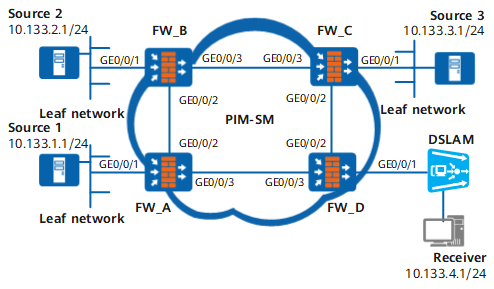
In the multicast network shown in Figure 1, PIM-SM is run in the network, and the ASM and SSM models are used to provide multicast services. The FW_D interface connected to the receiver runs IGMPv3. The IGMP version on the receiver is IGMPv2 and cannot be upgraded to IGMPv3.
The SSM group address range in the network is 232.1.1.0/24. Source 1, Source 2, and Source 3 send multicast data to the multicast groups in this range. It is required that the receiver receive the multicast data only from Source 1 and Source 3.
Solution: Configure SSM mapping on FW_D.
Device |
Interface |
IP address |
|---|---|---|
FW_A |
GE0/0/1 |
10.133.1.2/24 |
GE0/0/2 |
192.168.1.1/24 |
|
GE0/0/3 |
192.168.4.2/24 |
|
| FW_B | GE0/0/1 |
10.133.2.2/24 |
GE0/0/2 |
192.168.1.2/24 |
|
GE0/0/3 |
192.168.2.1/24 |
|
| FW_C | GE0/0/1 |
10.133.3.2/24 |
GE0/0/2 |
192.168.3.1/24 |
|
GE0/0/3 |
192.168.2.2/24 |
|
| FW_D | GE0/0/1 |
10.133.4.2/24 |
GE0/0/2 |
192.168.3.2/24 |
|
GE0/0/3 |
192.168.4.1/24 |
Configuration Roadmap
The configuration roadmap is as follows:
Enable SSM Mapping on the multicast FW_D interface connected to hosts.
Configure the SSM group address range on all the multicast FWs in the PIM-SM domain.
Configure the static SSM mapping rules on the FW_D that are enabled with SSM Mapping.
Procedure
- Configure an IP address for each interface and a unicast routing protocol on each FW.
# Configure FW_A:
<FW_A> system-view
[FW_A] interface GigabitEthernet 0/0/1
[FW_A-GigabitEthernet0/0/1] ip address 10.133.1.2 24
[FW_A-GigabitEthernet0/0/1] quit
[FW_A] interface GigabitEthernet 0/0/2
[FW_A-GigabitEthernet0/0/2] ip address 192.168.1.1 24
[FW_A-GigabitEthernet0/0/2] quit
[FW_A] interface GigabitEthernet 0/0/3
[FW_A-GigabitEthernet0/0/3] ip address 192.168.4.2 24
[FW_A-GigabitEthernet0/0/3] quit
[FW_A] router id 1.1.1.1
[FW_A] ospf 1
[FW_A-ospf-1] area 0
[FW_A-ospf-1-area-0.0.0.0] network 10.133.1.0 0.0.0.255
[FW_A-ospf-1-area-0.0.0.0] network 192.168.1.0 0.0.0.255
[FW_A-ospf-1-area-0.0.0.0] network 192.168.4.0 0.0.0.255
[FW_A-ospf-1-area-0.0.0.0] quit
[FW_A-ospf-1] quit
# Configure FW_B:
<FW_B> system-view
[FW_B] interface GigabitEthernet 0/0/1
[FW_B-GigabitEthernet0/0/1] ip address 10.133.2.2 24
[FW_B-GigabitEthernet0/0/1] quit
[FW_B] interface GigabitEthernet 0/0/2
[FW_B-GigabitEthernet0/0/2] ip address 192.168.1.2 24
[FW_B-GigabitEthernet0/0/2] quit
[FW_B] interface GigabitEthernet 0/0/3
[FW_B-GigabitEthernet0/0/3] ip address 192.168.2.1 24
[FW_B-GigabitEthernet0/0/3] quit
[FW_B] router id 2.2.2.2
[FW_B] ospf 1
[FW_B-ospf-1] area 0
[FW_B-ospf-1-area-0.0.0.0] network 10.133.2.0 0.0.0.255
[FW_B-ospf-1-area-0.0.0.0] network 192.168.1.0 0.0.0.255
[FW_B-ospf-1-area-0.0.0.0] network 192.168.2.0 0.0.0.255
[FW_B-ospf-1-area-0.0.0.0] quit
[FW_B-ospf-1] quit
# Configure FW_C:
<FW_C> system-view
[FW_C] interface GigabitEthernet 0/0/1
[FW_C-GigabitEthernet0/0/1] ip address 10.133.3.2 24
[FW_C-GigabitEthernet0/0/1] quit
[FW_C] interface GigabitEthernet 0/0/2
[FW_C-GigabitEthernet0/0/2] ip address 192.168.3.1 24
[FW_C-GigabitEthernet0/0/2] quit
[FW_C] interface GigabitEthernet 0/0/3
[FW_C-GigabitEthernet0/0/3] ip address 192.168.2.2 24
[FW_C-GigabitEthernet0/0/3] quit
[FW_C] router id 3.3.3.3
[FW_C] ospf 1
[FW_C-ospf-1] area 0
[FW_C-ospf-1-area-0.0.0.0] network 10.133.3.0 0.0.0.255
[FW_C-ospf-1-area-0.0.0.0] network 192.168.3.0 0.0.0.255
[FW_C-ospf-1-area-0.0.0.0] network 192.168.2.0 0.0.0.255
[FW_C-ospf-1-area-0.0.0.0] quit
[FW_C-ospf-1] quit
# Configure FW_D:
<FW_D> system-view
[FW_D] interface GigabitEthernet 0/0/1
[FW_D-GigabitEthernet0/0/1] ip address 10.133.4.2 24
[FW_D-GigabitEthernet0/0/1] quit
[FW_D] interface GigabitEthernet 0/0/2
[FW_D-GigabitEthernet0/0/2] ip address 192.168.3.2 24
[FW_D-GigabitEthernet0/0/2] quit
[FW_D] interface GigabitEthernet 0/0/3
[FW_D-GigabitEthernet0/0/3] ip address 192.168.4.1 24
[FW_D-GigabitEthernet0/0/3] quit
[FW_D] router id 4.4.4.4
[FW_D] ospf 1
[FW_D-ospf-1] area 0
[FW_D-ospf-1-area-0.0.0.0] network 10.133.4.0 0.0.0.255
[FW_D-ospf-1-area-0.0.0.0] network 192.168.3.0 0.0.0.255
[FW_D-ospf-1-area-0.0.0.0] network 192.168.4.0 0.0.0.255
[FW_D-ospf-1-area-0.0.0.0] quit
[FW_D-ospf-1] quit
- Enable IGMP and SSM mapping on the interface connected to hosts.
[FW_D] multicast routing-enable
[FW_D] interface GigabitEthernet 0/0/1
[FW_D-GigabitEthernet0/0/1] igmp enable
[FW_D-GigabitEthernet0/0/1] igmp version 3
[FW_D-GigabitEthernet0/0/1] igmp ssm-mapping enable
[FW_D-GigabitEthernet0/0/1] quit
- Configure the SSM group address range.
Configure the SSM group address range to 232.1.1.0/24 on all FWs. The configurations on FW_B, FW_C, and FW_D are similar to those on FW_A, and the detailed configurations are not mentioned here.
[FW_A] acl number 2000
[FW_A-acl-basic-2000] rule permit source 232.1.1.0 0.0.0.255
[FW_A-acl-basic-2000] quit
[FW_A] pim
[FW_A-pim] ssm-policy 2000
- Configure the static SSM mapping rules on the FW connected to hosts.
# Map the multicast groups within the 232.1.1.0/24 range to Source 1 and Source 3.
[FW_D] igmp
[FW_D-igmp] ssm-mapping 232.1.1.0 24 10.133.1.1
[FW_D-igmp] ssm-mapping 232.1.1.0 24 10.133.3.1
# View SSM mapping of the source/group-specific address on the FW.
<FW_D> display igmp ssm-mapping group IGMP SSM-Mapping conversion table of VPN-Instance: public net Total 2 entries 2 entries matched 00001. (10.133.1.1, 232.1.1.0/16) 00002. (10.133.3.1, 232.1.1.0/16) Total 2 entries matched - Verify the configuration.
# Configure the receiver to join group 232.1.1.1.
# Run the display igmp group ssm-mapping command to check information about a specified source/group address. The information about the specified source or group address on FW_D is displayed as follows:
<FW_D> display igmp group ssm-mappingIGMP SSM mapping interface group report information of VPN-Instance: public net
GigabitEthernet0/0/1 (10.133.4.2):Total 1 IGMP SSM-Mapping Group reported
Group Address Last Reporter Uptime Expires
232.1.1.1 10.133.4.1 00:01:44 00:00:26
<FW_D> display igmp group ssm-mapping verboseInterface group report information of VPN-Instance: public net
Limited entry of this VPN-Instance: -
GigabitEthernet0/0/1 (10.133.4.2):Total entry on this interface: 1
Limited entry on this interface: -
Total 1 IGMP SSM-Mapping Group reported
Group: 232.1.1.1
Uptime: 00:01:52
Expires: 00:00:18
Last reporter: 10.133.4.1
Last-member-query-counter: 0
Last-member-query-timer-expiry: off
Group mode: exclude
Version1-host-present-timer-expiry: off
Version2-host-present-timer-expiry: 00:00:17
# Run the display pim routing-table command to view the PIM-SM routing table on a FW. The PIM-SM routing table on FW_D is as follows:
<FW_D> display pim routing-tableVPN-Instance: public net
Total 0 (*, G) entry; 2 (S, G) entries
(10.133.1.1, 232.1.1.1)
Protocol: pim-ssm, Flag:SG_RCVR
UpTime: 00:11:25
Upstream interface: GigabitEthernet0/0/3Upstream neighbor: 192.168.4.2
RPF prime neighbor: 192.168.4.2
Downstream interface(s) information:
Total number of downstreams: 1
1: GigabitEthernet0/0/1Protocol: ssm-map, UpTime: 00:11:25, Expires:-
(10.133.3.1, 232.1.1.1)
Protocol: pim-ssm, Flag:SG_RCVR
UpTime: 00:11:25
Upstream interface: GigabitEthernet0/0/2Upstream neighbor: 192.168.3.1
RPF prime neighbor: 192.168.3.1
Downstream interface(s) information:
Total number of downstreams: 1
1: GigabitEthernet0/0/1Protocol: ssm-map, UpTime: 00:11:25, Expires:-
Configuration Scripts
Configuration script of FW_A
#
sysname FW_A#
multicast routing-enable
#
acl number 2000
rule 5 permit source 232.1.1.0 0.0.0.255
#
interface GigabitEthernet0/0/1ip address 10.133.1.2 255.255.255.0
pim sm
#
interface GigabitEthernet0/0/2ip address 192.168.1.1 255.255.255.0
pim sm
#
interface GigabitEthernet0/0/3ip address 192.168.4.2 255.255.255.0
pim sm
#
ospf 1
area 0.0.0.0
network 10.133.1.0 0.0.0.255
network 192.168.1.0 0.0.0.255
network 192.168.4.0 0.0.0.255
#
pim
ssm-policy 2000
#
return
Configuration script of FW_B
#
sysname FW_B#
multicast routing-enable
#
acl number 2000
rule 5 permit source 232.1.1.0 0.0.0.255
#
interface GigabitEthernet0/0/1ip address 10.133.2.2 255.255.255.0
pim sm
#
interface GigabitEthernet0/0/2ip address 192.168.1.2 255.255.255.0
pim sm
#
interface GigabitEthernet0/0/3ip address 192.168.2.1 255.255.255.0
pim sm
#
ospf 1
area 0.0.0.0
network 10.133.2.0 0.0.0.255
network 192.168.1.0 0.0.0.255
network 192.168.2.0 0.0.0.255
#
pim
ssm-policy 2000
#
return
Configuration script of FW_C
#
sysname FW_C#
multicast routing-enable
#
acl number 2000
rule 5 permit source 232.1.1.0 0.0.0.255
#
interface GigabitEthernet0/0/1ip address 10.133.3.2 255.255.255.0
pim sm
#
interface GigabitEthernet0/0/2ip address 192.168.3.1 255.255.255.0
pim sm
#
interface GigabitEthernet0/0/3ip address 192.168.2.2 255.255.255.0
pim sm
#
ospf 1
area 0.0.0.0
network 10.133.3.0 0.0.0.255
network 192.168.3.0 0.0.0.255
network 192.168.2.0 0.0.0.255
#
pim
ssm-policy 2000
#
return
Configuration script of FW_D
#
multicast routing-enable
#
acl number 2000
rule 5 permit source 232.1.1.0 0.0.0.255
#
interface GigabitEthernet0/0/1ip address 10.133.4.2 255.255.255.0
pim sm
igmp enable
igmp version 3
igmp ssm-mapping enable
#
interface GigabitEthernet0/0/2ip address 192.168.3.2 255.255.255.0
pim sm
#
interface GigabitEthernet0/0/3ip address 192.168.4.1 255.255.255.0
pim sm
#
igmp
ssm-mapping 232.1.1.0 255.255.255.0 10.133.1.1
ssm-mapping 232.1.1.0 255.255.255.0 10.133.3.1
#
pim
ssm-policy 2000
#
return