Example for Configuring Multicast Multi-Instance on an L3VPN
This section provides an example for configuring multicast multi-instance on an L3VPN.
Networking Requirements
On the network shown in Figure 1, CE1 and CE3 belong to VPN1; CE2 and CE4 belong to VPN2. Each PE connects to both VPN1 and VPN2. To separate multicast traffic between the VPN instances and implement multi-instance, configure a GRE tunnel between the PEs.
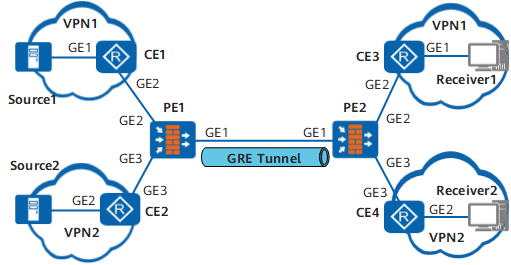
Device |
Interface |
IP Address |
|---|---|---|
CE1 |
GE1 |
10.1.1.1/24 |
GE2 |
10.1.2.1/24 |
|
PE1 |
GE1 |
11.1.1.1/24 |
GE2 |
10.1.2.2/24 |
|
GE3 |
10.1.3.1/24 |
|
Tunnel4/0/0 |
1.1.1.1/32 |
|
Tunnel4/0/1 |
1.1.1.9/32 |
|
Loopback0 |
1.1.1.1/32 |
|
Loopback1 |
1.1.1.9/32 |
|
CE2 |
GE2 |
10.1.4.1/24 |
GE3 |
10.1.3.2/24 |
|
PE2 |
GE1 |
11.1.1.2/24 |
GE2 |
10.1.5.1/24 |
|
GE3 |
10.1.6.1/24 |
|
Tunnel4/0/0 |
2.2.2.2/32 |
|
Tunnel4/0/1 |
2.2.2.9/32 |
|
Loopback0 |
2.2.2.2/32 |
|
Loopback1 |
2.2.2.9/32 |
|
CE3 |
GE1 |
10.1.7.1/24 |
GE2 |
10.1.5.2/24 |
|
Loopback0 |
3.3.3.3/32 |
|
CE4 |
GE2 |
10.1.8.1/24 |
GE3 |
10.1.6.2/24 |
|
Loopback1 |
4.4.4.4/32 |
Configuration Roadmap
The configuration roadmap is as follows:
Configure a BGP MPLS/IP VPN and ensure that the unicast VPN is working properly.
Create a GRE tunnel between the PEs to transmit multicast traffic of the VPN instances.
Configure a tunnel policy on each PE and apply the policy to the VPN instance IPv4 address family.
Enable multicast routing and PIM-SM on all devices that provide the multicast service.
Configure IGMP on the interfaces connecting a multicast device to a user network segment to allow the device to manage multicast group members on the network segment.
Procedure
- Configure a BGP MPLS IP VPN.
- Configure a GRE tunnel. Bind a tunnel interface on a PE to the same VPN instance as the interface that connects the PE to the CE.
 In multicast multi-instance over GRE scenarios, a tunnel interface's address must be the same as the GRE tunnel's source address. Otherwise, the GRE tunnel cannot transmit multicast traffic.
# Configure PE1.
[PE1] interface Tunnel 4/0/0
[PE1-Tunnel4/0/0] ip binding vpn-instance vpn1
[PE1-Tunnel4/0/0] ip address 1.1.1.1 255.255.255.255
[PE1-Tunnel4/0/0] tunnel-protocol gre
[PE1-Tunnel4/0/0] source loopback 0
[PE1-Tunnel4/0/0] destination 2.2.2.2
[PE1-Tunnel4/0/0] quit
[PE1] interface Tunnel 4/0/1
[PE1-Tunnel4/0/1] ip binding vpn-instance vpn2
[PE1-Tunnel4/0/1] ip address 1.1.1.9 255.255.255.255
[PE1-Tunnel4/0/1] tunnel-protocol gre
[PE1-Tunnel4/0/1] source loopback 1
[PE1-Tunnel4/0/1] destination 2.2.2.9
[PE1-Tunnel4/0/1] quit
# Configure PE2.
[PE2] interface Tunnel 4/0/0
[PE2-Tunnel4/0/0] ip binding vpn-instance vpn1
[PE2-Tunnel4/0/0] ip address 2.2.2.2 255.255.255.255
[PE2-Tunnel4/0/0] tunnel-protocol gre
[PE2-Tunnel4/0/0] source loopback 0
[PE2-Tunnel4/0/0] destination 1.1.1.1
[PE2-Tunnel4/0/0] quit
[PE2] interface Tunnel 4/0/1
[PE2-Tunnel4/0/1] ip binding vpn-instance vpn2
[PE2-Tunnel4/0/1] ip address 2.2.2.9 255.255.255.255
[PE2-Tunnel4/0/1] tunnel-protocol gre
[PE2-Tunnel4/0/1] source loopback 1
[PE2-Tunnel4/0/1] destination 1.1.1.9
[PE2-Tunnel4/0/1] quit
- Configure and apply a tunnel type prioritizing policy on each PE to have the PE select the GRE tunnel for VPN data transmission.
# Configure PE1.
[PE1] tunnel-policy gre1
[PE1-tunnel-policy-gre1] tunnel select-seq gre load-balance-number 1
[PE1-tunnel-policy-gre1] quit
[PE1] ip vpn-instance vpn1
[PE1-vpn-instance-vpn1] ipv4-family
[PE1-vpn-instance-vpn1-af-ipv4] tnl-policy gre1
[PE1-vpn-instance-vpn1-af-ipv4] quit
[PE1-vpn-instance-vpn1] quit
[PE1] ip vpn-instance vpn2
[PE1-vpn-instance-vpn2] ipv4-family
[PE1-vpn-instance-vpn2-af-ipv4] tnl-policy gre1
[PE1-vpn-instance-vpn2-af-ipv4] quit
[PE1-vpn-instance-vpn2] quit
# Configure PE2.
[PE2] tunnel-policy gre1
[PE2-tunnel-policy-gre1] tunnel select-seq gre load-balance-number 1
[PE2-tunnel-policy-gre1] quit
[PE2] ip vpn-instance vpn1
[PE2-vpn-instance-vpn1] ipv4-family
[PE2-vpn-instance-vpn1-af-ipv4] tnl-policy gre1
[PE2-vpn-instance-vpn1-af-ipv4] quit
[PE2-vpn-instance-vpn1] quit
[PE2] ip vpn-instance vpn2
[PE2-vpn-instance-vpn2] ipv4-family
[PE2-vpn-instance-vpn2-af-ipv4] tnl-policy gre1
[PE2-vpn-instance-vpn2-af-ipv4] quit
[PE2-vpn-instance-vpn2] quit
- Enable multicast routing and PIM-SM on each interface.
# Configure CE1.
[CE1] multicast routing-enable
[CE1] interface GigabitEthernet 0/0/0[CE1-GigabitEthernet0/0/0] pim sm[CE1-GigabitEthernet0/0/0] quit[CE1] interface GigabitEthernet 0/0/10[CE1-GigabitEthernet0/0/10] pim sm[CE1-GigabitEthernet0/0/10] quit# Configure PE1.
[PE1] multicast routing-enable
[PE1] interface GigabitEthernet 0/0/10[PE1-GigabitEthernet0/0/10] pim sm[PE1-GigabitEthernet0/0/10] quit[PE1] interface GigabitEthernet 0/0/3[PE1-GigabitEthernet0/0/3] pim sm[PE1-GigabitEthernet0/0/3] quit[PE1] interface Tunnel 4/0/0
[PE1-Tunnel4/0/0] pim sm
[PE1-Tunnel4/0/0] quit
[PE1] interface Tunnel 4/0/1
[PE1-Tunnel4/0/1] pim sm
[PE1-Tunnel4/0/1] quit
Repeat this step for CE2, PE2, CE3, and CE4. For configuration details, see Configuration Files in this section.
- Configure RPs for the VPN instances.
# Configure CE3.
[CE3] pim
[CE3-pim] c-bsr LoopBack0
[CE3-pim] c-rp LoopBack0
[CE3-pim] quit
# Configure CE4.
[CE4] pim
[CE4-pim] c-bsr LoopBack1
[CE4-pim] c-rp LoopBack1
[CE4-pim] quit
- Enable IGMP and add static groups on interfaces. Simulate multicast group join requests.
# Configure CE3.
[CE3] interface GigabitEthernet 0/0/0[CE3-GigabitEthernet0/0/0] pim sm[CE3-GigabitEthernet0/0/0] igmp enable[CE3-GigabitEthernet0/0/0] igmp static-group 225.1.1.1 source 10.1.1.10[CE3-GigabitEthernet0/0/0] quit# Configure CE4.
[CE4] interface GigabitEthernet 0/0/10[CE4-GigabitEthernet0/0/10] pim sm[CE4-GigabitEthernet0/0/10] igmp enable[CE4-GigabitEthernet0/0/10] igmp static-group 226.1.1.1 source 10.1.4.10[CE4-GigabitEthernet0/0/10] quit
- Verify the configuration.
# After completing the configurations, check that PIM routing entries are created successfully.
Run the display pim vpn-instance routing-table command on PE1 to view the PIM routing tables of the VPN instances.
[PE1] display pim vpn-instance vpn1 routing-table
 VPN-Instance: vpn1
 Total 0 (*, G) entry; 1 (S, G) entry

 (10.1.1.10, 225.1.1.1)
     RP: 3.3.3.3
     Protocol: pim-sm, Flag: SPT
     UpTime: 00:00:33
     Upstream interface: GigabitEthernet0/0/10
         Upstream neighbor: 10.1.2.1
         RPF prime neighbor: 10.1.2.1
     Downstream interface(s) information:
     Total number of downstreams: 1
         1: Tunnel4/0/0
             Protocol: pim-sm, UpTime: 00:00:33, Expires: 00:02:57
[PE1] display pim vpn-instance vpn2 routing-table
 VPN-Instance: vpn2
 Total 0 (*, G) entry; 1 (S, G) entry

 (10.1.4.10, 226.1.1.1)
     RP: 4.4.4.4
     Protocol: pim-sm, Flag: SPT
     UpTime: 00:43:44
     Upstream interface: GigabitEthernet0/0/3
         Upstream neighbor: 10.1.3.2
         RPF prime neighbor: 10.1.3.2
     Downstream interface(s) information:
     Total number of downstreams: 1
         1: Tunnel4/0/1
             Protocol: pim-sm, UpTime: 00:43:44, Expires: 00:02:47
Run the display pim routing-table command on CE1 and CE2 to view the PIM routing tables of the public network instance.
[CE1] display pim routing-table
 VPN-Instance: public net
 Total 0 (*, G) entry; 1 (S, G) entry

 (10.1.1.10, 225.1.1.1)
     RP: 3.3.3.3
     Protocol: pim-sm, Flag: SPT LOC
     UpTime: 00:01:03
     Upstream interface: GigabitEthernet0/0/0
         Upstream neighbor: NULL
         RPF prime neighbor: NULL
     Downstream interface(s) information:
     Total number of downstreams: 1
         1: GigabitEthernet0/0/10
             Protocol: pim-sm, UpTime: 00:01:03, Expires: 00:03:27
[CE2] display pim routing-table
 VPN-Instance: public net
 Total 0 (*, G) entry; 1 (S, G) entry

 (10.1.4.10, 226.1.1.1)
     RP: 4.4.4.4
     Protocol: pim-sm, Flag: SPT LOC
     UpTime: 00:46:44
     Upstream interface: GigabitEthernet0/0/10
         Upstream neighbor: NULL
         RPF prime neighbor: NULL
     Downstream interface(s) information:
     Total number of downstreams: 1
         1: GigabitEthernet0/0/3
             Protocol: pim-sm, UpTime: 00:46:44, Expires: 00:02:45
The command outputs show that PIM routing entries are created for the VPN instances on the PE and for the public network instance on the CEs. Receivers 1 and 2 successfully receive multicast traffic from Sources 1 and 2, respectively.
Configuration Scripts
CE1 configuration script
#
sysname CE1
#
multicast routing-enable
#
interface GigabitEthernet0/0/0
 undo shutdown
 ip address 10.1.1.1 255.255.255.0
 pim sm
#
interface GigabitEthernet0/0/10
 undo shutdown
 ip address 10.1.2.1 255.255.255.0
 pim sm
#
bgp 65001
 peer 10.1.2.2 as-number 100
 #
 ipv4-family unicast
  undo synchronization
  import-route direct
  peer 10.1.2.2 enable
#
return
PE1 configuration script
#
sysname PE1
#
multicast routing-enable
#
ip vpn-instance vpn1
 ipv4-family
  route-distinguisher 100:1
  tnl-policy gre1
  vpn-target 100:1 200:1 export-extcommunity
  vpn-target 100:1 200:1 import-extcommunity
  multicast routing-enable
#
ip vpn-instance vpn2
 ipv4-family
  route-distinguisher 200:1
  import route-policy import
  tnl-policy gre1
  vpn-target 100:1 200:1 export-extcommunity
  vpn-target 100:1 200:1 import-extcommunity
  multicast routing-enable
#
mpls lsr-id 1.1.1.1
mpls
#
interface GigabitEthernet0/0/0
 undo shutdown
 ip address 11.1.1.1 255.255.255.0
#
interface GigabitEthernet0/0/10
 undo shutdown
 ip binding vpn-instance vpn1
 ip address 10.1.2.2 255.255.255.0
 pim sm
#
interface GigabitEthernet0/0/3
 undo shutdown
 ip binding vpn-instance vpn2
 ip address 10.1.3.1 255.255.255.0
 pim sm
#
interface LoopBack0
 ip address 1.1.1.1 255.255.255.255
 pim sm
#
interface LoopBack1
 ip address 1.1.1.9 255.255.255.255
 pim sm
#
interface Tunnel4/0/0
 ip binding vpn-instance vpn1
 ip address 1.1.1.1 255.255.255.255
 tunnel-protocol gre
 source LoopBack0
 destination 2.2.2.2
 pim sm
#
interface Tunnel4/0/1
 ip binding vpn-instance vpn2
 ip address 1.1.1.9 255.255.255.255
 tunnel-protocol gre
 source LoopBack1
 destination 2.2.2.9
 pim sm
#
bgp 100
 peer 2.2.2.2 as-number 100
 peer 2.2.2.2 connect-interface LoopBack0
 peer 2.2.2.9 as-number 100
 peer 2.2.2.9 connect-interface LoopBack1
 #
 ipv4-family unicast
  undo synchronization
  peer 2.2.2.2 enable
  peer 2.2.2.9 enable
 #
 ipv4-family vpnv4
  policy vpn-target
  peer 2.2.2.2 enable
  peer 2.2.2.9 enable
 #
 ipv4-family vpn-instance vpn1
  import-route direct
  vpn-route cross multipath
  peer 10.1.2.1 as-number 65001
 #
 ipv4-family vpn-instance vpn2
  import-route direct
  vpn-route cross multipath
  peer 10.1.3.2 as-number 65002
#
ospf 1
 area 0.0.0.0
  network 1.1.1.1 0.0.0.0
  network 1.1.1.9 0.0.0.0
  network 11.1.1.0 0.0.0.255
#
route-policy import permit node 1
 if-match ip next-hop ip-prefix import
#
ip ip-prefix import index 10 permit 2.2.2.9 32
#
tunnel-policy gre1
 tunnel select-seq gre load-balance-number 1
#
return
PE2 configuration script
#
sysname PE2
#
multicast routing-enable
#
ip vpn-instance vpn1
 ipv4-family
  route-distinguisher 100:2
  tnl-policy gre1
  vpn-target 100:1 200:1 export-extcommunity
  vpn-target 100:1 200:1 import-extcommunity
  multicast routing-enable
#
ip vpn-instance vpn2
 ipv4-family
  route-distinguisher 200:2
  import route-policy import
  tnl-policy gre1
  vpn-target 100:1 200:1 export-extcommunity
  vpn-target 100:1 200:1 import-extcommunity
  multicast routing-enable
#
mpls lsr-id 2.2.2.2
mpls
#
interface GigabitEthernet0/0/0
 undo shutdown
 ip address 11.1.1.2 255.255.255.0
#
interface GigabitEthernet0/0/10
 undo shutdown
 ip binding vpn-instance vpn1
 ip address 10.1.5.1 255.255.255.0
 pim sm
#
interface GigabitEthernet0/0/3
 undo shutdown
 ip binding vpn-instance vpn2
 ip address 10.1.6.1 255.255.255.0
 pim sm
#
interface LoopBack0
 ip address 2.2.2.2 255.255.255.255
 pim sm
#
interface LoopBack1
 ip address 2.2.2.9 255.255.255.255
 pim sm
#
interface Tunnel4/0/0
 ip binding vpn-instance vpn1
 ip address 2.2.2.2 255.255.255.255
 tunnel-protocol gre
 source LoopBack0
 destination 1.1.1.1
 pim sm
#
interface Tunnel4/0/1
 ip binding vpn-instance vpn2
 ip address 2.2.2.9 255.255.255.255
 tunnel-protocol gre
 source LoopBack1
 destination 1.1.1.9
 pim sm
#
bgp 100
 peer 1.1.1.1 as-number 100
 peer 1.1.1.1 connect-interface LoopBack0
 peer 1.1.1.9 as-number 100
 peer 1.1.1.9 connect-interface LoopBack1
 #
 ipv4-family unicast
  undo synchronization
  peer 1.1.1.1 enable
  peer 1.1.1.9 enable
 #
 ipv4-family vpnv4
  policy vpn-target
  peer 1.1.1.1 enable
  peer 1.1.1.9 enable
 #
 ipv4-family vpn-instance vpn1
  import-route direct
  peer 10.1.5.2 as-number 65003
 #
 ipv4-family vpn-instance vpn2
  import-route direct
  vpn-route cross multipath
  peer 10.1.6.2 as-number 65004
#
ospf 1
 area 0.0.0.0
  network 2.2.2.2 0.0.0.0
  network 2.2.2.9 0.0.0.0
  network 11.1.1.0 0.0.0.255
#
route-policy import permit node 1
 if-match ip next-hop ip-prefix import
#
ip ip-prefix import index 10 permit 1.1.1.9 32
#
tunnel-policy gre1
 tunnel select-seq gre load-balance-number 1
#
return
CE2 configuration script
#
sysname CE2
#
multicast routing-enable
#
interface GigabitEthernet0/0/10
 undo shutdown
 ip address 10.1.4.1 255.255.255.0
 pim sm
#
interface GigabitEthernet0/0/3
 undo shutdown
 ip address 10.1.3.2 255.255.255.0
 pim sm
#
bgp 65002
 peer 10.1.3.1 as-number 100
 #
 ipv4-family unicast
  undo synchronization
  import-route direct
  peer 10.1.3.1 enable
#
return
CE3 configuration script
#
sysname CE3
#
multicast routing-enable
#
interface GigabitEthernet0/0/0
 undo shutdown
 ip address 10.1.7.1 255.255.255.0
 pim sm
#
interface GigabitEthernet0/0/10
 undo shutdown
 ip address 10.1.5.2 255.255.255.0
 pim sm
#
bgp 65003
 peer 10.1.5.1 as-number 100
 #
 ipv4-family unicast
  undo synchronization
  import-route direct
  peer 10.1.5.1 enable
#
pim
 c-bsr LoopBack0
 c-rp LoopBack0
#
return
CE4 configuration script
#
sysname CE4
#
multicast routing-enable
#
interface GigabitEthernet0/0/10
 undo shutdown
 ip address 10.1.8.1 255.255.255.0
 pim sm
#
interface GigabitEthernet0/0/3
 undo shutdown
 ip address 10.1.6.2 255.255.255.0
 pim sm
#
bgp 65004
 peer 10.1.6.1 as-number 100
 #
 ipv4-family unicast
  undo synchronization
  import-route direct
  peer 10.1.6.1 enable
#
pim
 c-bsr LoopBack1
 c-rp LoopBack1
#
return