Example for Changing Static Multicast Routes to RPF Routes
By configuring a static multicast route in the multicast network, you can change the RPF route and create a multicast path different from the unicast path, from the multicast source to the receiver.
Networking Requirements
As shown in Figure 1, the network runs PIM-DM, all FWs support multicast, and the receiver can receive information from the multicast source. FW_A, FW_B, and FW_C run OSPF. It is required to configure a static multicast route to distinguish the multicast path from the source to the receiver from the unicast path from the source to the receiver.
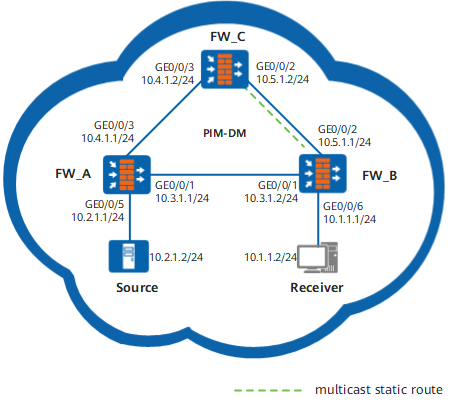
Configuration Roadmap
The configuration roadmap is as follows:
Configure an IP address and enable OSPF on each interface.
Enable multicast on each FW, PIM-DM on each interface, and IGMP on the interface connected to hosts.
Configure static multicast Reverse Path Forwarding (RPF) routes on FW_B, and specify FW_C as the RPF neighbor to the source.
Procedure
- Configure an IP address and a unicast routing protocol
on each FW.
As shown in Figure 1, configure IP addresses and masks on the interfaces of each FW. OSPF is run on FW_A, FW_B, and FW_C, and the three FWs are able to update routes among them through the unicast routing protocol.
On FW_A:
# Assign an IP address to GigabitEthernet 0/0/1.
<FW_A> system-view
[FW_A] interface GigabitEthernet 0/0/1
[FW_A-GigabitEthernet0/0/1] ip address 10.3.1.1 24
[FW_A-GigabitEthernet0/0/1] quit
# Assign an IP address to GigabitEthernet 0/0/3.
[FW_A] interface GigabitEthernet 0/0/3
[FW_A-GigabitEthernet0/0/3] ip address 10.4.1.1 24
[FW_A-GigabitEthernet0/0/3] quit
# Assign an IP address to GigabitEthernet 0/0/5.
[FW_A] interface GigabitEthernet 0/0/5
[FW_A-GigabitEthernet0/0/5] ip address 10.2.1.1 24
[FW_A-GigabitEthernet0/0/5] quit
# Configure OSPF.
[FW_A] router id 1.1.1.1
[FW_A] ospf 1
[FW_A-ospf-1] area 0
[FW_A-ospf-1-area-0.0.0.0] network 10.2.1.0 0.0.0.255
[FW_A-ospf-1-area-0.0.0.0] network 10.3.1.0 0.0.0.255
[FW_A-ospf-1-area-0.0.0.0] network 10.4.1.0 0.0.0.255
[FW_A-ospf-1-area-0.0.0.0] quit
[FW_A-ospf-1] quit
On FW_B:
# Assign an IP address to GigabitEthernet 0/0/1.
<FW_B> system-view
[FW_B] interface GigabitEthernet 0/0/1
[FW_B-GigabitEthernet0/0/1] ip address 10.3.1.2 24
[FW_B-GigabitEthernet0/0/1] quit
# Assign an IP address to GigabitEthernet 0/0/2.
[FW_B] interface GigabitEthernet 0/0/2
[FW_B-GigabitEthernet0/0/2] ip address 10.5.1.1 24
[FW_B-GigabitEthernet0/0/2] quit
# Assign an IP address to GigabitEthernet 0/0/6.
[FW_B] interface GigabitEthernet 0/0/6
[FW_B-GigabitEthernet0/0/5] ip address 10.1.1.1 24
[FW_B-GigabitEthernet0/0/5] quit
# Configure OSPF.
[FW_B] router id 2.2.2.2
[FW_B] ospf 1
[FW_B-ospf-1] area 0
[FW_B-ospf-1-area-0.0.0.0] network 10.1.1.0 0.0.0.255
[FW_B-ospf-1-area-0.0.0.0] network 10.3.1.0 0.0.0.255
[FW_B-ospf-1-area-0.0.0.0] network 10.5.1.0 0.0.0.255
[FW_B-ospf-1-area-0.0.0.0] quit
[FW_B-ospf-1] quit
On FW_C:
# Assign an IP address to GigabitEthernet 0/0/2.
[FW_C] interface GigabitEthernet 0/0/2
[FW_C-GigabitEthernet0/0/2] ip address 10.5.1.2 24
[FW_C-GigabitEthernet0/0/2] quit
# Assign an IP address to GigabitEthernet 0/0/3.
<FW_C> system-view
[FW_C] interface GigabitEthernet 0/0/3
[FW_C-GigabitEthernet0/0/3] ip address 10.4.1.2 24
[FW_C-GigabitEthernet0/0/3] quit
# Configure OSPF.
[FW_C] router id 1.1.1.1
[FW_C] ospf 1
[FW_C-ospf-1] area 0
[FW_C-ospf-1-area-0.0.0.0] network 10.4.1.0 0.0.0.255
[FW_C-ospf-1-area-0.0.0.0] network 10.5.1.0 0.0.0.255
[FW_C-ospf-1-area-0.0.0.0] quit
[FW_C-ospf-1] quit
- Enable multicast on each FWand PIM-DM on each
interface
# Enable multicast on each FW, PIM-DM on each interface, and IGMP on the interface connected to hosts. The configurations on other FWs are similar to that of FW_B, and are not mentioned here.
[FW_B] multicast routing-enable[FW_B] interface GigabitEthernet 0/0/1
[FW_B-GigabitEthernet0/0/1] pim dm
[FW_B-GigabitEthernet0/0/1] quit
[FW_B] interface GigabitEthernet 0/0/2
[FW_B-GigabitEthernet0/0/2] pim dm
[FW_B-GigabitEthernet0/0/2] quit
[FW_B] interface GigabitEthernet 0/0/6
[FW_B-GigabitEthernet0/0/6] pim dm
[FW_B-GigabitEthernet0/0/6] igmp enable
[FW_B-GigabitEthernet0/0/6] quit
# Run the display multicast rpf-info command on FW_B to view the RPF information of the source. You can find that the RPF route is a unicast route, and the RPF neighbor is FW_A. The display is as follows:
<FW_B> display multicast rpf-info 10.2.1.2VPN-Instance: public net
RPF information about source: 10.2.1.2
RPF interface: GigabitEthernet0/0/1, RPF neighbor: 10.3.1.1Referenced route/mask: 10.2.1.0/24
Referenced route type: unicast
Route selection rule: preference-preferred Load splitting rule: disabled - Configure a static multicast route
Configure a static multicast RPF route on FW_B and configure FW_C as the RPF neighbor to the source.
<FW_B> system-view[FW_B] ip rpf-route-static 10.2.1.0 255.255.255.0 10.5.1.2 - Verify the configuration
Run the display multicast rpf-info command on FW_B to view the RPF information of the source. The RPF route and the RPF neighbor are updated according to the static multicast route. The display of RPF is as follows:
<FW_B> display multicast rpf-info 10.2.1.2VPN-Instance: public net
RPF information about source: 10.2.1.2
RPF interface: GigabitEthernet0/0/2, RPF neighbor: 10.5.1.2Referenced route/mask: 10.2.1.0/24
Referenced route type: mstatic
     Route selection rule: preference-preferred
     Load splitting rule: disabled
Configuration Scripts
Configuration script of FW_B
#
sysname FW_B
#
multicast routing-enable
#
interface GigabitEthernet 0/0/1
ip address 10.3.1.2 255.255.255.0
pim dm
#
interface GigabitEthernet 0/0/2
ip address 10.5.1.1 255.255.255.0
pim dm
#
interface GigabitEthernet 0/0/6
ip address 10.1.1.1 255.255.255.0
pim dm
igmp enable
#
ospf 1
area 0.0.0.0
network 10.1.1.0 0.0.0.255
network 10.3.1.0 0.0.0.255
network 10.5.1.0 0.0.0.255
#
ip rpf-route-static 10.2.1.0 255.255.255.0 10.5.1.2
#
return