Example for Connecting the RPF Route Through a Static Multicast Route
After a static multicast route is configured in the multicast network, a receiver can receive multicast data from a multicast source in another area that is unreachable with unicast routes.
Networking Requirements
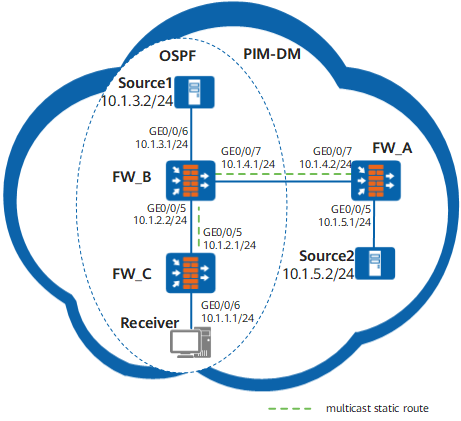
As shown in Figure 1, the network runs PIM-DM, all FWs support multicast, and receiver can receive information from the multicast source Source1. FW_B and FW_C run OSPF. There is no unicast route between FW_A and FW_B. It is required to use a multicast static route to enable the receiver to receive information sent by Source2.
Configuration Roadmap
The configuration roadmap is as follows:
Configure an IP address and OSPF on each interface.
Enable multicast on each FW, PIM-DM on each interface, and IGMP on the interface connected to hosts.
Configure a static multicast Reverse Path Forwarding (RPF) route between FW_B and FW_C.
Procedure
- Configure an IP address and a unicast routing protocol
on each FW.
As shown in Figure 1, configure IP addresses and masks of the interfaces on each FW. FW_B and FW_C belong to the same OSPF area, and the two FWs are able to update routes among them through the unicast routing protocol.
On FW_A:
# Assign an IP address to GigabitEthernet 0/0/5.
<FW_A> system-view
[FW_A] interface GigabitEthernet 0/0/5
[FW_A-GigabitEthernet0/0/5] ip address 10.1.5.1 24
[FW_A-GigabitEthernet0/0/5] quit
# Assign an IP address to GigabitEthernet 0/0/7.
[FW_A] interface GigabitEthernet 0/0/7
[FW_A-GigabitEthernet0/0/7] ip address 10.1.4.2 24
[FW_A-GigabitEthernet0/0/7] quit
On FW_B:
# Assign an IP address to GigabitEthernet 0/0/5.
<FW_B> system-view
[FW_B] interface GigabitEthernet 0/0/5
[FW_B-GigabitEthernet0/0/5] ip address 10.1.2.2 24
[FW_B-GigabitEthernet0/0/5] quit
# Assign an IP address to GigabitEthernet 0/0/6.
[FW_B] interface GigabitEthernet 0/0/6
[FW_B-GigabitEthernet0/0/6] ip address 10.1.3.1 24
[FW_B-GigabitEthernet0/0/6] quit
# Assign an IP address to GigabitEthernet 0/0/7.
[FW_B] interface GigabitEthernet 0/0/7
[FW_B-GigabitEthernet0/0/5] ip address 10.1.4.1 24
[FW_B-GigabitEthernet0/0/5] quit
# Configure OSPF.
[FW_B] router id 2.2.2.2
[FW_B] ospf 1
[FW_B-ospf-1] area 0
[FW_B-ospf-1-area-0.0.0.0] network 10.1.2.0 0.0.0.255
[FW_B-ospf-1-area-0.0.0.0] network 10.1.3.0 0.0.0.255
[FW_B-ospf-1-area-0.0.0.0] network 10.1.4.0 0.0.0.255
[FW_B-ospf-1-area-0.0.0.0] quit
[FW_B-ospf-1] quit
On FW_C:
# Assign an IP address to GigabitEthernet 0/0/5.
[FW_C] interface GigabitEthernet 0/0/5
[FW_C-GigabitEthernet0/0/5] ip address 10.1.2.1 24
[FW_C-GigabitEthernet0/0/5] quit
# Assign an IP address to GigabitEthernet 0/0/6.
<FW_C> system-view
[FW_C] interface GigabitEthernet 0/0/6
[FW_C-GigabitEthernet0/0/6] ip address 10.1.1.1 24
[FW_C-GigabitEthernet0/0/6] quit
# Configure OSPF.
[FW_C] router id 2.2.2.2
[FW_C] ospf 1
[FW_C-ospf-1] area 0
[FW_C-ospf-1-area-0.0.0.0] network 10.1.1.0 0.0.0.255
[FW_C-ospf-1-area-0.0.0.0] network 10.1.2.0 0.0.0.255
[FW_C-ospf-1-area-0.0.0.0] quit
[FW_C-ospf-1] quit
- Enable multicast on each FW and PIM-DM on
each interface
# Enable multicast on each FW, enable PIM-DM on each interface, and enable IGMP on the interface connected to hosts.
[FW_A] multicast routing-enable[FW_A] interface GigabitEthernet 0/0/5
[FW_A-GigabitEthernet0/0/5] pim dm
[FW_A-GigabitEthernet0/0/5] quit
[FW_A] interface GigabitEthernet 0/0/7
[FW_A-GigabitEthernet0/0/7] pim dm
[FW_B] multicast routing-enable[FW_B] interface GigabitEthernet 0/0/5
[FW_B-GigabitEthernet0/0/5] pim dm
[FW_B-GigabitEthernet0/0/5] quit
[FW_B] interface GigabitEthernet 0/0/6
[FW_B-GigabitEthernet0/0/6] pim dm
[FW_B-GigabitEthernet0/0/6] quit
[FW_B] interface GigabitEthernet 0/0/7
[FW_B-GigabitEthernet0/0/7] pim dm
[FW_B-GigabitEthernet0/0/7] quit
[FW_C] multicast routing-enable[FW_C] interface GigabitEthernet 0/0/5
[FW_C-GigabitEthernet0/0/5] pim dm
[FW_C-GigabitEthernet0/0/5] quit
[FW_C] interface GigabitEthernet 0/0/6
[FW_C-GigabitEthernet0/0/6] pim dm
[FW_C-GigabitEthernet0/0/6] igmp enable
[FW_C-GigabitEthernet0/0/6] quit
# Source 1 (10.1.3.2/24) and Source 2 (10.1.5.2/24) send multicast data to the multicast group G (225.1.1.1). The receiver joins G. The receiver can then receive the multicast data sent by Source 1, but cannot receive the multicast data sent by Source 2.
# Run the display multicast rpf-info 10.1.5.2 command on FW_B and FW_C. If there is no display, it indicates that FW_B and FW_C have no RPF route to Source 2.
- Configure a static multicast route
# Configure a static multicast RPF route on FW_B and configure FW_A as the RPF neighbor to Source 2.
[FW_B] ip rpf-route-static 10.1.5.0 255.255.255.0 10.1.4.2# Configure a static multicast RPF route on FW_C, and configure FW_B as the RPF neighbor to Source 2.
[FW_C] ip rpf-route-static 10.1.5.0 255.255.255.0 10.1.2.2 - Verify the configuration
# Run the display multicast rpf-info 10.1.5.2 command on FW_B and FW_C to view the RPF information of Source 2. The display information of RPF is as follows:
<FW_B> display multicast rpf-info 10.1.5.2VPN-Instance: public net
RPF information about source: 10.1.5.2
RPF interface: GigabitEthernet0/0/7, RPF neighbor: 10.1.4.2Referenced route/mask: 10.1.5.0/24
Referenced route type: mstatic
Route selecting rule: preference-preferred Load splitting rule: disabled<FW_C> display multicast rpf-info 10.1.5.2VPN-Instance: public net
RPF information about source: 10.1.5.2
RPF interface: GigabitEthernet0/0/5, RPF neighbor: 10.1.2.2Referenced route/mask: 10.1.5.0/24
Referenced route type: mstatic
     Route selection rule: preference-preferred
     Load splitting rule: disabled
# Run the display pim routing-table command to view the routing table. FW_C has the multicast entry of Source 2. The receiver can receive the multicast data from Source 2.
<FW_C> display pim routing-tableVPN-Instance: public net
Total 1 (*, G) entry; 2 (S, G) entries
(*, 225.1.1.1)
Protocol: pim-dm, Flag: WC
UpTime: 03:54:19
Upstream interface: NULL
Upstream neighbor: NULL
RPF prime neighbor: NULL
Downstream interface(s) information:
Total number of downstreams: 1
1: GigabitEthernet0/0/6Protocol: pim-dm, UpTime: 01:38:19, Expires: never
(10.1.3.2, 225.1.1.1)
Protocol: pim-dm, Flag: ACT
UpTime: 00:00:44
Upstream interface: GigabitEthernet0/0/5Upstream neighbor: 10.1.2.2
RPF prime neighbor: 10.1.2.2
Downstream interface(s) information:
Total number of downstreams: 1
1: GigabitEthernet0/0/6Protocol: pim-dm, UpTime: 00:00:44, Expires: never
(10.1.5.2, 225.1.1.1)
Protocol: pim-dm, Flag: ACT
UpTime: 00:00:44
Upstream interface: GigabitEthernet0/0/5Upstream neighbor: 10.1.2.2
RPF prime neighbor: 10.1.2.2
Downstream interface(s) information:
Total number of downstreams: 1
1: GigabitEthernet0/0/6Protocol: pim-dm, UpTime: 00:00:44, Expires: never
Configuration Scripts
Configuration script of FW_A
#
sysname FW_A#
multicast routing-enable
#
interface GigabitEthernet0/0/5ip address 10.1.5.1 255.255.255.0
pim dm
#
interface GigabitEthernet0/0/7ip address 10.1.4.2 255.255.255.0
pim dm
#
ospf 1
area 0.0.0.0
network 10.1.5.0 0.0.0.255
network 10.1.4.0 0.0.0.255
#
return
Configuration script of FW_B
#
sysname FW_B#
multicast routing-enable
#
interface GigabitEthernet0/0/5ip address 10.1.2.2 255.255.255.0
pim dm
#
interface GigabitEthernet0/0/6ip address 10.1.3.1 255.255.255.0
pim dm
#
interface GigabitEthernet0/0/7ip address 10.1.4.1 255.255.255.0
pim dm
#
ospf 1
area 0.0.0.0
network 10.1.2.0 0.0.0.255
network 10.1.3.0 0.0.0.255
#
ip rpf-route-static 10.1.5.0 24 10.1.4.2
#
return
Configuration script of FW_C
#
sysname FW_C#
multicast routing-enable
#
interface GigabitEthernet0/0/5ip address 10.1.2.1 255.255.255.0
pim dm
#
interface GigabitEthernet0/0/6ip address 10.1.1.1 255.255.255.0
igmp enable
pim dm
#
ospf 1
area 0.0.0.0
network 10.1.1.0 0.0.0.255
network 10.1.2.0 0.0.0.255
#
ip rpf-route-static 10.1.5.0 24 10.1.2.2
#
return