Configuring Multicast NAT
When the NAT device divides the intranet and extranet into two independent multicast domains, you can configure the multicast NAT function to enable intranet receivers to access extranet resources.
Prerequisites
The unicast routing protocol is configured to enable intranet devices to normally access the extranet.
The PIM-SM network configuration is complete. For details, see PIM-SM (IPv4) Configuration.
Context
As shown in Figure 1, the FW divides the network into two multicast domains. Receivers are on the intranet, and the multicast source is on the extranet. Configuring multicast NAT on the FW enables intranet receivers to demand extranet resources and protects the multicast source against exposure to risks.
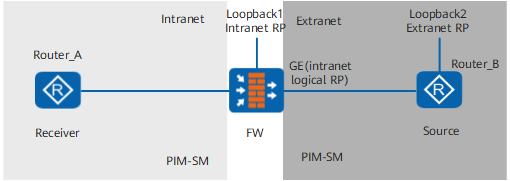

The limitations of multicast NAT are as follows:
- Both the intranet and the extranet must run the PIM-SM protocol. Other multicast routing protocols are not supported.
- The routes to the multicast source and MSDP peer must exist on the FW.
- You are advised to disable the switchover from the RPT to the SPT on the Designated Router (DR) on the intranet receiver side.
The requirements are as follows:
- The extranet interface (GE interface on the figure) of the FW is configured as the BSR boundary, ensuring that the intranet and extranet are two independent multicast domains and can elect RPs independently.
- The extranet interface of the FW serves as the logical RP of the intranet and establishes an MSDP peer with the extranet RP. In this way, the intranet RP can obtain the information about the multicast source.
- Configure multicast NAT on the FW. Upon receiving a multicast packet (S, G), the device translates the packet into (S', G) through NAT, and then forwards it. Ensure that routes to the address exist on other intranet devices. In this way, the data packets received by downstream devices can pass the RPF check and be forwarded normally.
Procedure
- Run:
The system view is displayed.
- Run:
multicast forwarding-table source-nat source-address [ vpn-instance vpn-instance-name ]
The multicast NAT function is enabled.
Follow-up Procedure
In the view of the extranet interface on the FW, run: pim bsr-boundary The BSR service boundary is configured.
In the MSDP view, run: originating-rp interface-type interface-number The intranet logical RP is configured.
In the MSDP views of the FW and extranet RP respectively, run: peer peer-address connect-interface interface-type interface-number An MSDP peer is established between the intranet logical RP and the extranet RP.