CLI: Example for Configuring Destination NAT for IPv6 Internet Users to Access Intranet Servers
Networking Requirements
The FW serves as a security gateway at the border of an enterprise network. To enable the web server on the intranet to provide services for external users, configure destination NAT on the FW to provide IP addresses for Internet users. Figure 1 shows the network environment. The router is the access gateway provided by the ISP.
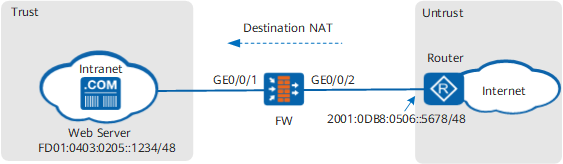
Data Planning
Item |
Data |
Description |
|
|---|---|---|---|
GigabitEthernet 0/0/1 |
IP address: FD01:0403:0205::5678/48 Security zone: Trust |
The IP address of GigabitEthernet 0/0/1 on the intranet server must be set as the default gateway. |
|
GigabitEthernet 0/0/2 |
IP address: 2001:0DB8:0506::1234/48 Security zone: Untrust |
Set the parameters according to the requirement of the ISP. |
|
Network segment that can be accessed by the Internet |
2001:0DB8:0102::/48 |
- |
|
Destination address segment after translation |
FD01:0403:0205::/48 |
- |
|
Route |
Default route of the FW |
Destination address: 0:0::0:0 Next hop: 2001:0DB8:0506::5678/48 |
To ensure that traffic from the intranet server can be forwarded to the ISP router, configure a default route destined for the Internet on the FW. |
Router static route |
Destination address: address before destination NAT Next hop: IP address of GigabitEthernet 0/0/2 |
To ensure that the traffic returned by the Internet can be forwarded to the FW, manually configure static routes on the router. In most cases, you have to contact the ISP network administrator to configure the static routes. |
|
Configuration Roadmap
- Configure interface IP addresses and assign the interfaces to security zones.
- Configure a security policy to allow Internet users to access the intranet server.
Configure the destination NAT function so that when an Internet user accesses an intranet server, the FW can send traffic to the intranet server.
- Configure a default route on the FW, so that traffic from the intranet server can be forwarded to the ISP router.
- Configure static routes on the router, so that the router forwards return traffic from the Internet to the FW.
Procedure
- Enable the IPv6 packet forwarding function.
[FW] ipv6 - Configure interface IP addresses and assign the interfaces to security zones.
# Configure the IP address of GigabitEthernet 0/0/1.
<FW> system-view
 [FW] interface GigabitEthernet 0/0/1
 [FW-GigabitEthernet 0/0/1] ipv6 enable
 [FW-GigabitEthernet 0/0/1] ipv6 address FD01:0403:0205::5678 48
 [FW-GigabitEthernet 0/0/1] quit
# Configure the IP address of GigabitEthernet 0/0/2.
[FW] interface GigabitEthernet 0/0/2
 [FW-GigabitEthernet 0/0/2] ipv6 enable
 [FW-GigabitEthernet 0/0/2] ipv6 address 2001:0DB8:0506::1234 48
 [FW-GigabitEthernet 0/0/2] quit
# Add GigabitEthernet 0/0/1 to the trust zone.
[FW] firewall zone trust
 [FW-zone-untrust] add interface GigabitEthernet 0/0/1
 [FW-zone-untrust] quit
# Add GigabitEthernet 0/0/2 to the untrust.
[FW] firewall zone untrust
 [FW-zone-dmz] add interface GigabitEthernet 0/0/2
 [FW-zone-dmz] quit
- Configure a security policy to allow Internet users to access the intranet server.
[FW] security-policy
 [FW-policy-security] rule name policy1
 [FW-policy-security-rule-policy1] source-zone untrust
 [FW-policy-security-rule-policy1] destination-zone trust
 [FW-policy-security-rule-policy1] destination-address FD01:0403:0205:: 48
 [FW-policy-security-rule-policy1] action permit
 [FW-policy-security-rule-policy1] quit
 [FW-policy-security] quit
- Configure a NAT policy.
[FW] nat-policy
 [FW-policy-nat] rule name policy_nat1
 [FW-policy-nat-rule-policy_nat1] nat-type nat66
 [FW-policy-nat-rule-policy_nat1] source-zone untrust
 [FW-policy-nat-rule-policy_nat1] destination-address 2001:0DB8:0102::1234 48
 [FW-policy-nat-rule-policy_nat1] action destination-nat static FD01:0403:0205:: 48
 [FW-policy-nat-rule-policy_nat1] quit
 [FW-policy-nat] quit
- Configure black-hole routes destined for the destination address of traffic to prevent routing loops.
[FW] ipv6 route-static 2001:0DB8:0102::1234 48 NULL 0 - Configure a default route, so that traffic from the intranet server can be forwarded to the ISP router.
[FW] ipv6 route-static 0:0::0:0 0 2001:0DB8:0506::5678 - Configure the default gateway on each host on the intranet, so that the hosts send traffic to the FW when they access the Internet.
- Configure static routes on the router, so that the router forwards return traffic from the Internet to the FW.
Contact the ISP network administrator to perform this step.
Configuration Scripts
Configuration script for the FW:
#
  sysname FW
 #
 ipv6
 #
 interface GigabitEthernet0/0/1
  undo shutdown
  ipv6 enable
  ipv6 address FD01:0403:0205::5678 48
 #
 interface GigabitEthernet0/0/2
  undo shutdown
  ipv6 enable
  ipv6 address 2001:0DB8:0506::1234 48
 #
 firewall zone untrust
  set priority 5
  add interface GigabitEthernet0/0/1
 #
 firewall zone trust
  set priority 85
  add interface GigabitEthernet0/0/2
 #
  ipv6 route-static 2001:0DB8:0102::1234 48 NULL 0
  ipv6 route-static 0:0::0:0 0 2001:0DB8:0506::5678
 #
 security-policy
   rule name policy1
     source-zone untrust
     destination-zone trust
     destination-address FD01:0403:0205:: 48
     action permit
 #
 nat-policy
   rule name policy_nat1
     nat-type nat66
     source-zone untrust
     destination-address 2001:0DB8:0102::1234 48
     action destination-nat static FD01:0403:0205:: 48
 #
 return