Example for Configuring Static ARP
This section describes how to configure static ARP. Static ARP helps provide communication security between enterprise departments.
Networking Requirements
A FW shown in Figure 1 connects departments of a company, and each department joins different VLANs. Hosts in the headquarters office and a file backup server are allocated manually configured IP addresses. Hosts in departments dynamically obtain IP addresses using DHCP.
Hosts in the marketing department can access the Internet and are often attacked by ARP packets. Attackers attack the FW and modify dynamic ARP entries on the FW. As a result, communication between hosts in the headquarters and external devices is interrupted, and hosts in departments fail to access the file backup server. The company requires that static ARP entries be configured on the FW. Static ARP allows hosts in the headquarters to communicate with external devices and hosts in departments to access the file backup server.
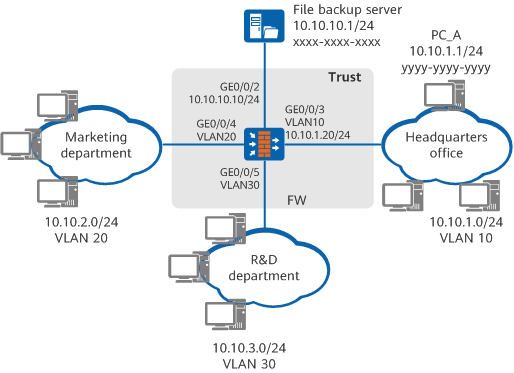
Configuration Roadmap
The configuration roadmap is as follows:

This example describes only ARP-related configurations, but not other configurations, such as DHCP.
Configure static ARP entries of hosts in the headquarters on the FW to prevent ARP attack packets from altering ARP entries, which prevents communication interruptions.
Configure static ARP entries of the file backup server on the FW to prevent ARP attack packets from altering ARP entries, which prevents failures in accessing the file backup server.
Procedure
- Configure static ARP entries for the host in the headquarters.
# Create VLAN 10.
<FW> system-view
[FW] vlan 10
[FW-vlan-10] quit
# Add GigabitEthernet 0/0/3 to VLAN 10.
[FW] interface GigabitEthernet 0/0/3
[FW-GigabitEthernet0/0/3] portswitch
[FW-GigabitEthernet0/0/3] port link-type access
[FW-GigabitEthernet0/0/3] port default vlan 10
[FW-GigabitEthernet0/0/3] quit
# Configure an IP address for Vlanif 10.
[FW] interface Vlanif 10
[FW-Vlanif10] ip address 10.10.1.20 255.255.255.0
[FW-Vlanif10] quit
# Configure static ARP entries for hosts in the headquarters. The following example uses the configuration on PC_A(configuration on other PCs is omitted). In the static ARP entry, PC_A IP address 10.10.1.1 is mapped to the MAC address yyyy-yyyy-yyyy, and the VLAN ID is 10.
[FW] arp static 10.10.1.1 yyyy-yyyy-yyyy vid 10 interface GigabitEthernet 0/0/3
- Configure a static ARP entry for the file backup server.
# Configure an IP address for GigabitEthernet 0/0/2.
[FW] interface GigabitEthernet 0/0/2
[FW-GigabitEthernet0/0/2] ip address 10.10.10.10 255.255.255.0
[FW-GigabitEthernet0/0/2] quit
# Configure a static ARP entry for the file backup server to map the IP address 10.10.10.1/24 to the MAC address xxxx-xxxx-xxxx.
[FW] arp static 10.10.10.1 xxxx-xxxx-xxxx - Add interfaces to a security zones.
# Assign interfaces to the Trust zone.
[FW] firewall zone trust
[FW-zone-trust] add interface GigabitEthernet 0/0/2
[FW-zone-trust] add interface GigabitEthernet 0/0/3
[FW-zone-trust] add interface GigabitEthernet 0/0/4
[FW-zone-trust] add interface GigabitEthernet 0/0/5
[FW-zone-trust] quit
Configuration Verification
Run the display arp static command on the FW to view static ARP entries.
[FW] display arp static IP ADDRESS MAC ADDRESS EXPIRE(M) TYPE INTERFACE VPN-INSTANCE VLAN ------------------------------------------------------------------------------ 10.10.10.1 xxxx-xxxx-xxxx S-- 10.10.1.1 yyyy-yyyy-yyyy S-- 10 10.10.2.1 zzzz-zzzz-zzzz S-- 20 10.10.3.1 wwww-wwww-wwww S-- 30 ------------------------------------------------------------------------------ Total:4 Dynamic:0 Static:4 Interface:0- Headquarters devices properly communicate with other departments, without interruptions.
- All departments can access the file backup server.
Configuration Script
#
 sysname FW
#
 vlan batch 10 20 30
#
interface Vlanif10
 ip address 10.10.1.20 255.255.255.0
#
interface GigabitEthernet0/0/2
 undo shutdown
 ip address 10.10.10.10 255.255.255.0
#
interface GigabitEthernet0/0/3
 portswitch
 undo shutdown
 port link-type access
 port default vlan 10
#
firewall zone trust
 set priority 85
 add interface GigabitEthernet0/0/2
 add interface GigabitEthernet0/0/3
 add interface GigabitEthernet0/0/4
 add interface GigabitEthernet0/0/5
#
arp static 10.10.10.1 xxxx-xxxx-xxxx
arp static 10.10.1.1 yyyy-yyyy-yyyy vid 10 GigabitEthernet 0/0/3
arp static 10.10.2.1 zzzz-zzzz-zzzz vid 20 GigabitEthernet 0/0/4
arp static 10.10.3.1 wwww-wwww-wwww vid 30 GigabitEthernet 0/0/5
#
return