Example for Configuring ARP Automatic Scanning and Fixed ARP
This section describes how to configure ARP automatic scanning and fixed ARP. The configuration enables a device to rapidly generate dynamic ARP entries and convert the dynamic ARP entries to static ARP entries. This process ensures reliable and secure network operations.
Networking Requirements
On a small-sized LAN, a network administrator configures static ARP entries on a gateway to ensure network communications security. However, once a device MAC address is changed, the network administrator has to reconfigure a static ARP entry on the gateway, which increases network operation and maintenance costs.
If the network adapters of HostA, HostB, HostC, and HostD are replaced, the existing static ARP entries for these devices on the PE become invalid on the network shown in Figure 1. To solve this problem and ensure network security, you can configure ARP automatic scanning and fixed ARP on the PE. The two functions enable the PE to rapidly learn the MAC address of each host, generate dynamic ARP entries, and convert the dynamic ARP entries to static ARP entries.
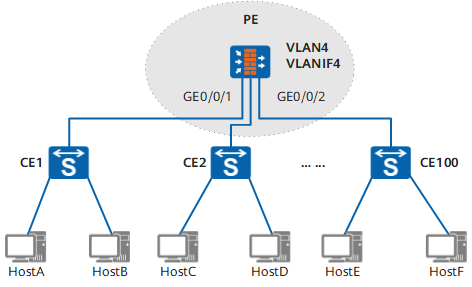
Configuration Roadmap
The configuration roadmap is as follows:
Configure a VLAN, create a VLANIF interface, and configure an IP address for the VLANIF interface.
Configure ARP automatic scanning on the VLANIF interface.
Configure fixed ARP on the VLANIF interface.
Data Preparation
To complete the configuration, you need the following data:
- VLAN ID (4)
- Types and numbers of the interfaces (GE0/0/1 and GE0/0/2) that join the VLAN
- IP address (10.1.1.1/24) of the VLANIF interface
- IP addresses of HostA (10.1.1.2/24), HostB (10.1.1.3/24), HostC (10.1.1.4/24), and HostD (10.1.1.5/24)
Procedure
- Configure an IP address for each host.
# Assign 10.1.1.2/24 to HostA.
# Assign 10.1.1.3/24 to HostB.
# Assign 10.1.1.4/24 to HostC.
# Assign 10.1.1.5/24 to HostD.
- Configure a VLAN and create a VLANIF interface.
<FW> system-view
[FW] sysname PE
[PE] interface GigabitEthernet 0/0/1
[PE-GigabitEthernet 0/0/1] portswitch
[PE-GigabitEthernet 0/0/1] quit
[PE] interface GigabitEthernet 0/0/2
[PE-GigabitEthernet 0/0/2] portswitch
[PE-GigabitEthernet 0/0/2] quit
[PE] vlan 4
[PE-vlan4] port GigabitEthernet 0/0/1 to 1/0/2
[PE-vlan4] quit
[PE] interface vlanif 4
[PE-Vlanif4] ip address 10.1.1.1 255.255.255.0
[PE-Vlanif4] quit
Run the display arp all command to view the ARP entries on the PE. The ARP entries on the VLANIF interface are displayed only.
[PE] display arp all IP ADDRESS MAC ADDRESS EXPIRE(M) TYPE INTERFACE VPN-INSTANCE VLAN ------------------------------------------------------------------------------ 10.1.1.1 0018-****-04c3 I - Vlanif4 ------------------------------------------------------------------------------ Total:1 Dynamic:0 Static:0 Interface:1 - Configure ARP automatic scanning.
[PE] interface vlanif 4
[PE-Vlanif4] arp scan 10.1.1.2 to 10.1.1.5
[PE-Vlanif4] quit
Run the display arp all command to view the ARP entries on the PE. The ARP entries of HostA, HostB, HostC, and HostD are displayed.
[PE] display arp all IP ADDRESS MAC ADDRESS EXPIRE(M) TYPE INTERFACE VPN-INSTANCE VLAN ------------------------------------------------------------------------------ 10.1.1.1 1051-****-e079 I - Vlanif4 10.1.1.2 1051-****-e07b 20 D-0 GigabitEthernet 0/0/1 4/- 10.1.1.3 1051-****-e07d 20 D-0 GigabitEthernet 0/0/1 4/- 10.1.1.4 1051-****-e081 20 D-0 GigabitEthernet 0/0/2 4/- 10.1.1.5 1051-****-e083 20 D-0 GigabitEthernet 0/0/2 4/- ------------------------------------------------------------------------------ Total:5 Dynamic:4 Static:0 Interface:1 - Configure fixed ARP.
[PE] interface vlanif 4
[PE-Vlanif4] arp fixup
[PE-Vlanif4] quit
Run the display arp all command to view the ARP entries on the PE. The dynamic ARP entries of HostA, HostB, HostC, and HostD have been converted to static ARP entries.
[PE] display arp all
IP ADDRESS      MAC ADDRESS     EXPIRE(M) TYPE        INTERFACE   VPN-INSTANCE
                                          VLAN
------------------------------------------------------------------------------
10.1.1.1        0018-****-04c3            I -         Vlanif4
10.1.1.2        0018-****-04c3  19        S-0         GigabitEthernet 0/0/1
                                             4/-
10.1.1.3        00e0-****-1015  19        S-0         GigabitEthernet 0/0/1
                                             4/-
10.1.1.4        00e0-****-1015  19        S-0         GigabitEthernet 0/0/2
                                             4/-
10.1.1.5        00e0-****-1015  19        S-0         GigabitEthernet 0/0/2
                                             4/-
------------------------------------------------------------------------------
Total:5        Dynamic:0      Static:4    Interface:1
Configuration Files
Configuration file of PE
#
 sysname PE
#
 vlan batch 4
#
interface Vlanif4
 ip address 10.1.1.1 255.255.255.0
#
interface GigabitEthernet 0/0/1
 portswitch
 undo shutdown
 port hybrid pvid vlan 4
 undo port hybrid vlan 1
 port hybrid untagged vlan 4
#
interface GigabitEthernet 0/0/2
 portswitch
 undo shutdown
 port hybrid pvid vlan 4
 undo port hybrid vlan 1
 port hybrid untagged vlan 4
#