Example for Configuring Proxy ARP
This section provides an example for configuring proxy ARP. Proxy ARP implements communication between branches on the same network segment but on different physical networks.
Networking Requirements
Branches A and B of a company shown in Figure 1 are located in different cities. Multiple routing devices are deployed between branches, and routes are reachable. IP addresses of the routing devices are on the same network segment 10.10.0.0/16. Branches A and B belong to different broadcast domains and cannot communicate on a LAN. Hosts of branches with default gateway addresses cannot communicate across network segments.
The company requires that branches A and B communicate without changing host configurations.
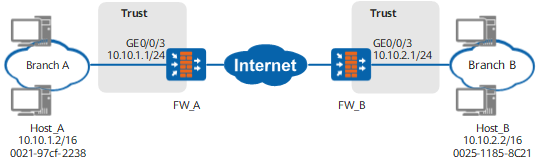
Configuration Roadmap
The configuration roadmap is as follows:

This example describes only ARP-related configurations, but not configurations, such as routes between branches A and B.
Enable proxy ARP on the interface of FW_A connected to branch A.
Enable proxy ARP on the interface of FW_B connected to branch B.
- Configure routes to ensure that FW_A and branch B are reachable to each other, and FW_B and branch A are reachable to reach other.
Procedure
- Configure FW_A.
# Configure an IP address for GigabitEthernet 0/0/3.
<FW_A> system-view
[FW_A] interface GigabitEthernet 0/0/3
[FW_A-GigabitEthernet0/0/3] ip address 10.10.1.1 255.255.255.0
# Enable proxy ARP.
[FW_A-GigabitEthernet0/0/3] arp-proxy enable
[FW_A-GigabitEthernet0/0/3] quit
# Assign interfaces to security zones.
[FW_A] firewall zone trust
[FW_A-zone-trust] add interface GigabitEthernet 0/0/3
[FW_A-zone-trust] quit
- Configure FW_B.
# Configure an IP address for GigabitEthernet 0/0/3.
<FW_B> system-view
[FW_B] interface GigabitEthernet 0/0/3
[FW_B-GigabitEthernet0/0/3] ip address 10.10.2.1 255.255.255.0
# Enable proxy ARP.
[FW_B-GigabitEthernet0/0/3] arp-proxy enable
[FW_B-GigabitEthernet0/0/3] quit
# Assign interfaces to security zones.
[FW_B] firewall zone trust
[FW_B-zone-trust] add interface GigabitEthernet 0/0/3
[FW_B-zone-trust] quit
Configuration Verification
# Select host_A in branch A and select host_B in branch B. Run the ping command on host_A to ping host_B. The ping is successful.
C:\Documents and Settings\Administrator>ping 10.10.2.2

Pinging 10.10.2.2 with 32 bytes of data:

Reply from 10.10.2.2: bytes=32 time=3ms TTL=126
Reply from 10.10.2.2: bytes=32 time=11ms TTL=126
Reply from 10.10.2.2: bytes=32 time=2ms TTL=126
Reply from 10.10.2.2: bytes=32 time=1ms TTL=126

Ping statistics for 10.10.2.2:
    Packets: Sent = 4, Received = 4, Lost = 0 (0% loss),
Approximate round trip times in milli-seconds:
    Minimum = 1ms, Maximum = 11ms, Average = 4ms
# View the ARP table of host_A. You can see that the MAC address of host_B is the MAC address of GigabitEthernet 0/0/3 on FW_A.
C:\Documents and Settings\Administrator>arp -a
Interface: 10.10.1.2 --- 0x3
  Internet Address      Physical Address      Type
  10.10.1.1             00-22-a1-01-b5-db     dynamic
  10.10.2.2             00-22-a1-01-b5-db     dynamic
# View the ARP table of host_B. You can see that the MAC address of host_A is the MAC address of GigabitEthernet 0/0/3 on FW_B.
C:\Documents and Settings\Administrator>arp -a

Interface: 10.10.2.2 --- 0x2
  Internet Address      Physical Address      Type
  10.10.1.2             00-e0-fc-00-00-00     dynamic
  10.10.2.1             00-e0-fc-00-00-00     dynamic
Configuration Scripts
Configuration script for FW_A:
#
sysname FW_A
#
interface GigabitEthernet0/0/3
 ip address 10.10.1.1 255.255.255.0
 arp-proxy enable
#
firewall zone trust
 set priority 85
 add interface GigabitEthernet0/0/3
#
return
Configuration script for FW_B:
#
sysname FW_B
#
interface GigabitEthernet0/0/3
 ip address 10.10.2.1 255.255.255.0
 arp-proxy enable
#
firewall zone trust
 set priority 85
 add interface GigabitEthernet0/0/3
#
return