Configuring the Device as a DHCP Server
A DHCP server provides dynamic and static address allocation and supports customized configurations of DNS servers, gateways, WINS servers, NetBIOS node types, and Option fields for clients.
Context
If a DHCP server and clients are on the same network segment, the DHCP server provides the clients with dynamically assigned IP addresses, statically configured IP addresses, designated DNS servers, gateways, and WINS servers.
The DHCP server and relay services cannot coexist on the same interface.

The sum of the number of IP addresses being in use and that of expired IP addresses equals to the number of DHCP clients. When the sum of the number of IP addresses being in use and that of expired IP addresses reaches to the maximum of DHCP client specification, the device can automatically release some of the expired IP addresses to reduce the memory usage.
Procedure
- Choose .
- Click Add.
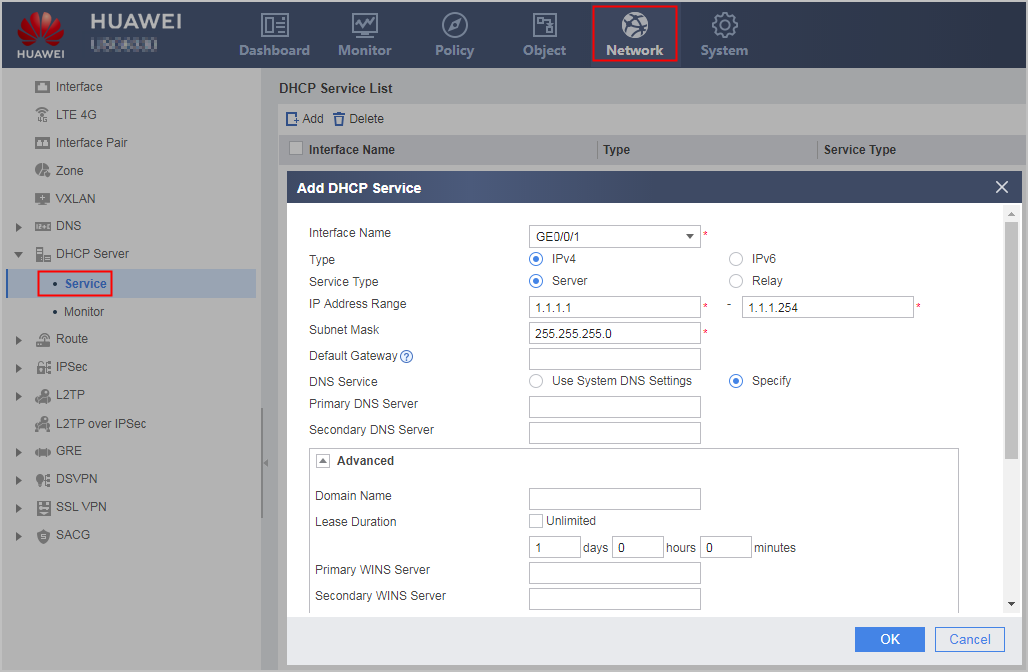
In a virtual system, only the Specify option is supported. The Use System DNS Settings options is not supported.
- Set the following parameters.
For the DHCP server configuration on the web UI, only the interface address pool is supported, and the assigned addresses in the address pool must belong to the same network segment as the specified interface IP address. Therefore, IP address assignment across network segments cannot be configured for the DHCP server on the web UI.
Parameter
Description
Interface Name
Name of the interface on which the DHCP server function is configured.
The interface must be an existing one and Connection Type must be set to Static IP.
Type
Protocol type on the interface:
- IPv4: enables DHCP. Select IPv4 in this example.
- IPv6: enables DHCPv6.
Service Type
Enable either the DHCP server or relay service on this interface.
When the DHCP server is enabled on the interface, the Service Type must be set to Server.
IP Addresses Range
Range of IP addresses assigned to a DHCP client.
By default, the system takes the IP address mask range for the interface as the assignable IP address range. For example, the IP address of an interface is 192.168.1.5 255.255.255.0. When you create a DHCP server on the interface, the system considers IP Addresses Range to be 192.168.1.1 to 192.168.1.254 by default. Because 192.168.1.5 is the IP address of the interface, this IP address will not be assigned. If the assignable IP address range is different from the default value, you can specify this parameter.
To assign a correct IP address, configure the range to be the same as the network segment on which the IP address of the interface for the DHCP server resides.
Subnet Mask
Subnet mask of the IP address assigned to a DHCP client. The subnet mask determines which part of an IP address serves as the network/subnet ID and which part serves as a host ID.
By default, the system uses the mask of the interface IP address as the subnet mask. If necessary, you can change the subnet mask.
Default Gateway
Default gateway assigned to a DHCP client.
The default gateway must be on the same network segment as the IP address of the DHCP client.
NOTICE:The default gateway address cannot be a broadcast address or network address.
DNS Service
Method used to set the DNS server address:
- Use System DNS Setting: enables DNS proxy on the DHCP server and takes the default gateway address as a DNS server address.
- Specify: specifies a DNS server address.
This parameter must be specified when the DHCP client accesses the Internet by using domain names. The DNS and DHCP servers must be routable.
Primary DNS Server
Primary DNS server address assigned to a DHCP client.
This parameter needs to be specified when DNS Service is Specify.
Secondary DNS Server
Secondary DNS server address assigned to a DHCP client.
When the DHCP client fails to resolve domain names using the primary DNS server, the DHCP client requests the secondary DNS server for domain name resolution.
This parameter can be specified when DNS Service is Specify.
The secondary DNS server address must be different from the primary one.
Advanced
Domain Name
Domain name suffix assigned to a DHCP client.
After a DHCP client obtains a domain name suffix assigned by a server and accesses network resources using domain names, the client automatically adds the domain name suffix to an incomplete domain name that a user enters to form a complete domain name.
Lease Duration
Lase for an address assigned to a DHCP client. The lease specifies how long the DHCP client can use the IP address assigned by the server.
You can set an address lease based on the duration of a connection between a client and a physical network in an address pool. If clients on a wireless network frequently disconnect from the network, you can decrease the address lease, such as to 0 days 8 hours 0 minutes. If clients are connected to the network for a stably long period of time, you can increase the lease or even set an infinite period.
Primary WINS Server
Primary WINS server address assigned to a DHCP client.
Hosts running the Windows operating system and NetBIOS resolve NetBIOS host names to IP addresses. The resolution methods for NetBIOS host name include local name resolution, broadcast query, and WINS server resolution. WINS server resolution is implemented by a WINS server.
The primary WINS server and DHCP server must be routable.
Secondary WINS Server
Secondary WINS server address assigned to a DHCP client.
When the DHCP client fails to resolve NetBIOS host names using the primary WINS server, the client requests the secondary WINS server for host name resolution.
The secondary WINS server and DHCP server must be routable.
Reserved IP Address
IP addresses that cannot be automatically assigned.
The IP addresses that are already assigned, such as to a DNS server, cannot be automatically assigned to clients. You reserve the assigned IP addresses. This configuration prevents address conflicts and shortens the detection time during address assignment, which improves DHCP address assignment efficiency.
Before you designate IP addresses as reserved, enable the DHCP and DHCP server function on the interface. If these prerequisites are not addressed, perform operations on the dialog box that is displayed when you create a reserved IP address.
Bound Host MAC Address
Bind IP addresses to be assigned in IP Addresses Range to MAC addresses of clients.
When the DHCP server receives an IP address request with a MAC address of a client, the DHCP server assigns a unique IP address bound to the MAC address to the client.
Before you configure static address binding, enable the DHCP service and the DHCP server function on the interface. If these prerequisites are not addressed, perform operations on the dialog box that is displayed when you create static address binding.
- Click OK.
If the operation is successful, DHCP Service List is displayed on the page, and new configuration items are added to the list.
Repeat as needed to configure the DHCP server function on multiple interfaces.