Configuring the Device as a DHCP Relay
This section describes how to configure DHCP relay. DHCP relay helps a DHCP client on a specific network segment obtain an IP address from a DHCP server on another network segment. DHCP relay also allows DHCP clients on different network segments to share a DHCP server.
Prerequisites
A DHCP server has been configured based on a global address pool.
No interface address pool can be configured for the DHCP server interface that connects to the DHCP relay agent.
- The DHCP server and DHCP relay interface are reachable to each other.
The DHCP relay interface and client reside on the same network segment.
The IP address of the DHCP relay interface must be on the same network segment as the IP address that the DHCP server assigns to the client.
- The default gateway address of the DHCP client must be the IP address of the DHCP relay interface.
Procedure
- Choose .
- Click Add.
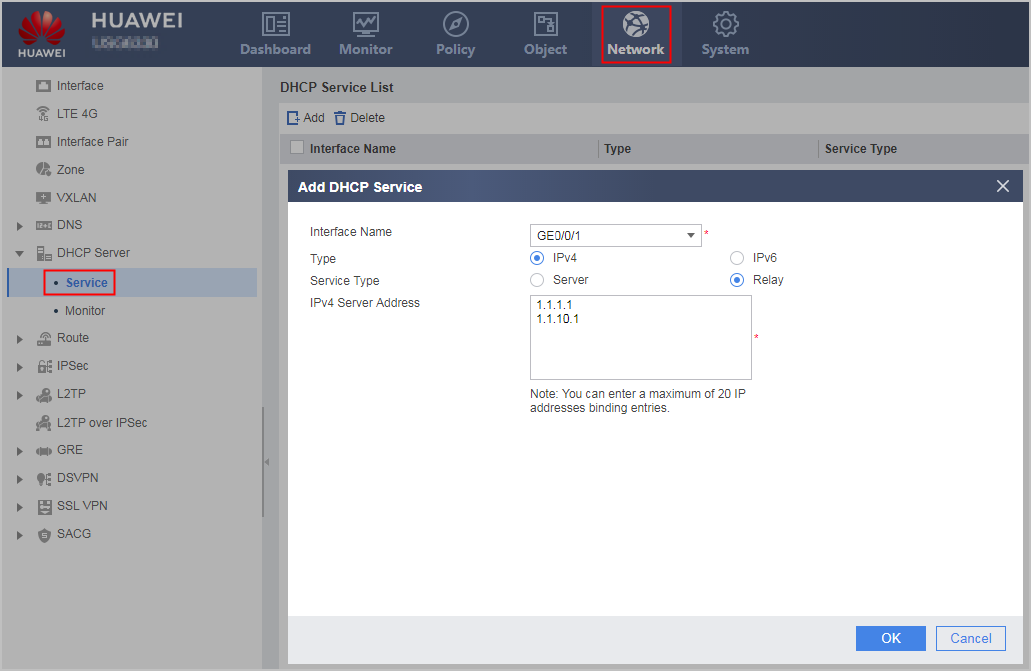
- Set the following parameters.
Parameter
Description
Interface Name
Name of the interface on which the DHCP relay function is configured.
The interface must exist. Connection Type can be set only to Static IP, and the interface IP address must be on the same network segment as the DHCP client.
Service Type
Enable either the DHCP server or relay service on this interface.
When DHCP relay is enabled on the interface, the Service Type must be Relay.
IPv4 Server IP Address
IP address that a DHCP server assigns and the DHCP relay agent forwards to a client.
- Click OK.
If the operation is successful, DHCP Service List is displayed on the page, and new configuration items are added to the list.
Repeat previous operations to configure the DHCP relay function on multiple interfaces.