Configuring the Device as a DHCPv6 Relay
A DHCPv6 client can communicate with DHCPv6 servers on other network segments through a DHCPv6 relay, and finally obtains the IP address. In so doing, DHCPv6 clients on multiple network segments can use the same DHCP server, which saves costs and facilitates centralized management.
Procedure
- Choose .
- Click Add.
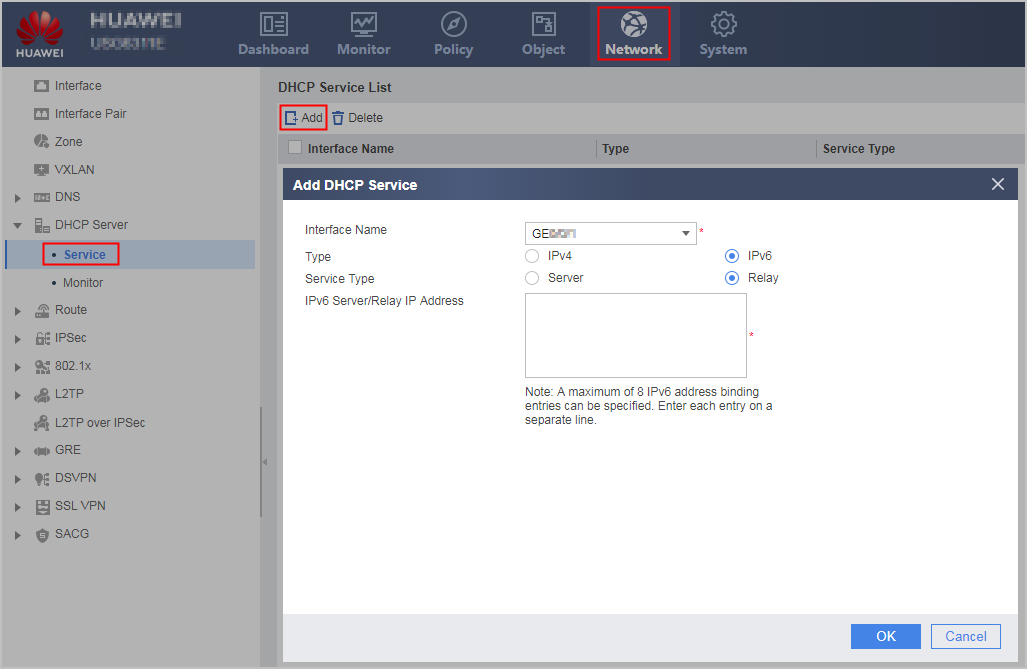
- Set parameters one by one.
Parameter
Description
Interface Name
Name of the interface that serves as a DHCPv6 relay
Connection Type can be set only to Static IP. The specified interface IP address must belong to the same network segment as the DHCP client.
Type
Whether a DHCPv4 relay or DHCPv6 relay is selected
In this section, set the parameter to IPv6 because a DHCPv6 relay is used.
Service Type
Whether a DHCPv6 server or DHCPv6 relay service is enabled on the interface.
In this section, set the parameter to Relay because a DHCPv6 relay is used.
IPv6 Server/Relay IP Address
Next-hop address of the DHCPv6 relay, which can the IP address of another DHCPv6 relay or a DHCPv6 server.
- Click OK.
If the operation succeeds, DHCP Service List is displayed on the page, and new configuration items are added to the list.
Repeat the preceding operations to configure the DHCPv6 relay function on multiple interfaces.