Web: Example for Configuring a DHCPv6 Relay
This section provides an example for configuring a DHCPv6 client to obtain an IPv6 address from a DHCPv6 server through a DHCPv6 relay.
Networking Requirements
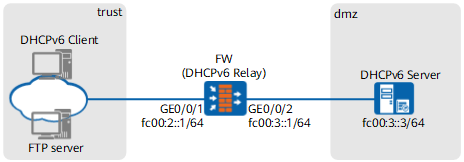
As shown in Figure 1, according to the network planning, the IPv6 address assigned to the DHCPv6 client is not on the same network segment as the IPv6 address of the DHCPv6 server. A DHCPv6 relay needs to be deployed between the DHCPv6 client and server so that the client can obtain an IPv6 address and other network configurations from the server.
Procedure
- Set IP addresses for interfaces on the FW and assign the interfaces to security zones.
- Choose .
Click
 of GE0/0/1 and set required parameters.
Zone
trust
IPv6
IPv6
Select Enable Protocol.
IPv6 Address
fc00:2::1/64
- Click OK.
Configure GE0/0/2 based on the preceding step.
Zone
dmz
IPv6
IPv6
Select Enable Protocol.
IPv6 Address
fc00:3::1/64
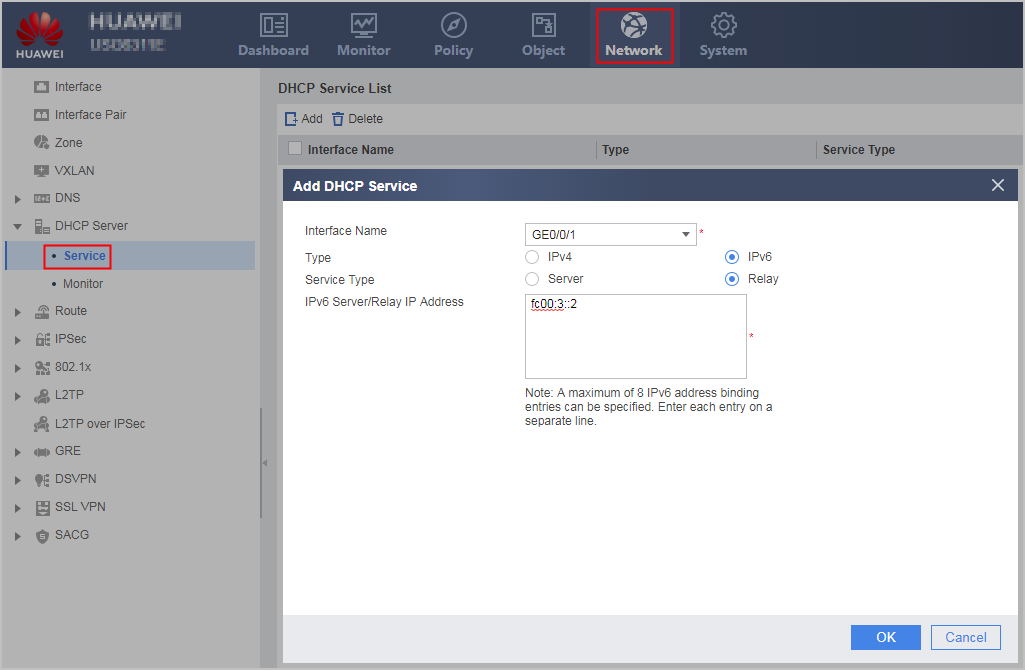
- Configure the FW as a DHCPv6 relay.
- Choose .
- Click Add and set parameters as follows:
- Click OK.
- Configure security policies to permit traffic as desired.
Choose .
Click Add to configure a security policy to permit DHCP packet exchanges.
Name
dhcpv6
Source Zone
trust,local
Destination Zone
local,dmz
Action
Allow
- Click OK.
Verification
Check whether the DHCPv6 client has obtained an IPv6 address. If no, check the configurations.
Configuration Scripts
#
ipv6
#
interface GigabitEthernet0/0/1
 ipv6 enable
 ipv6 address FC00:2::1/64
 dhcpv6 relay destination FC00:3::2
#
interface GigabitEthernet0/0/2
 ipv6 enable
 ipv6 address FC00:3::1/64
#
firewall zone trust
 set priority 85
 add interface GigabitEthernet0/0/1
#
firewall zone dmz
 set priority 50
 add interface GigabitEthernet0/0/2
#
security-policy
  rule name dhcpv6
    source-zone trust
    source-zone local
    destination-zone local
    destination-zone dmz
    action permit