CLI:Example for Configuring a DHCPv6 Server
Networking Requirements
If a large number of IPv6 addresses need to be manually configured, the workload on configuration will be huge, and the manually configured addresses have poor manageability. The administrator requires that IPv6 addresses and network configuration parameters be obtained automatically to facilitate centralized management and hierarchical IPv6 network deployment.
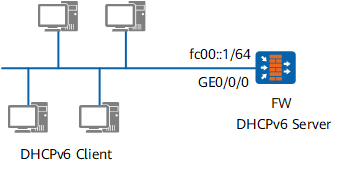
Configuration Roadmap
Enable IPv6 functions on the interface so that devices can communicate using IPv6.
Enable the DHCPv6 Server function so that devices can obtain IPv6 address prefixes using DHCPv6.
Procedure
- Enable the DHCP service
<sysname> system-view
[sysname] dhcp enable
- add the interface to the Trust zone.
[sysname] firewall zone trust
[sysname-zone-trust] add interface GigabitEthernet 0/0/0
[sysname-zone-trust] quit
- Configure the ipv6 function on interfaces
[sysname] ipv6
[sysname] interface GigabitEthernet 0/0/0
[sysname-GigabitEthernet0/0/0] ip address 10.102.0.1 255.255.255.0
[sysname-GigabitEthernet0/0/0] ipv6 enable
[sysname-GigabitEthernet0/0/0] ipv6 address auto link-local
[sysname-GigabitEthernet0/0/0] ipv6 address fc00::1/64
- Enable the RA message advertisement function to make the DHCPv6 client learn the default route destined for the IPv6 gateway through RA messages. Configure the M and O flags of the advertised RA messages to make the DHCPv6 client obtain an IPv6 address and other network parameters using DHCP.
[sysname-GigabitEthernet0/0/0] undo ipv6 nd ra halt
[sysname-GigabitEthernet0/0/0] ipv6 nd autoconfig managed-address-flag
[sysname-GigabitEthernet0/0/0] ipv6 nd autoconfig other-flag
[sysname-GigabitEthernet0/0/0] ipv6 nd ra prefix default no-advertise    //RA packets do not carry the default prefix generated by the interface IPv6 address.
[sysname-GigabitEthernet0/0/0] quit
- Configure security policies.
[sysname] security-policy
[sysname-policy-security]rule name policy_sec
[sysname-policy-security-rule-policy_sec]source-zone trust local
[sysname-policy-security-rule-policy_sec]destination-zone local trust
[sysname-policy-security-rule-policy_sec]action permit
[sysname-policy-security-rule-policy_sec]quit
[sysname-policy-security]quit
- Configure a DHCPv6 server
[sysname] dhcpv6 pool pool1
[sysname-dhcpv6-pool-pool1] address prefix FC00:3::9/64
[sysname-dhcpv6-pool-pool1] dns-server fc00:4::1
[sysname-dhcpv6-pool-pool1] quit
- Enable the DHCPv6 server function on the interface
[sysname] interface GigabitEthernet 0/0/0
[sysname-GigabitEthernet0/0/0] dhcpv6 server pool1
[sysname-GigabitEthernet0/0/0] quit
- Verify the configuration
Run the display dhcpv6 pool command on the FW to check information about the DHCPv6 address pool.
<sysname> display dhcpv6 pool pool1
DHCPv6 pool: pool1
  Address prefix: FC00:3::9/64
    Lifetime valid 172800 seconds, preferred 86400 seconds
    0 in use, 0 conflicts
  Information refresh time: 86400
  DNS server address: FC00:4::1
  Conflict-address expire-time: 172800
  Renew-time-percent : 50
  Rebind-time-percent : 80
  Active normal clients: 0
Run the display dhcpv6 server command on the FW to check information about the DHCPv6 server.
<sysname> display dhcpv6 server
 Interface                                DHCPv6 pool
 GigabitEthernet0/0/0                     pool1
Configuration File
Configuration file of FW
#
dhcp enable
#
ipv6
#
dhcpv6 pool pool1
 address prefix FC00:3::9/64
 dns-server FC00:4::1
#
interface GigabitEthernet0/0/0
 ipv6 enable
 ip address 10.102.0.1 255.255.255.0
 ipv6 address FC00::1/64
 ipv6 address auto link-local
 undo ipv6 nd ra halt
 ipv6 nd autoconfig managed-address-flag
 ipv6 nd autoconfig other-flag
 ipv6 nd ra prefix default no-advertise
 dhcpv6 server pool1
#
firewall zone trust
 add interface GigabitEthernet 0/0/0
#
security-policy
 rule name policy_sec
  source-zone trust local
  destination-zone local trust
  action permit
#
return