CLI:Example for Configuring a DHCPv6 PD Server
Networking Requirements
As shown in Figure 1, FW and Switch are directly connected and on the same link. Switch cannot communicate with other devices because it has no IPv6 address and other network configuration parameters. The FW needs to be configured as a DHCPv6 PD server to assign IPv6 addresses and other network configuration parameters to DHCPv6 clients. This facilitates centralized management and layered IPv6 network deployment.
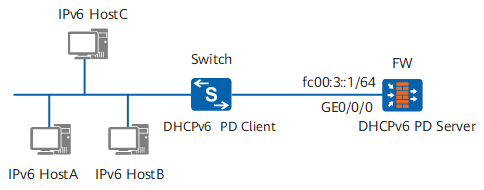
Configuration Roadmap
Enable IPv6 on interfaces so that devices can communicate using IPv6.
Enable the DHCPv6 PD server function so that DHCPv6 PD server can assign IPv6 addresses using DHCPv6.
Procedure
- Enable the DHCP service
<sysname> system-view
[sysname] dhcp enable
- add the interface to the Trust zone.
[sysname] firewall zone trust
[sysname-zone-trust] add interface GigabitEthernet 0/0/0
[sysname-zone-trust] quit
- Configure IPv6 functions on interfaces
[sysname] ipv6
[sysname] interface GigabitEthernet 0/0/0
[sysname-GigabitEthernet0/0/0] ip address 10.102.0.1 255.255.255.0
[sysname-GigabitEthernet0/0/0] ipv6 enable
[sysname-GigabitEthernet0/0/0] ipv6 address auto link-local
[sysname-GigabitEthernet0/0/0] ipv6 address FC00:3::1/64
[sysname-GigabitEthernet0/0/0] quit
- Configure security policies.
[sysname] security-policy
[sysname-policy-security]rule name policy_sec
[sysname-policy-security-rule-policy_sec]source-zone trust local
[sysname-policy-security-rule-policy_sec]destination-zone local trust
[sysname-policy-security-rule-policy_sec]action permit
[sysname-policy-security-rule-policy_sec]quit
[sysname-policy-security]quit
- Configure a DHCPv6 PD server
[sysname] dhcpv6 pool pool1
[sysname-dhcpv6-pool-pool1] prefix-delegation fc00:3::/60 64
[sysname-dhcpv6-pool-pool1] dns-server fc00:4::1
[sysname-dhcpv6-pool-pool1] quit
- Enable the DHCPv6 PD server function on an interface
[sysname] interface GigabitEthernet 0/0/0
[sysname-GigabitEthernet0/0/0] dhcpv6 server pool1
[sysname-GigabitEthernet0/0/0] quit
[sysname] quit
- Verify the configuration
# Run the display dhcpv6 pool command on the FW to check information about the DHCPv6 address pool.
<sysname> display dhcpv6 pool pool1
 DHCPv6 pool: pool1
  Prefix delegation: FC00:3::/60 64
    Lifetime valid 172800 seconds, preferred 86400 seconds
    0 in use
  Information refresh time: 86400
  DNS server address: FC00:4::1
  conflict-address expire-time: 172800
  renew-time-percent : 50
  rebind-time-percent : 80
  Active pd clients: 0
# Run the display dhcpv6 server command on the FW to check information about the DHCPv6 PD server.
<sysname> display dhcpv6 server
  Interface                                DHCPv6 pool
  GigabitEthernet0/0/0                     pool1
Configuration File
Configuration file of FW
#
dhcp enable
#
ipv6
#
dhcpv6 pool pool1
 prefix-delegation FC00:3::/60 64
 dns-server FC00:4::1
#
interface GigabitEthernet0/0/0
 dhcpv6 server pool1
 ip address 10.102.0.1 255.255.255.0
 ipv6 enable
 ipv6 address auto link-local
 ipv6 address FC00:3::1/64
#
firewall zone trust
 add interface GigabitEthernet 0/0/0
#
security-policy
 rule name policy_sec
  source-zone trust local
  destination-zone local trust
  action permit
#
return