CLI:Example for Configuring a DHCPv6 Relay
Networking Requirements
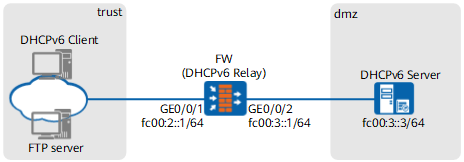
As shown in Figure 1, the DHCPv6 client address is fc00:2::/64 and the DHCPv6 server address is fc00:3::3/64. The DHCPv6 client and server are on different links; therefore, a DHCPv6 relay agent is required to forward DHCPv6 packets.
The FW needs to function as the DHCPv6 relay agent to forward DHCPv6 packets between the DHCPv6 client and server. In addition, the FW functions as the gateway device of the network at fc00:2::/64. Hosts on the network to obtain IPv6 addresses and other network configuration parameters through DHCPv6.
Configuration Roadmap
Enable IPv6 on interfaces so that devices can communicate using IPv6.
Enable the DHCPv6 relay function so that the DHCPv6 server and client on different links can transmit packets.
Procedure
- Enable ipv6 service.
[sysname] ipv6
- Configure the IP addresses for the interfaces of FWand assign the interfaces to the specified security zones.
<sysname> system-view
[sysname] interface GigabitEthernet 0/0/1
[sysname-GigabitEthernet 0/0/1] ipv6 enable
[sysname-GigabitEthernet 0/0/1] ipv6 address fc00:2::1 64
[sysname-GigabitEthernet 0/0/1] quit
[sysname] interface GigabitEthernet 0/0/2
[sysname-GigabitEthernet 0/0/2] ipv6 enable
[sysname-GigabitEthernet 0/0/2] ipv6 address fc00:3::1 64
[sysname-GigabitEthernet 0/0/2] quit
[sysname] firewall zone trust
[sysname-zone-trust] add interface GigabitEthernet 0/0/1
[sysname-zone-trust] quit
[sysname] firewall zone dmz
[sysname-zone-dmz] add interface GigabitEthernet 0/0/2
[sysname-zone-dmz] quit
- Configure FW as a DHCPv6 relay. Specify a DHCPv6 server address and enable the relay interface configurations.
[sysname] interface GigabitEthernet 0/0/1
[sysname-GigabitEthernet 0/0/1] ipv6 enable
[sysname-GigabitEthernet 0/0/1] dhcpv6 relay destination fc00:3::3
[sysname-GigabitEthernet 0/0/1] quit
- Configure security policies to permit traffic as desired.
[sysname] security-policy
[sysname-policy-security] rule name sec_policy
[sysname-policy-security-rule-sec_policy] source-zone trust
[sysname-policy-security-rule-sec_policy] destination-zone local
[sysname-policy-security-rule-sec_policy] source-zone local
[sysname-policy-security-rule-sec_policy] destination-zone dmz
[sysname-policy-security-rule-sec_policy] action permit
[sysname-policy-security-rule-sec_policy] quit
Configuration Verification
- On any PC in the department, press and enter cmd to display the DOS screen. Run the ipconfig /all command. If the configuration succeeds, the client obtains such information as the IPv6 address and DNS server address.

If the DHCPv6 client obtains incomplete information (for example, only the IP address is obtained), run the ipconfig /release command to lease the dynamic IP address, and run the ipconfig /renew command to apply for a new IP address and other network parameters.
- Run the display dhcpv6 relay command on the FW to view the DHCPv6 relay configuration.
[sysname] display dhcpv6 relay
--------------------------------------------------------------------------------
Interface               Mode        Destination
--------------------------------------------------------------------------------
GigabitEthernet 0/0/1     Relay       FC00:3::3
--------------------------------------------------------------------------------
 Print count : 1                    Total count : 1
Configuration Scripts
Configuration scripts of FW
#
ipv6
#
interface GigabitEthernet 0/0/1
 ipv6 enable
 ipv6 address fc00:2::1 64
 dhcpv6 relay destination fc00:3::3
#
interface GigabitEthernet 0/0/2
 ipv6 enable
 ipv6 address fc00:3::1 64
#
firewall zone trust
 set priority 85
 add interface GigabitEthernet 0/0/1
#
firewall zone dmz
 set priority 50
 add interface GigabitEthernet 0/0/2
#
security-policy
 rule name sec_policy
  source-zone local
  source-zone trust
  destination-zone dmz
  destination-zone local
  action permit
#
return