CLI:Example for Configuring a DHCPv6 Client
Networking Requirements
As shown in Figure 1, FW_A needs to be deployed as the DHCPv6 server and FW_B as the DHCPv6 client so that FW_B can dynamically obtain the IPv6 address and DNS server address.
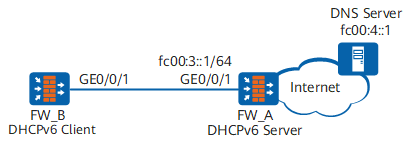
Configuration Roadmap
On FW_A, configure the DHCPv6 server function so that the DHCPv6 server can dynamically assign the IPv6 address and DNS server address to the DHCPv6 client. Configure IPv6 addresses for interfaces, configure an IPv6 address pool, and enable the DHCPv6 server function on the interfaces.
On FW_B, configure the DHCPv6 client function so that the DHCPv6 client can dynamically obtain the IPv6 address and DNS server address from the DHCPv6 server. Configure the IPv6 function and enable the DHCPv6 client function on interfaces.
Procedure
- Configure the DHCPv6 server function on FW_A.
# Configure IPv6 addresses for interfaces.
<sysname> system-view
[sysname] sysname FW_A
[FW_A] ipv6
[FW_A] interface GigabitEthernet0/0/1
[FW_A-GigabitEthernet0/0/1] ipv6 enable
[FW_A-GigabitEthernet0/0/1] ipv6 address fc00:3::1/64
[FW_A-GigabitEthernet0/0/1] quit
# Configure an IPv6 address pool.
[FW_A] dhcpv6 pool pool1
[FW_A-dhcpv6-pool-pool1] address prefix fc00:3::/64
[FW_A-dhcpv6-pool-pool1] dns-server fc00:4::1
[FW_A-dhcpv6-pool-pool1] quit
# Enable the DHCPv6 server function on the interfaces.
[FW_A] dhcp enable
[FW_A] interface GigabitEthernet0/0/1
[FW_A-GigabitEthernet0/0/1] dhcpv6 server pool1
[FW_A-GigabitEthernet0/0/1] quit
[FW_A] quit
- Configure the DHCPv6 client function on FW_B.
# Configure the IPv6 function on the interfaces.
<sysname> system-view
[sysname] sysname FW_B
[FW_B] dhcp enable
[FW_B] ipv6
[FW_B] interface GigabitEthernet0/0/1
[FW_B-GigabitEthernet0/0/1] ipv6 enable
[FW_B-GigabitEthernet0/0/1] ipv6 address auto link-local
[FW_B-GigabitEthernet0/0/1] ipv6 address auto global default
# Enable the DHCPv6 client function on the interfaces.
[FW_B-GigabitEthernet0/0/1] ipv6 address auto dhcp
[FW_B-GigabitEthernet0/0/1] quit
[FW_B] quit
- Verify the configuration.
# Run the display dhcpv6 pool command on FW_A to view the configuration and address allocation of the IPv6 address pool pool1.
<FW_A> display dhcpv6 pool pool1 DHCPv6 pool: pool1 Address prefix: FC00:3::/64 Lifetime valid 172800 seconds, preferred 86400 seconds 1 in use, 0 conflicts Information refresh time: 86400 DNS server address: FC00:4::1 conflict-address expire-time: 172800 renew-time-percent : 50 rebind-time-percent : 80 Active normal clients: 1<FW_A> display dhcpv6 pool pool1 allocated address Address Valid Expires Left ------------------------------------------------------------------------------- FC00:3::2 172800 2018-05-29 05:47:19 159594 ------------------------------------------------------------------------------- Total : 1# Run the display dhcpv6 client command on FW_B to check the DHCPv6 client configuration.
<FW_B> display dhcpv6 client
GigabitEthernet0/0/1 is in stateful DHCPv6 client mode.
Stateful DHCPv6 client is in BOUND state.
Preferred server DUID   : 00030001000B099C1162
  Reachable via address : FE80::20B:9FF:FE03:AC9B
IA NA IA ID 0x000004E1 T1 43200 T2 69120
  Obtained     : 2018-05-26 17:47:15
  Renews       : 2018-05-27 05:47:15
  Rebinds      : 2018-05-27 12:59:15
  Address      : FC00:3::2
    Lifetime valid 172800 seconds, preferred 86400 seconds
    Expires at 2018-05-28 17:47:15(172726 seconds left)
DNS server     : FC00:4::1
Configuration Files
Configuration file of FW_A
#
sysname FW_A
#
ipv6
#
dhcp enable
#
dhcpv6 pool pool1
 address prefix FC00:3::/64
 dns-server FC00:4::1
#
interface GigabitEthernet0/0/1
 ipv6 enable
 ipv6 address FC00:3::1/64
 dhcpv6 server pool1
#
return
Configuration file of FW_B
#
sysname FW_B
#
ipv6
#
dhcp enable
#
interface GigabitEthernet0/0/1
 ipv6 enable
 ipv6 address auto link-local
 ipv6 address auto global default
 ipv6 address auto dhcp
#
return