CLI:Example for Configuring a DHCPv6 PD Client
Networking Requirements
As shown in Figure 1, FW_A and FW_B are located on the same link. FW_B functions as the gateway of PC1-PCn and is connected to PC1-PCn through GigabitEthernet 0/0/2-GigabitEthernet 0/0/n. FW_A is deployed as the DHCPv6 PD server and FW_B is deployed as the DHCPv6 PD client. PC1-PCn automatically generate IPv6 addresses by advertising routes based on the IPv6 address prefixed obtained by the DHCPv6 PD client. This implements deployment of host IPv6 addresses.
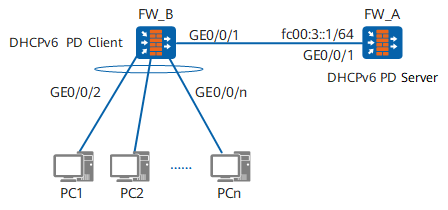
Configuration Roadmap
Configure the DHCPv6 PD server function on FW_A to dynamically assign IPv6 address prefixes to the DHCPv6 PD client. Configure IPv6 addresses for interfaces, configure an IPv6 address pool, and enable the DHCPv6 PD server function on the interfaces.
Configure the DHCPv6 PD client function on FW_B to dynamically obtain IPv6 address prefixes from the DHCPv6 PD server. Configure the IPv6 function and enable the DHCPv6 client function on interfaces.
Bind the obtained IPv6 address prefixes on FW_B so that PC1-PCn can automatically generate IPv6 addresses by advertising routes.
- On FW_B, configure the IPv6 address and domain name suffix of the DNS server so that the downlink port can advertise RA packets carrying IPv6 DNS server information to hosts PC1 to PCn.
Configure PC1-PCn to automatically obtain IPv6 addresses.

Hosts connected to a DHCPv6 PD client can reside on multiple network segments. For example, the length of the prefix obtained by the DHCPv6 PD client in this example is 63. The hosts then can be divided into two network segments ::0:0:0:0:1/64 and ::1:0:0:0:1/64. You can run the ipv6 address myprefix ::0:0:0:0:1/64 command on the Layer 3 interface connected to the hosts that reside on ::0:0:0:0:1/64 and run the ipv6 address myprefix ::1:0:0:0:1/64 command on the Layer 3 interface connected to the hosts that reside on ::1:0:0:0:1/64.
Procedure
- Configure the DHCPv6 PD server function on FW_A.
# Configure IPv6 addresses for interfaces.
<sysname> system-view
[sysname] sysname FW_A
[FW_A] ipv6
[FW_A] interface GigabitEthernet0/0/1
[FW_A-GigabitEthernet0/0/1] ipv6 enable
[FW_A-GigabitEthernet0/0/1] ipv6 address fc00:3::1/64
[FW_A-GigabitEthernet0/0/1] quit
# Configure an IPv6 PD address pool.
[FW_A] dhcpv6 pool pool1
[FW_A-dhcpv6-pool-pool1] prefix-delegation fc00:2::/60 63
[FW_A-dhcpv6-pool-pool1] quit
# Enable the DHCPv6 PD server function on the interfaces.
[FW_A] dhcp enable
[FW_A] interface GigabitEthernet0/0/1
[FW_A-GigabitEthernet0/0/1] dhcpv6 server pool1
[FW_A-GigabitEthernet0/0/1] quit
- Configure the DHCPv6 PD client function on FW_B.
# Configure the IPv6 function on the interfaces.
<sysname> system-view
[sysname] sysname FW_B
[FW_B] dhcp enable
[FW_B] ipv6
[FW_B] interface GigabitEthernet0/0/1
[FW_B-GigabitEthernet0/0/1] ipv6 enable
[FW_B-GigabitEthernet0/0/1] ipv6 address auto link-local
# Enable the DHCPv6 PD client function on the interfaces.
[FW_B-GigabitEthernet0/0/1] dhcpv6 client pd myprefix
[FW_B-GigabitEthernet0/0/1] quit
- On FW_B, set an IPv6 address for the interface. The IPv6 address of the interface and the prefix obtained by the DHCPv6 PD client are combined into a 128-bit IPv6 address, and a 64-bit IPv6 prefix is advertised. Take the configurations on GigabitEthernet 0/0/2 as an example. The configurations on other interfaces are the same as the configurations on GigabitEthernet 0/0/2.
[FW_B] interface GigabitEthernet 0/0/2
[FW_B-GigabitEthernet0/0/2] ipv6 enable
[FW_B-GigabitEthernet0/0/2] ipv6 address auto link-local
[FW_B-GigabitEthernet0/0/2] ipv6 address myprefix ::1/64
[FW_B-GigabitEthernet0/0/2] undo ipv6 nd ra halt
[FW_B-GigabitEthernet0/0/2] quit
- On FW_B, set an IPv6 address for the interface. The IPv6 address of the interface and the prefix obtained by the DHCPv6 PD client are combined into a 128-bit IPv6 address, and a 64-bit IPv6 prefix is advertised. Take the configurations on GigabitEthernet0/0/3 as an example. The configurations on other interfaces are the same as the configurations on GigabitEthernet0/0/3.
[FW_B] interface
[FW_B-GigabitEthernet0/0/3] ipv6 enable
[FW_B-GigabitEthernet0/0/3] ipv6 address auto link-local
[FW_B-GigabitEthernet0/0/3] ipv6 address myprefix ::1:0:0:0:1/64
[FW_B-GigabitEthernet0/0/3] undo ipv6 nd ra halt
[FW_B-GigabitEthernet0/0/3] quit
- On FW_B, configure the IPv6 address and domain name suffix of the DNS server.
# Configure the IPv6 address of the DNS server.
[FW_B] dns server ipv6 240c::6666# (Optional) Configure the domain name suffix of the DNS server.
[FW_B] dns domain com.cn - Configure PC1 to automatically obtain an IPv6 address (using Windows 7 as an example). The configurations on other hosts are the same as the configurations on PC1.
- Right-click Network and choose Properties to display the Network and Sharing Center window.
- Click Local Area Connection to display the Local Area Connection Status window.
- Click Properties to display the Local Area Connection Properties window.
- Select Internet Protocol Version 6 (TCP/IPv6) and click Properties to display the Internet Protocol Version 6 (TCP/IPv6) Properties window. Select Obtain an IPv6 address automatically and click OK.
- Verify the configuration.
# Run the display dhcpv6 pool command on FW_A to check the configuration and address prefix allocation of the IPv6 PD address pool pool1.
[FW_A] display dhcpv6 pool pool1 DHCPv6 pool: pool1 Prefix delegation: FC00:2::/60 63 Lifetime valid 172800 seconds, preferred 86400 seconds 1 in use Information refresh time: 86400 conflict-address expire-time: 172800 renew-time-percent : 50 rebind-time-percent : 80 Active pd clients: 1[FW_A] display dhcpv6 pool pool1 allocated prefix Prefix/length Valid Expires Left ------------------------------------------------------------------------------- FC00:2::/63 172800 2018-05-26 09:39:33 172462 ------------------------------------------------------------------------------- Total : 1# On FW_B, run the display dhcpv6 client command to check the DHCPv6 PD client configuration and run the display ipv6 interface command to check the IPv6 address information on the host-side interface GigabitEthernet 0/0/2.
[FW_B] display dhcpv6 client
GigabitEthernet0/0/1 is in DHCPv6-PD client mode.
DHCPv6-PD client is in BOUND state.
Preferred server DUID   : 00030001000B0923198D
  Reachable via address : FE80::20B:9FF:FEED:14D4
IA PD IA ID 0x00000751 T1 43200 T2 69120
  Prefix name  : myprefix
  Obtained     : 2018-05-24 09:36:38
  Renews       : 2018-05-24 21:36:38
  Rebinds      : 2018-05-25 04:48:38
  Prefix       : FC00:2::/63
    Lifetime valid 172800 seconds, preferred 86400 seconds
    Expires at 2018-05-26 09:36:37(172286 seconds left)
[FW_B] display ipv6 interface GigabitEthernet 0/0/2
GigabitEthernet0/0/2 current state : UP
IPv6 protocol current state : UP
IPv6 is enabled, link-local address is FE80::200:FF:FE00:212
  Global unicast address(es):
    FC00:2::1, subnet is FC00:2::/64
  Joined group address(es):
    FF02::1:FF00:1
    FF02::1:FF00:212
    FF02::2
    FF02::1
  MTU is 1500 bytes
  ND DAD is enabled, number of DAD attempts: 1
  ND reachable time is 30000 milliseconds
  ND retransmit interval is 1000 milliseconds
  ND stale time is 1200 seconds
  ND advertised reachable time is 0 milliseconds
  ND advertised retransmit interval is 0 milliseconds
  ND router advertisement max interval 600 seconds, min interval 200 seconds
  ND router advertisements live for 1800 seconds
  ND router advertisements hop-limit 64
  ND default router preference medium
  Hosts use stateless autoconfig for addresses
# Check the IPv6 address configuration on PCs. In this example, the IPv6 address fc00:2::d5b2:274:370b:4c6e obtained by PC1 is displayed in the Network Connection Details window of PC1.
Configuration Files
Configuration file of FW_A
#
sysname FW_A
#
ipv6
#
dhcp enable
#
dhcpv6 pool pool1
 prefix-delegation FC00:2::/60 63
#
interface GigabitEthernet0/0/1
 ipv6 enable
 ipv6 address FC00:3::1/64
 dhcpv6 server pool1
#
return
Configuration file of FW_B
#
sysname FW_B
#
ipv6
#
dhcp enable
#
interface GigabitEthernet0/0/1
 ipv6 enable
 ipv6 address auto link-local
 dhcpv6 client pd myprefix
#
interface GigabitEthernet0/0/2
 ipv6 enable
 ipv6 address myprefix ::1/64
 ipv6 address auto link-local
 undo ipv6 nd ra halt
#
interface GigabitEthernet0/0/3
 ipv6 enable
 ipv6 address myprefix ::1:0:0:0:1/64
 ipv6 address auto link-local
 undo ipv6 nd ra halt
#
dns server ipv6 240c::6666
dns domain com.cn
#
return