Configuring DNS
After you specify a DNS server address on a device, the device can serve as a DNS client or DNS proxy agent to send domain name resolution requests to a specific DNS server.
Context
A DNS server accepts the domain name resolution requests initiated by a DNS client. You can manually set an address for the DNS server connected to a device. The DNS server address is generally provided by an Internet Service Provider (ISP). The address can also be automatically obtained using Dynamic Host Configuration Protocol (DHCP) or Point-to-Point Protocol over Ethernet (PPPoE) on an interface. For information about how to configure interfaces, see Interface.
The DNS server whose address is manually configured has a higher priority than the one whose address is dynamically obtained. If two DNS servers obtain addresses in the same way, the one that obtains an address earlier enjoys a higher priority. When resolving domain names, the device sends query packets (based on the priorities) to DNS servers until the query succeeds.
Procedure
- Choose .
- In DNS Server
List, click Add.
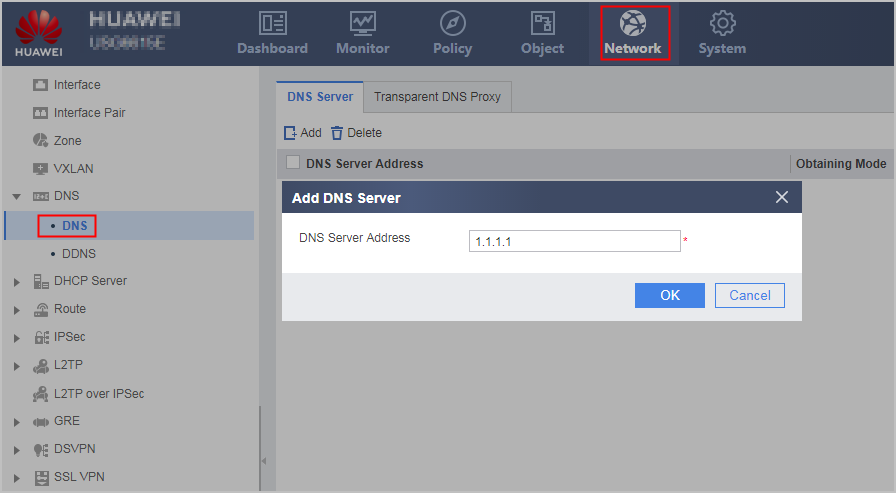
- Set an IP address for
the DNS server.
If the operation succeeds, the new configuration with Obtaining Mode of Manual is displayed in DNS Server List.
Repeat the previous operations to assign IPv4 addresses to multiple DNS servers.
 In addition to Manual, the following address allocation modes can be selected from DNS Server List:
- DHCP: The address of the DNS server is obtained dynamically using DHCP.
- PPPoE: The address of the DNS server is obtained dynamically using PPPoE.