Configuring DDNS
When a FW serves as a DDNS client, a DNS server dynamically updates the mapping between domain names and IPv4 addresses after being notified by a DDNS service provider. This process ensures that domain names are resolved into correct IPv4 addresses.
Context
A DDNS policy is a collection of such information as the DDNS server address, login user name, password, DDNS client domain name, and bound interface. After a DDNS policy is created, the same DDNS policy can be bound to different interfaces, which simplifies the DDNS configuration.
Procedure
- Choose .
- Click Add in DDNS Policy List.
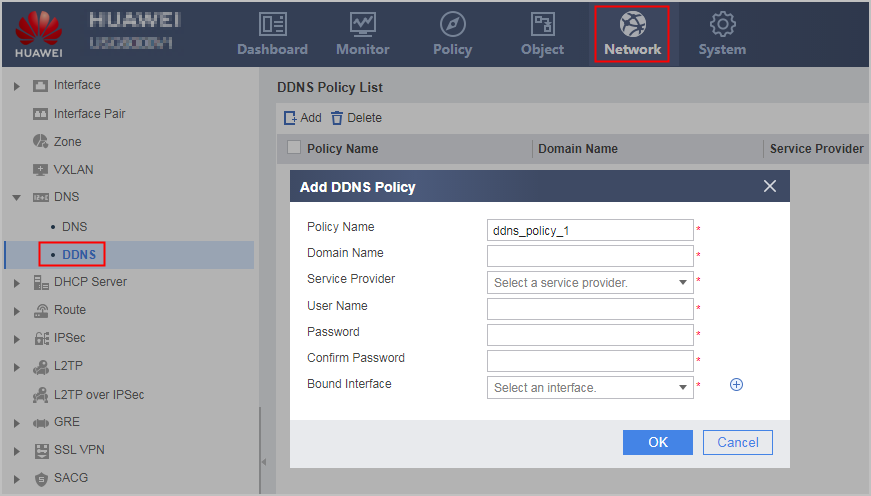
- Set the following DDNS policy parameters.
Parameter
Description
Policy Name
Unique DDNS policy name.
If the specified policy name is the same as an existing one, the new configuration overwrites the previous one.
To identify DDNS policies easily, you can configure easy-to-remember and meaningful names.
Domain Name
Register the DDNS client domain name to the DDNS service provider.
Service Provider
Domain name of the supported DDNS service provider.
URL
Enter the URL in DDNS update requests.
This parameter can be configured only when Service Provider is set to Customization.
The http://<username>:<password> format in the URL field is fixed and cannot be modified. Enter the at sign (@) following <password> and then enter the URL provided by the DDNS server provider. You can obtain the URL of a DDNS server at the website of the DDNS server provider.
If the URL contains a question mark (?), the value ranges from 20 to 254 characters, and you must use double quotation marks ("") to enclose it.
User Name
User name registered to the DDNS service provider.
Password
Password for the user name used by the DDNS client to access the DDNS service provider.
Confirm Password
Enter a value in Password.
Bound Interface
Bind a DDNS policy to an existing interface.
You can perform either of the following operations:
- To bind another interface to the DDNS policy, click
 .
. - To delete a binding entry, click
 .
.
- To bind another interface to the DDNS policy, click
- Click OK.
If the operation is successful, the new configuration is displayed in DDNS Policy List.
Repeat the previous operations to create multiple DDNS policies.