Configuring a Management Interface
This section describes how to configure a Management Interface for you to manage the FW.
Context
Management Interfaces fall into GE0/0/0 and MEth0/0/0 Interfaces and are displayed differently on various models. To be specific, Management Interfaces are GE0/0/0 Interfaces on the desktop device and MEth0/0/0 Interfaces on other models.
A MEth0/0/0 Management Interface is an independent Management Interface and does not support most functions of a service interface. However, the services supported by a GE0/0/0 Management Interface and a service interface are basically the same. It is recommended that Management Interfaces be used only for management. You are not advised to configure services on Management Interfaces.
By default, the IP address of the Management Interface is 192.168.0.1. The interface has been added to the Trust zone, and the HTTP, HTTPS, and Ping permissions are enabled on the Management interface. You can access the device through the Management Interface without configuring any security policy. The HTTP, HTTPS, Telnet, Ping, SSH, NETCONF, and SNMP permissions are disabled on non-Management interfaces.
VPN instance default is bound to the Management Interface by default. If the Management Interface is used to ping, STelnet, Telnet, FTP, or SFTP other PCs or devices, the vpn-instance default parameter must be specified, such as telnet vpn-instance default 10.2.2.1.
Procedure
- Choose .
- Click
 for a specific interface. Management Interface is shown in the following figure.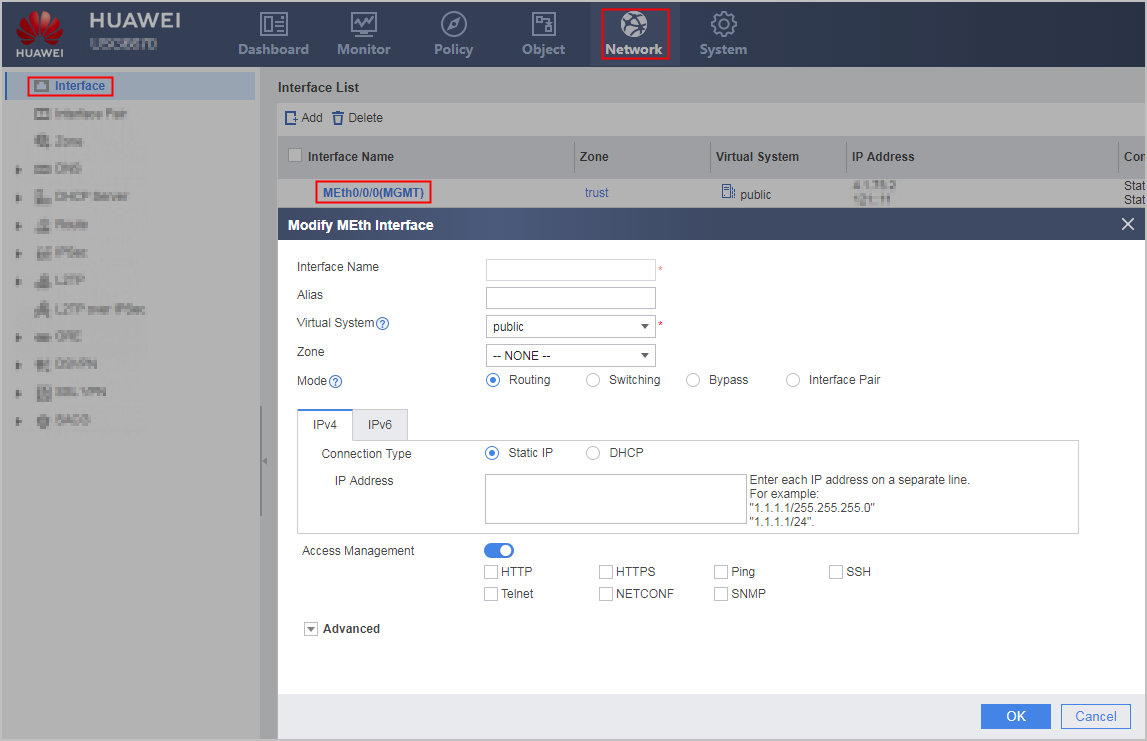
- Set the parameters according to the actual situation, and then click OK. Configuring a Layer-3 Ethernet Interface lists the parameters.