Configuring a Loopback Interface
This section describes how to configure a loopback interface. Once created, a loopback interface remains in the Up state. Loopback interface characteristics are used to improve reliability.
Context
This section describes how to configure a loopback interface. A loopback interface is a virtual interface. The IP address of a loopback interface is specified as a source address for packets to improve network reliability.
Procedure
- Choose .
- Click Add.
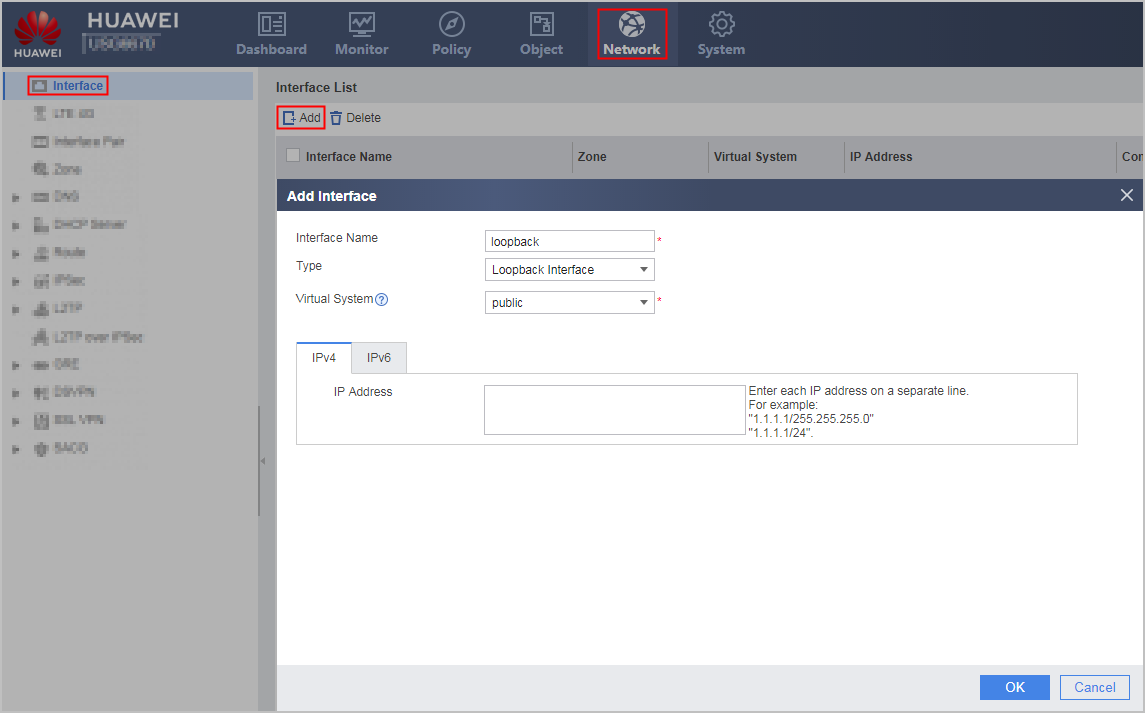
- Configure the following loopback interface parameters.
Parameter
Description
Interface Name
Alias name for a loopback interface.
Type
Type of an interface to be created.
When creating a loopback interface, set this parameter to Loopback Interface.
Virtual System
Name of a virtual system for an interface.
The virtual system must exist on the device.
IPv4
IP Address
IPv4 address of an interface.
This value must be unique on a network.
IPv6
IPv6
Enable the IPv6 capability on the specified interface.
Enabling IPv6 is a prerequisite for using IPv6 functions. Choose and enable IPv6 globally to allow the FW to forward IPv6 packets.
IPv6 Address
IPv6 address of an interface.
This value must be unique on a network.
- Click OK.
If the operation is successful, the new loopback interface is displayed in Interface List.
Repeat previous steps to create other loopback interfaces.