CLI: Example for Configuring Link Aggregation in LACP Mode
This section provides an example for configuring link aggregation in LACP mode to increase link bandwidth and reliability.
Networking Requirements
A company has two branches: LAN 1 and LAN 2. LAN 1 and LAN 2 are connected by FW_A and FW_B, as shown in Figure 1.
A large amount of traffic is continuously transmitted between LAN 1 and LAN 2. Link aggregation needs to be configured to increase link bandwidth. Meanwhile, link aggregation in LACP mode uses 2:1 backup to enhance reliability. LAN 1 is on the network segment 10.1.1.0/24, and LAN 2 is on the network segment 10.1.3.0/24.
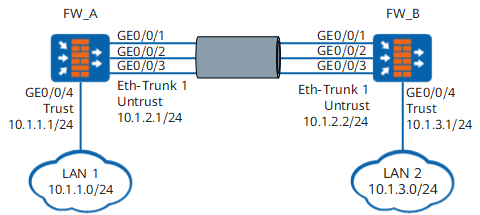
Configuration Roadmap
The configuration roadmap is as follows:
- Create a Layer-3 Eth-Trunk interface that connects LAN 1 and LAN 2 across network segments.
- Configure link aggregation in LACP mode.
- Add physical interfaces to the Eth-Trunk interface.
- Set the upper limit of active interfaces to 2 to implement 2:1 backup.
- Assign interfaces to security zones and configure security policies.
- Configure reachable routes.
Procedure
- Configure FW_A.
# Create an Eth-Trunk interface.
<FW_A> system-view
[FW_A] interface eth-trunk 1
[FW_A-Eth-Trunk1] ip address 10.1.2.1 24
# Configuring link aggregation in LACP mode and add the interface members.
[FW_A-Eth-Trunk1] mode lacp-static
[FW_A-Eth-Trunk1] trunkport GigabitEthernet 0/0/1 to 1/0/3
[FW_A-Eth-Trunk1] quit
# Set the maximum threshold of active interfaces to 2 to implement 2:1 backup.
[FW_A] interface eth-trunk 1
[FW_A-Eth-Trunk1] max active-linknumber 2
[FW_A-Eth-Trunk1] quit
# Set the IP addresses of GigabitEthernet 0/0/4.
[FW_A] interface GigabitEthernet 0/0/4
[FW_A-GigabitEthernet0/0/4] ip address 10.1.1.1 24
[FW_A-GigabitEthernet0/0/4] quit
# Assign interfaces to security zones.
[FW_A] firewall zone trust
[FW_A-zone-trust] add interface GigabitEthernet 0/0/4
[FW_A-zone-trust] quit
[FW_A] firewall zone untrust
[FW_A-zone-untrust] add interface eth-trunk 1
[FW_A-zone-untrust] quit
# Configure security policies.
[FW_A] security-policy
[FW_A-policy-security] rule name policy_sec_1
[FW_A-policy-security-rule-policy_sec_1] source-zone trust
[FW_A-policy-security-rule-policy_sec_1] source-address 10.1.1.0 24
[FW_A-policy-security-rule-policy_sec_1] destination-zone untrust
[FW_A-policy-security-rule-policy_sec_1] destination-address 10.1.3.0 24
[FW_A-policy-security-rule-policy_sec_1] action permit
[FW_A-policy-security-rule-policy_sec_1] quit
[FW_A-policy-security] rule name policy_sec_2
[FW_A-policy-security-rule-policy_sec_2] source-zone untrust
[FW_A-policy-security-rule-policy_sec_2] source-address 10.1.3.0 24
[FW_A-policy-security-rule-policy_sec_2] destination-zone trust
[FW_A-policy-security-rule-policy_sec_2] destination-address 10.1.1.0 24
[FW_A-policy-security-rule-policy_sec_2] action permit
[FW_A-policy-security-rule-policy_sec_2] quit
# Configure routes.
[FW_A] ip route-static 0.0.0.0 0 10.1.2.2 - Configure FW_B.
The configuration of FW_B is similar to that of FW_A. Therefore, the configuration details are not provided.
Configuration Verification
View Eth-Trunk 1 information. The following example uses the command output of FW_A.
<FW_A> display trunkmembership eth-trunk 1
Trunk ID                     : 1
Used Status                  : VALID
TYPE                         : Ethernet
Working Mode                 : Static
Number Of Ports In Trunk = 3
Number Of Up Ports In Trunk = 2
Operate Status: up
Interface GigabitEthernet0/0/1, valid, operate down, weight=1
Interface GigabitEthernet0/0/2, valid, operate up, weight=1
Interface GigabitEthernet0/0/3, valid, operate up, weight=1
The Number Of Ports in Trunk field value is 3, and the Number Of UP Ports in Trunk field value is 2. This 2:1 backup complies with the configuration.
Use a PC in LAN 1 and a PC in LAN 2 to ping each other. Check whether the two PCs can ping each other. If the ping fails, modify the configuration and try again.
Configuration Scripts
Configuration script for FW_A:
#
 sysname FW_A
#
interface Eth-Trunk1
 ip address 10.1.2.1 255.255.255.0
 mode lacp-static
 max active-linknumber 2
#
interface GigabitEthernet0/0/4
 ip address 10.1.1.1 255.255.255.0
#
interface GigabitEthernet0/0/1
 eth-trunk 1
interface GigabitEthernet0/0/2
 eth-trunk 1
interface GigabitEthernet0/0/3
 eth-trunk 1
#
firewall zone trust
 set priority 85
 add interface GigabitEthernet0/0/4
#
firewall zone untrust
 set priority 5
 add interface eth-trunk1
#
ip route-static 0.0.0.0 0 10.1.2.2
#
security-policy
  rule name policy_sec_1
    source-zone trust
    destination-zone untrust
    source-address 10.1.1.0 24
    destination-address 10.1.3.0 24
    action permit
  rule name policy_sec_2
    source-zone untrust
    destination-zone trust
    source-address 10.1.3.0 24
    destination-address 10.1.1.0 24
    action permit
#
return