CLI: Example for Configuring Link Aggregation in Manual Mode
This section provides an example for configuring link aggregation in manual mode to increase link bandwidth.
Networking Requirements
A company has two branches on LAN 1 and LAN 2. LAN 1 is connected to FW_A, and LAN 2 is connected to FW_B, as shown in Figure 1.
A large amount of traffic continuously goes between LAN 1 and LAN 2. Links can be bundled in to an Eth-Trunk interface to increase the link bandwidth. LAN 1 and LAN 2 are on the same network segment 192.168.0.1/24.
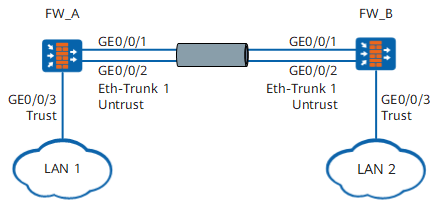
Configuration Roadmap
The configuration roadmap is as follows:
- Create a Layer-2 Eth-Trunk interface. Because LAN 1 and LAN 2 are on the same network segment, the Layer-2 Eth-Trunk interface is used.
- Assign interfaces to security zones and configure security policies.
Procedure
- Configure FW_A.
# Create a Layer-2 Eth-Trunk interface.
<FW> system-view
[FW] sysname FW_A
[FW_A] interface eth-trunk 1
[FW_A-Eth-Trunk1] portswitch
[FW_A-Eth-Trunk1] port link-type access
[FW_A-Eth-Trunk1] quit
# Add a physical interface into the Eth-Trunk interface.
[FW_A] interface GigabitEthernet 0/0/1
[FW_A-GigabitEthernet0/0/1] eth-trunk 1
[FW_A-GigabitEthernet0/0/1] quit
[FW_A] interface GigabitEthernet 0/0/2
[FW_A-GigabitEthernet0/0/2] eth-trunk 1
[FW_A-GigabitEthernet0/0/2] quit
# Assign interfaces to security zones.
[FW_A] firewall zone trust
[FW_A-zone-trust] add interface GigabitEthernet 0/0/3
[FW_A-zone-trust] quit
[FW_A] firewall zone untrust
[FW_A-zone-untrust] add interface eth-trunk 1
[FW_A-zone-untrust] quit
# Configure security policies.
[FW_A] security-policy
[FW_A-policy-security] rule name policy_sec_1
[FW_A-policy-security-rule-policy_sec_1] source-zone trust
[FW_A-policy-security-rule-policy_sec_1] source-zone untrust
[FW_A-policy-security-rule-policy_sec_1] destination-zone trust
[FW_A-policy-security-rule-policy_sec_1] destination-zone untrust
[FW_A-policy-security-rule-policy_sec_1] action permit
[FW_A-policy-security-rule-policy_sec_1] quit
- Configure FW_B.
The configuration of FW_B is similar to that of FW_A. The configuration details are not provided.
Configuration Verification
View Eth-Trunk 1 information on FW_A.
<FW_A> display trunkmembership eth-trunk 1
Trunk ID                     : 1
Used Status                  : VALID
TYPE                         : Ethernet
Working Mode                 : Load-balance
Working State                : Normal
Number Of Ports In Trunk     : 2
Number Of Up Ports In Trunk  : 2
Operate Status               : Up

Interface GigabitEthernet0/0/1, valid, operate up, weight=1,standby interface NULL
Interface GigabitEthernet0/0/2, valid, operate up, weight=1,standby interface NULL
The previous information shows that GigabitEthernet 0/0/1 and GigabitEthernet 0/0/2 have already become member interfaces of Eth-Trunk 1.
Use a PC in LAN 1 and a PC in LAN 2 to ping each other. Check whether the two PCs can ping each other. If they fail to ping each other, modify the configuration and try again.
Configuration Script
Configuration script for FW_A:
#
 sysname FW_A
#
interface Eth-Trunk1
 portswitch
 port link-type access
#
interface GigabitEthernet0/0/1
 portswitch
 port link-type access
 eth-trunk 1
interface GigabitEthernet0/0/2
 portswitch
 port link-type access
 eth-trunk 1
#
firewall zone trust
 set priority 85
 add interface GigabitEthernet0/0/3
#
firewall zone untrust
 set priority 5
 add interface Eth-Trunk1
#
security-policy
  rule name policy_sec_1
    source-zone trust
    source-zone untrust
    destination-zone trust
    destination-zone untrust
    action permit
#
return