CLI: Example for Configuring VLAN Trunk Interfaces to Enable VLANs on Different Network Segments to Communicate
This section provides an example for configuring VLAN trunk interfaces when VLANs are deployed across devices. Data of a specific VLAN is identified by an 802.1q tag and is transmitted over trunk links formed by connected trunk interfaces.
Networking Requirements
As shown in Figure 1, PCs of the financial and marketing departments of an enterprise are distributed in two buildings, each of which is connected to a FW. The two FWs are connected to each other. To improve service security, the FWs can be configured to forbid inter-department communication so that only PCs of the same department can communicate with each other.
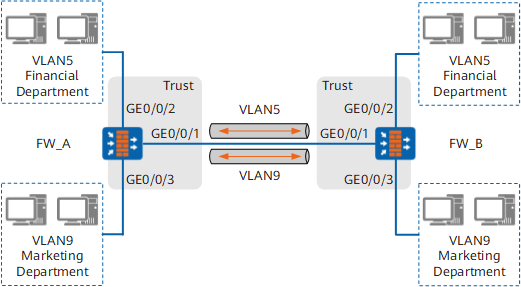
Configuration Roadmap
The configuration roadmap is as follows:
- Create VLAN5 and VLAN9 on both FW_A and FW_B. Add interfaces of each FW to two VLANs so that PCs connected to each interface can access separate VLANs.
- Configure trunk interfaces on FW_A and FW_B to allow VLAN5 and VLAN9 packets through.
Procedure
- Configure FW_A.
# Create VLANs.
<FW> system-view
[FW] sysname FW_A
[FW_A] vlan batch 1 5 9
# Add the interfaces to the VLANs.
[FW_A] interface GigabitEthernet 0/0/1
[FW_A-GigabitEthernet0/0/1] portswitch
[FW_A-GigabitEthernet0/0/1] port link-type trunk
[FW_A-GigabitEthernet0/0/1] port trunk allow-pass vlan 5 9
[FW_A-GigabitEthernet0/0/1] quit
[FW_A] interface GigabitEthernet 0/0/2
[FW_A-GigabitEthernet0/0/2] portswitch
[FW_A-GigabitEthernet0/0/2] port link-type access
[FW_A-GigabitEthernet0/0/2] port default vlan 5
[FW_A-GigabitEthernet0/0/2] quit
[FW_A] interface GigabitEthernet 0/0/3
[FW_A-GigabitEthernet0/0/3] portswitch
[FW_A-GigabitEthernet0/0/3] port link-type access
[FW_A-GigabitEthernet0/0/3] port default vlan 9
[FW_A-GigabitEthernet0/0/3] quit
# Assign the interfaces to the trust zone.
[FW_A] firewall zone trust
[FW_A-zone-trust] add interface GigabitEthernet 0/0/1
[FW_A-zone-trust] add interface GigabitEthernet 0/0/2
[FW_A-zone-trust] add interface GigabitEthernet 0/0/3
- Configure FW_B.
The configuration of FW_B is similar to that of FW_A. The configuration details are not provided.
Configuration Verification
Run the display interface command in the system view to display the information of GigabitEthernet 0/0/1, GigabitEthernet 0/0/2 and GigabitEthernet 0/0/3, then you can check whether the physical status of each interface is up.
- After completing the configuration, verify that PCs only in the same department can communicate with each other.
Configuration Scripts
Configuration script for FW_A:
#
 vlan batch 1 5 9
#
 sysname FW_A
#
interface GigabitEthernet0/0/1
 portswitch
 port link-type trunk
 port trunk allow-pass vlan 5 9
#
interface GigabitEthernet0/0/2
 portswitch
 port link-type access
 port default vlan 5
#
interface GigabitEthernet0/0/3
 portswitch
 port link-type access
 port default vlan 9
#
firewall zone trust
 set priority 85
 add interface GigabitEthernet0/0/1
 add interface GigabitEthernet0/0/2
 add interface GigabitEthernet0/0/3
#
return
Configuration script for FW_B:
#
 vlan batch 1 5 9
#
 sysname FW_B
#
interface GigabitEthernet0/0/1
 portswitch
 port link-type trunk
 port trunk allow-pass vlan 5 9
#
interface GigabitEthernet0/0/2
 portswitch
 port link-type access
 port default vlan 5
#
interface GigabitEthernet0/0/3
 portswitch
 port link-type access
 port default vlan 9
#
firewall zone trust
 set priority 85
 add interface GigabitEthernet0/0/1
 add interface GigabitEthernet0/0/2
 add interface GigabitEthernet0/0/3
#
return