CLI: Example for Configuring VLANs on Ethernet Subinterfaces to Allow the VLANs to Communicate
This section provides an example for configuring VLANs on Layer-3 subinterfaces to allow the VLANs to communicate. As the number of physical interfaces is limited, you can configure multiple subinterfaces on a physical interface. Each subinterface belongs to a specific VLAN. VLANs can communicate with each other on a single physical interface.
Networking Requirements
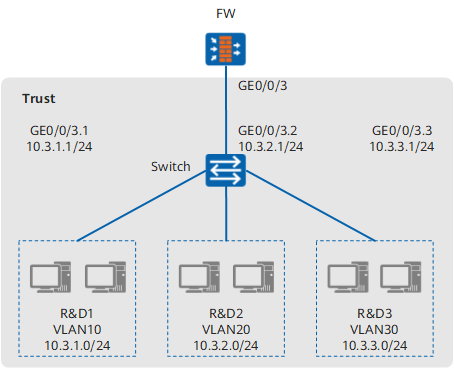
Three project teams in the R&D department shown in Figure 1 are deployed separately and belong to VLAN10, VLAN20, and VLAN30, respectively. PCs of these project teams need to communicate with each other to enable project teams to work with each other.
Configuration Roadmap
The configuration roadmap is as follows:
- Enable the subinterface function on GigabitEthernet 0/0/3 of the FW and create a subinterface for each VLAN to allow inter-VLAN communication, which enables Layer-3 communication between different VLANs.
- Configure a VLAN on the switch and assign interfaces to VLANs. The configuration details are not provided.
- Use the IP address of a VLAN-specific subinterface as the gateway address for the PCs on a specific VLAN. The configuration details on PCs are not provided.
Procedure
- Configure the Layer-3 Ethernet sub-interfaces.
<FW> system-view
[FW] interface GigabitEthernet 0/0/3.1
[FW-GigabitEthernet0/0/3.1] alias GigabitEthernet0/0/3.1
[FW-GigabitEthernet0/0/3.1] vlan-type dot1q 10
[FW-GigabitEthernet0/0/3.1] ip address 10.3.1.1 255.255.255.0
[FW-GigabitEthernet0/0/3.1] quit
[FW] interface GigabitEthernet 0/0/3.2
[FW-GigabitEthernet0/0/3.2] alias GigabitEthernet0/0/3.2
[FW-GigabitEthernet0/0/3.2] vlan-type dot1q 20
[FW-GigabitEthernet0/0/3.2] ip address 10.3.2.1 255.255.255.0
[FW-GigabitEthernet0/0/3.2] quit
[FW] interface GigabitEthernet 0/0/3.3
[FW-GigabitEthernet0/0/3.3] alias GigabitEthernet0/0/3.3
[FW-GigabitEthernet0/0/3.3] vlan-type dot1q 30
[FW-GigabitEthernet0/0/3.3] ip address 10.3.3.1 255.255.255.0
[FW-GigabitEthernet0/0/3.3] quit
- Assign the created sub-interfaces to the security zone.
[FW] firewall zone trust
[FW-zone-trust] add interface GigabitEthernet 0/0/3.1
[FW-zone-trust] add interface GigabitEthernet 0/0/3.2
[FW-zone-trust] add interface GigabitEthernet 0/0/3.3
[FW-zone-trust] quit
Configuration Verification
Display the status of GigabitEthernet 0/0/3.1, GigabitEthernet 0/0/3.2 and GigabitEthernet 0/0/3.3. Check whether the physical status and the IPv4 status of each sub-interface is up. Now set the GigabitEthernet 0/0/3.1 of USG6000E as an example.
[FW] display interface GigabitEthernet 2/1/11.10
GigabitEthernet 0/0/3.1 current state : UP
Line protocol current state : UP
Last line protocol up time : 2015-05-26 18:09:59 UTC+08:00
Description:Huawei, USG6000E Series, GigabitEthernet 0/0/3.1 Interface
Route Port,The Maximum Transmit Unit is 1500
Internet Address is 10.3.1.1/24
IP Sending Frames' Format is PKTFMT_ETHNT_2, Hardware address is 286e-d448-03f9
Encapsulation dot1q Virtual LAN, The number of Vlan is 1, Vlan ID 10
Current system time: 2015-05-30 17:11:17+08:00
Last 300 seconds input rate 0 bits/sec, 0 packets/sec
Last 300 seconds output rate 8 bits/sec, 0 packets/sec
    Input: 0 packets,0 bytes,
           0 unicast,0 broadcast,0 multicast
           0 errors,0 drops,
    Output:8558 packets,547712 bytes,
           0 unicast,2856 broadcast,5702 multicast
           0 errors,0 drops
    Input bandwidth utilization  :    0%
    Output bandwidth utilization :    0%
- Check whether PCs in VLAN10, VLAN20, and VLAN30 can communicate. If they can communicate, the configuration is successful. If they fail to communicate, modify the configuration and try again.
Configuration Script
#
interface GigabitEthernet0/0/3.1
 vlan-type dot1q 10
 alias GigabitEthernet0/0/3.1
 ip address 10.3.1.1 255.255.255.0
#
interface GigabitEthernet0/0/3.2
 vlan-type dot1q 20
 alias GigabitEthernet0/0/3.2
 ip address 10.3.2.1 255.255.255.0
#
interface GigabitEthernet0/0/3.3
 vlan-type dot1q 30
 alias GigabitEthernet0/0/3.3
 ip address 10.3.3.1 255.255.255.0
#
firewall zone trust
 set priority 85
 add interface GigabitEthernet0/0/3.1
 add interface GigabitEthernet0/0/3.2
 add interface GigabitEthernet0/0/3.3
#
return