CLI: Example for Accessing the Internet in Transparent Mode
Networking Requirements
As shown in Figure 1, the service interfaces of the FW all need to work at Layer 2 and be added to VLAN 10. Intranet users need to access the Internet through the FW in Layer 2 mode.
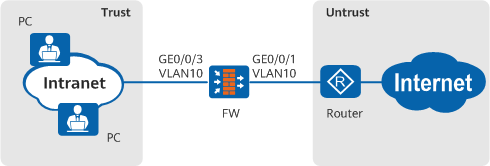
Configuration Roadmap
- Configure interfaces and complete basic network configurations.
- Configure a security policy so that intranet PCs can access the Internet.
Procedure
- Complete basic network configurations.
# Switch interfaces of the FW to Layer 2 interfaces and add them to VLAN 10.
<FW> system-view
[FW] vlan 10
[FW] interface GigabitEthernet 0/0/1
[FW-GigabitEthernet0/0/1] portswitch
[FW-GigabitEthernet0/0/1] port link-type access
[FW-GigabitEthernet0/0/1] port default vlan 10
[FW-GigabitEthernet0/0/1] quit
[FW] interface GigabitEthernet 0/0/3
[FW-GigabitEthernet0/0/3] portswitch
[FW-GigabitEthernet0/0/3] port link-type access
[FW-GigabitEthernet0/0/3] port default vlan 10
[FW-GigabitEthernet0/0/3] quit
# Add interfaces of the FW to security zones.
[FW] firewall zone untrust
[FW-zone-untrust] add interface GigabitEthernet 0/0/1
[FW-zone-untrust] quit
[FW] firewall zone trust
[FW-zone-trust] add interface GigabitEthernet 0/0/3
[FW-zone-trust] quit
- Configure a security policy so that intranet PCs can access the Internet. You are advised to configure refined security policies based on the actual networking.
[FW] security-policy
[FW-security-policy] rule name policy_sec_1
[FW-security-policy-sec_policy_1] source-zone trust
[FW-security-policy-sec_policy_1] destination-zone untrust
[FW-security-policy-sec_policy_1] action permit
[FW-security-policy-sec_policy_1] quit
[FW-security-policy] quit
Verification
Check whether intranet PCs can access the Internet through the FW. If so, the configuration is successful. If the PCs fail to access the Internet, modify the configuration and try again.
Configuration Script
#
interface GigabitEthernet0/0/1
 portswitch
 port link-type access
 port default vlan 10
#
interface GigabitEthernet0/0/3
 portswitch
 port link-type access
 port default vlan 10
#
firewall zone trust
 set priority 85
 add interface GigabitEthernet0/0/3
#
firewall zone untrust
 set priority 5
 add interface GigabitEthernet0/0/1
#
security-policy
  rule name policy_sec_1
    source-zone trust
    destination-zone untrust
    source-address 10.3.0.0 24
    action permit
#
return