Configuring Interface Access Management
Mechanism
The FW allows or forbids external devices to access interfaces using various protocols, such as HTTP, HTTPS, Telnet, Ping, SSH, NETCONF, and SNMP. By default, the interface access management function is enabled on the FW. However, management and non-management interfaces have different protocol permissions. HTTP, HTTPS, and Ping are enabled on the management interface. Users can access the device through the management interface without configuring any security policy. HTTP, HTTPS, Telnet, Ping, SSH, NETCONF, and SNMP are disabled on non-management interfaces.
Interface access management complies with the following basic rules:
- The priority of interface access management is higher than that of security policies. If interface access management is configured on an interface, security policies do not take effect on the packets that access this interface.
- Interface access management takes effect only on the inbound interface of packets. Access management configured on other interfaces of the FW does not control the access of the packets.
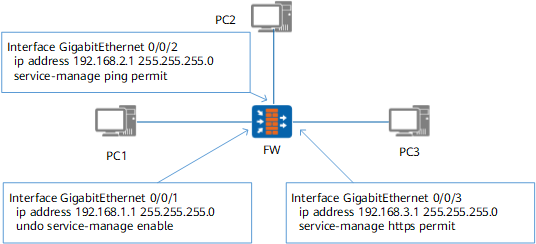
As shown in Figure 1, access management is disabled on GigabitEthernet 0/0/1 of the FW, and is enabled on GigabitEthernet 0/0/2 and GigabitEthernet 0/0/3.
- When PC1 accesses GigabitEthernet 0/0/3 at 192.168.3.1 through HTTPS, the access packet is controlled only by security policies, not by interface access management. This is because access management is disabled on GigabitEthernet 0/0/1.
- When PC2 accesses GigabitEthernet 0/0/3 at 192.168.3.1 through HTTPS, the access packet is discarded due to interface access management. This is because HTTPS access is disabled on GigabitEthernet 0/0/2.
- When PC3 accesses GigabitEthernet 0/0/1 at 192.168.1.1 through HTTPS, the access packet is controlled only by interface access management, not by security policies. This is because HTTPS access is enabled on GigabitEthernet 0/0/3.
- When PC3 accesses GigabitEthernet 0/0/3 at 192.168.3.1 through HTTPS, the access packet is controlled only by interface access management, not by security policies. This is because HTTPS access is enabled on GigabitEthernet 0/0/3.
- When PC1 accesses GigabitEthernet 0/0/3 at 192.168.3.1 through HTTPS, if the packet between PC1 and FW is encapsulated in tunnel mode, the packet is processed in the same way as that for non-tunnel-encapsulated packets. As access management is disabled on the inbound interface GigabitEthernet 0/0/1, the packet is controlled only by security policies, not by access management. If access management is enabled on the inbound interface GigabitEthernet 0/0/1, the packet is not controlled only by interface access management, not by security policies.
If the interface access management function cannot meet refined management requirements (such as management based on source IP addresses), disable interface access management and configure refined security policies based on source IP addresses to implement access management.
Procedure
- Run system-view
The system view is displayed.
- Run interface interface-type interface-number
The interface view is displayed.
- Run service-manage enable
Interface access management is enabled.
By default, interface access management is enabled.
- Run service-manage { http | https | ping | ssh | snmp | netconf | telnet | all } { permit | deny }
HTTP, HTTPS, Ping, SSH, SNMP, NETCONF, and Telnet can be used or cannot be used to access the device.
- Run quit
Return to the system view.