CLI Example for Configuring Stateless Address Autoconfiguration
This section provides an example for configuring stateless address autoconfiguration. An interface on a device can automatically obtain an IPv6 address and can communicate with another device.
Networking Requirements
FW_A and FW_B are connected on the network shown in Figure 1. GigabitEthernet 0/0/1 on FW_A automatically obtains an IPv6 address to communicate with FW_B.
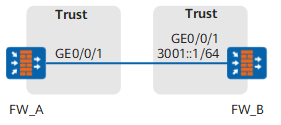
Configuration Roadmap
The configuration roadmap is as follows:
Enable stateless address autoconfiguration on FW_A to enable GigabitEthernet 0/0/1 to automatically obtain an IPv6 address.
Configure a global unicast address on FW_B and enable RA advertisement to use an RA message to advertise an IPv6 prefix to FW_A.
Procedure
- Configure FW_A.
# Enable IPv6.
<FW> system-view
[FW] sysname FW_A
[FW_A] ipv6
# Assign a link-local address to GigabitEthernet 0/0/1.
[FW_A] interface GigabitEthernet 0/0/1
[FW_A-GigabitEthernet0/0/1] ipv6 enable
[FW_A-GigabitEthernet0/0/1] ipv6 address auto link-local
# Enable stateless address autoconfiguration.
[FW_A-GigabitEthernet0/0/1] ipv6 address auto global
[FW_A-GigabitEthernet0/0/1] quit
# Assign GigabitEthernet 0/0/1 to a Trusted security zone.
[FW_A] firewall zone trust
[FW_A-zone-trust] add interface GigabitEthernet 0/0/1
[FW_A-zone-trust] quit
# Configure a security policy.
[FW_A] security-policy
[FW_A-policy-security] rule name policy_sec_1
[FW_A-policy-security-rule-policy_sec_1] source-zone local trust
[FW_A-policy-security-rule-policy_sec_1] destination-zone trust local
[FW_A-policy-security-rule-policy_sec_1] action permit
[FW_A-policy-security-rule-policy_sec_1] quit
[FW_A-policy-security] quit
- Configure FW_B.
# Enable IPv6.
<FW> system-view
[FW] sysname FW_B
[FW_B] ipv6
# Assign a global unicast address to GigabitEthernet 0/0/1.
[FW_B] interface GigabitEthernet 0/0/1
[FW_B-GigabitEthernet0/0/1] ipv6 enable
[FW_B-GigabitEthernet0/0/1] ipv6 address 3001::1 64
# Enable RA message advertisement.
[FW_B-GigabitEthernet0/0/1] undo ipv6 nd ra halt
[FW_B-GigabitEthernet0/0/1] quit
# Assign GigabitEthernet 0/0/1 to a Trusted security zone.
[FW_B] firewall zone trust
[FW_B-zone-trust] add interface GigabitEthernet 0/0/1
[FW_B-zone-trust] quit
# Configure a security policy.
[FW_B] security-policy
[FW_B-policy-security] rule name policy_sec_1
[FW_B-policy-security-rule-policy_sec_1] source-zone local trust
[FW_B-policy-security-rule-policy_sec_1] destination-zone trust local
[FW_B-policy-security-rule-policy_sec_1] action permit
[FW_B-policy-security-rule-policy_sec_1] quit
[FW_B-policy-security] quit
Configuration Verification
Display the IPv6 address of GigabitEthernet 0/0/1. The IPv6 address prefix is 3001::/64.
Run the display this ipv6 interface command to view the IPv6 address of GigabitEthernet 0/0/1.
[FW_A]  interface GigabitEthernet 0/0/1
[FW_A-GigabitEthernet0/0/1] display this ipv6 interface
GigabitEthernet0/0/1 current state : UP
IPv6 protocol current state : UP
IPv6 is enabled, link-local address is FE80::200:5EFF:FEB5:400
  Global unicast address(es):
    3001::200:5EFF:FEB5:400, subnet is 3001::/64
  Joined group address(es):
    FF02::1:FFB5:400
    FF02::2
    FF02::1
  MTU is 1500 bytes
  ND DAD is enabled, number of DAD attempts: 1
  ND reachable time is 30000 milliseconds
  ND retransmit interval is 1000 milliseconds
  Hosts use stateless autoconfig for addresses
Display default routes in the IPv6 FIB table. The destination address is ::.
# Run the display ipv6 fib command to view the default routes in the IPv6 FIB table.[FW_A] display ipv6 fib IPv6 FIB Table: Total number of Routes : 5 Destination: ::1 PrefixLength : 128 Nexthop : ::1 Flag : HU Label : NULL Tunnel Token : 0 PortIndex : 4278190080 Tunnel ID : 0 TimeStamp : Date- 17:10:2011, Time- 14:28:23 reference : 1 Interface : InLoopBack0 IP6Token : 0x0 Destination: FE80:: PrefixLength : 10 Nexthop : :: Flag : BU Label : NULL Tunnel Token : 0 PortIndex : 335544320 Tunnel ID : 0 TimeStamp : Date- 17:10:2011, Time- 14:32:59 reference : 1 Interface : NULL0 IP6Token : 0x0 Destination: :: PrefixLength : 0 Nexthop : FE80::200:5EFF:FE87:4003 Flag : GSU Label : NULL Tunnel Token : 0 PortIndex : 1 Tunnel ID : 0 TimeStamp : Date- 17:10:2011, Time- 14:40:14 reference : 1 Interface : GigabitEthernet0/0/1 IP6Token : 0x0 Destination: 3001::200:5EFF:FEB5:400 PrefixLength : 128 Nexthop : ::1 Flag : HU Label : NULL Tunnel Token : 0 PortIndex : 4278190080 Tunnel ID : 0 TimeStamp : Date- 17:10:2011, Time- 14:40:16 reference : 1 Interface : InLoopBack0 IP6Token : 0x0 Destination: 3001:: PrefixLength : 64 Nexthop : 3001::200:5EFF:FEB5:400 Flag : U Label : NULL Tunnel Token : 0 PortIndex : 1 Tunnel ID : 0 TimeStamp : Date- 17:10:2011, Time- 14:40:16 reference : 1 Interface : GigabitEthernet0/0/1 IP6Token : 0x0
Configuration Scripts
Configuration script for FW_A:
#
 sysname FW_A
#
ipv6
#
interface GigabitEthernet0/0/1
 ipv6 enable
 ipv6 address auto link-local
 ipv6 address auto global
#
firewall zone trust
 set priority 85
 add interface GigabitEthernet0/0/1
#
security-policy
  rule name policy_sec_1
    source-zone local
    source-zone trust
    destination-zone local
    destination-zone trust
    action permit
#
return
Configuration script for FW_B:
#
 sysname FW_B
#
ipv6
#
interface GigabitEthernet0/0/1
 ipv6 enable
 ipv6 address 3001::1/64
 undo ipv6 nd ra halt
#
firewall zone trust
 set priority 85
 add interface GigabitEthernet0/0/1
#
security-policy
  rule name policy_sec_1
    source-zone local
    source-zone trust
    destination-zone local
    destination-zone trust
    action permit
#
return