Configuring a VXLAN Using the Web UI
This section describes the VXLAN configuration method on the web UI.
Context
The FW acts as a Layer-3 gateway on a VXLAN. You must configure a VXLAN tunnel and a VXLAN interface.
During the VXLAN tunnel or interface creation on the web UI, if the specified VXLAN ID (VNI) does not exist, the FW automatically creates a BD and associates the BD with the VXLAN ID.
Procedure
- Choose .
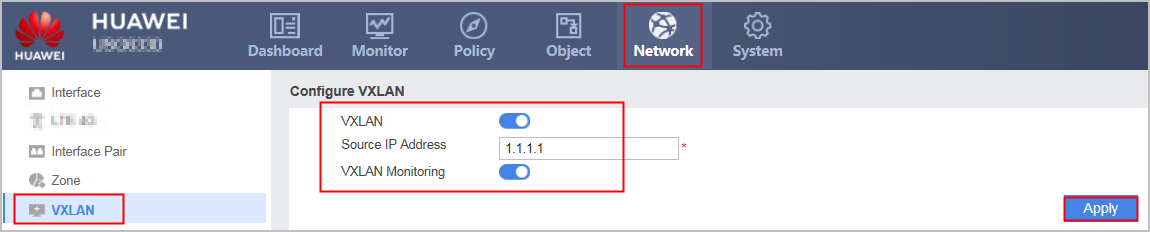
- Select Enable corresponding to VXLAN and VXLAN Monitoring, enter the source IP address of the VTEP, and click Apply.
Parameter
Description
VXLAN
Enable the VXLAN function.
Source IP Address
Specify the source IP address of the local VTEP.
VXLAN Monitoring
Enable the VXLAN packet statistics function. After this function is enabled, you can view the number of packets and the amount of traffic passing through the tunnel in VXLAN List. This function affects device performance.
- Configure a VXLAN tunnel.
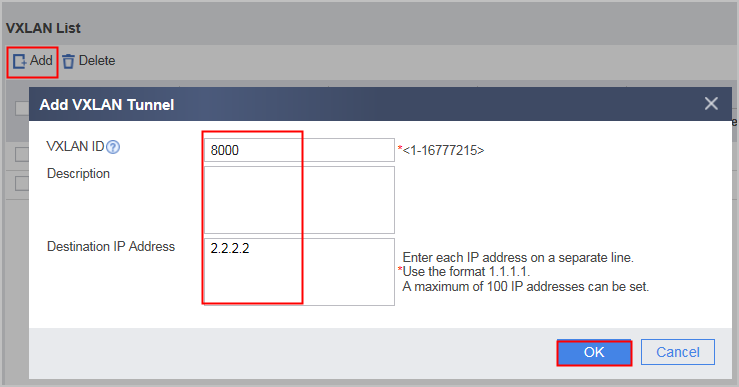
In VXLAN List, click Add, enter the VXLAN ID and IP address of the remote VTEP, and click OK.
Parameter
Description
VXLAN ID
VNI, VXLAN network identifier
Description
Description of the vxlan tunnel.
Destination IP Address
IP address of the remote VTEP
NOTE:The IP address of the remote VTEP cannot be in the same network segment as the IP address of the BDIF. Otherwise, the VXLAN tunnel cannot be established.
After the tunnel is configured, you can view the number of packets and the amount of traffic passing through the tunnel in VXLAN List. If the VXLAN ID of the tunnel is associated with a VXLAN interface, the tunnel cannot be deleted.
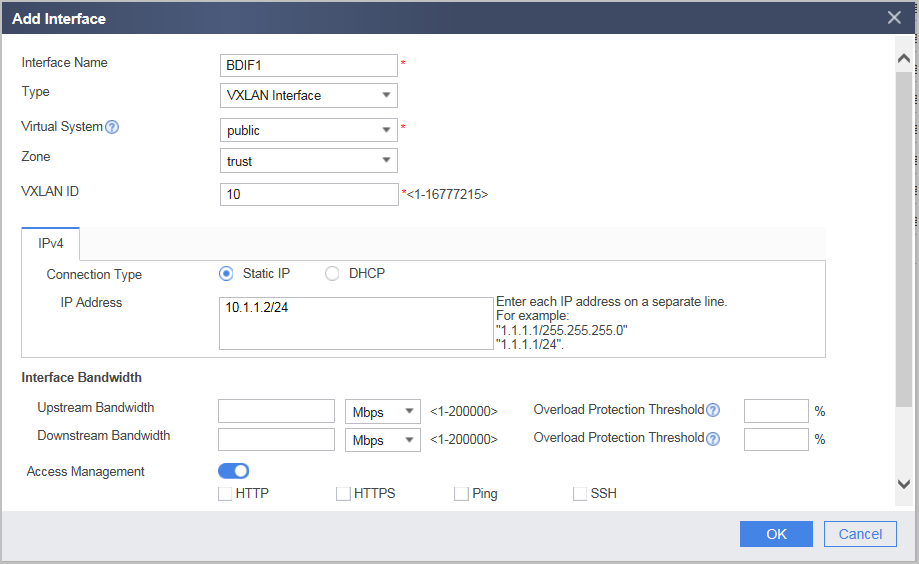
- Configure a VXLAN interface.
For detailed configurations, see Configuring VXLAN Interfaces.
- Click Add, set parameters, and click OK.
The VXLAN ID must be consistent with the VXLAN tunnel configuration.
- Click Add, set parameters, and click OK.