NQA Basic Concepts
Before configuring NQA, understand basic NQA concepts, including the NQA server and client, test instance, as well as test and probe.
NQA Server and Client
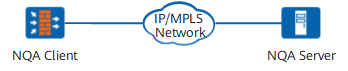
As shown in Figure 1, typical NQA test networking consists of the following parts:
- NQA client: initiates NQA tests and collects test results.
- NQA server: receives, processes, and replies to the probe packets sent from the NQA client.
- For TCP, UDP, and UDP-jitter tests, the listening service must be enabled for the specific IP addresses and ports on the NQA server.
- For DHCP, FTP, HTTP, and DNS tests, the NQA server must have the related functions configured. Otherwise, it cannot process such requests from the client. For example, the NQA server must have the web service enabled for an HTTP test, and the requested page in the HTTP Get packet from the client must exist on the server. Otherwise, the test will fail. For a DNS test, the server must have the DNS service enabled, and the client-requested domain name must exist on the server. Otherwise, the test will fail.
- For UDP-tracert and ICMP tests, there is no special requirement from the server.
NQA Test Instance
An NQA test instance is a collection of test parameters, for example, the test type, destination address, and destination port. Each NQA test instance is identified by its administrator and name. Administrators manage and schedule NQA tests based on NQA test instances. Test instances are created on NQA clients. One client can have multiple NQA test instances configured and concurrent NQA tests performed.
Test and Probe
After an NQA test instance is enabled, it is performed at the interval specified in the frequency command.
Each NQA test contains the number of consecutive probes specified in the probe-count command.
The meaning of probes varies according to test types:
- ICMP and UDP tests: A probe sends one probe packet.
- DHCP, FTP, HTTP, and DNS tests: A probe completes a related function. For example, applying to a DHCP server for an IP address, uploading a file to or downloading a file from an FTP server, requesting a web page from an HTTP server, or resolving a domain name into an IP address.
- UDP-tracert test: The whole tracert process to a destination node is called a test. A probe sends a probe packet with a specific TTL value for the times specified in the probe-count command.
- UDP-jitter test: A probe consecutively sends the number of probe packets specified in the jitter-packetnum command.