NQA Test Mechanisms
These test mechanisms help you understand the meanings of test parameters and results.
ICMP Test
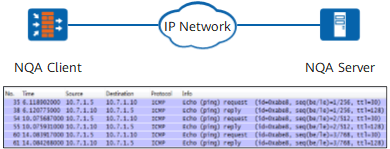
The NQA client sends an Echo Request packet to the server.
After receiving the packet, the server sends an Echo Reply packet to the client.
After receiving the packet, the client computes the difference between the Echo Request packet sending time and the Echo Reply packet receiving time to obtain the communication time with the server.
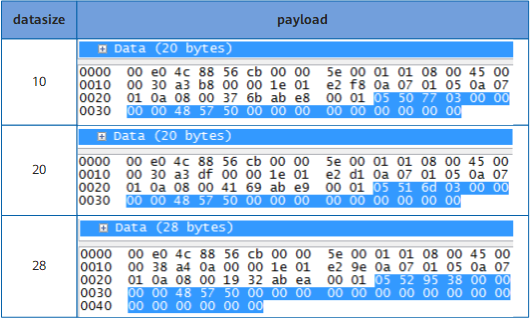
The default payload size is 20 bytes for an ICMP test packet created by the FW. You can run the datasize command change the payload size. If the specified datasize value is smaller than 20, the FW still creates ICMP packets with a 20-byte payload. If the datasize value is greater than 20, the FW creates ICMP packets based on the specified payload size.
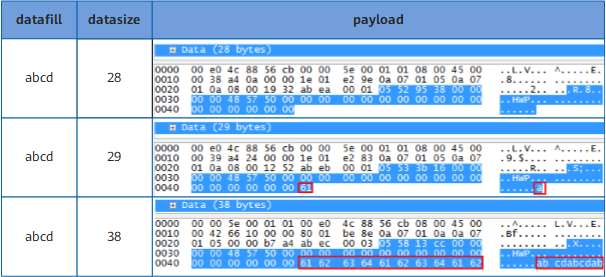
You can run the datafill command to adjust the padding field in the payload. The string specified in this command is padded cyclically from the 29th byte of the payload. That is, the datafill configuration takes effect only when the datasize value is greater than 28. For example, the Payload column in Figure 3 shows the payloads when datafill is set to abcd and datasize is set to 28, 29, and 38.
DHCP Test
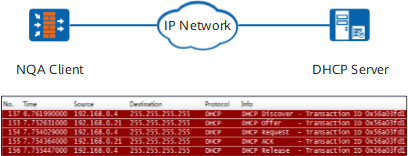
DHCP tests check whether DHCP servers can respond to DHCP requests from clients and compute the time spent on allocating IP addresses to the clients.
The NQA client simulates a DHCP client to send a DHCP Discover packet to a DHCP server to apply for an IP address. After the DHCP test is complete, the NQA client proactively sends a DHCP Release packet to release the obtained IP address.
FTP Test
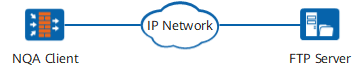
An FTP test uses TCP packets to obtain the speed at which a specified file is downloaded from or uploaded to an FTP server. An FTP test obtains the response speed in two phases:
Control connection: The test counts the time spent on the three-way TCP handshake between the client and FTP server to establish a control connection as well as the signaling exchange time over the control connection.
Data connection: The test counts the time spent on uploading a specified file to or downloading a specified file from the FTP server over the data connection.
Through FTP tests, the NQA client can calculate the minimum, average, and maximum time of the control and data connections.
During FTP download tests, the NQA client does not save the file downloaded from the FTP server to a local disk. Instead, it releases the occupied memory resources immediately after calculating the spent time.
File upload has the following situations based on the file name specified in the ftp-filename command and file size specified in the ftp-filesize command:
- The file name is specified, but the file size is not.
- If the specified file is a local file, upload the local file to the FTP server.
- If the specified file does not exist locally, a file of 1 MB is created according to the file name specified in the ftp-filename command.
The file size is specified, but the file name is not.
The NQA client creates a file named NQA-ftp-client.txt in the size specified in the ftp-filesize command.
- Both the file name and file size are specified.
If the specified file is a local file, upload the local file to the FTP server. If the size of the local file is greater than the file size specified in the ftp-filesize command, only the specified part of the file is uploaded. If the size of the local file is smaller than the file size specified in the ftp-filesize command, the NQA client directly sends the file.
- If the specified file does not exist locally, a file is created according to the file name specified in the ftp-filename command and the file size specified in the ftp-filesize command.
HTTP Test
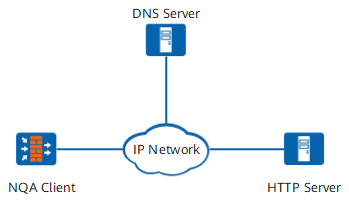
An HTTP test checks whether the NQA client can connect to a specified HTTP server and calculates the time spent on obtaining data from the HTTP server to determine the HTTP server connectivity and performance.
The test procedure is as follows:
- The NQA client sends a DNS packet to a DNS server to request for the IP address corresponding to the HTTP server's domain name.
- The DNS server translates the HTTP server's domain name into the IP address and sends the IP address to the NQA client.
- The NQA client creates an HTTP Get packet based on the IP address and relative resource path specified in the http-url command and sends the packet to the HTTP server.
- The HTTP server sends a response packet to the NQA client.
- The NQA client calculates the response speed in each phase.
An HTTP test obtains the response speed in three phases:
DNS resolution period: during which the client sends the DNS packet to the DNS server, the DNS server resolves the HTTP server's domain name, and the DNS server sends the resolved IP address back to the client
TCP connection period: during which the client takes to set up a TCP connection to the HTTP server using the three-way handshake
Communication period: during which the client sends an HTTP Get packet to the HTTP server and the server sends a response packet back to the client
Using HTTP tests, the NQA client can obtain the minimum, maximum, and average periods of DNS query, TCP connection establishment, and HTTP-based communication.
DNS Test
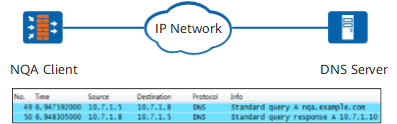
A DNS test measures the speed at which an NQA client sends a UDP packet to a DNS server to resolve a specified domain name into an IP address. The test procedure is as follows:
The NQA client sends a Query packet to the DNS server.
The DNS server resolves the domain name into an IP address and sends the Response packet to the NQA client.
The NQA client calculates the difference between the time the Query packet was sent and the time the Response packet was received to obtain the DNS domain name resolution period.
UDP-tracert Test

A UDP-tracert test monitors a forwarding path between an NQA client and a destination and collects statistics about nodes along the forwarding path. A UDP-tracert test instance has similar functions as a tracert operation and outputs more information including the average delay, packet loss values, and the time the last packet was received. The test procedure is as follows:
The NQA client sends a UDP packet with the TTL being 1 to the server.
The TTL times out when the packet arrives at the first hop R1. R1 replies with an ICMP Time Exceeded packet.
After receiving the ICMP packet, the NQA records the IP address of R1 and creates a UDP packet with the TTL being 2.
The TTL times out when the packet arrives at the second hop R2. R2 replies with an ICMP Time Exceeded packet.
The preceding steps repeat until the destination is reached.
The default size of a test packet payload constructed by the FW is 12 bytes. You can run the datasize command change the payload size. If the specified datasize value is smaller than 12, the FW still creates packets with a 12-byte payload. If the datasize value is greater than 12, the FW creates packets based on the specified payload size.
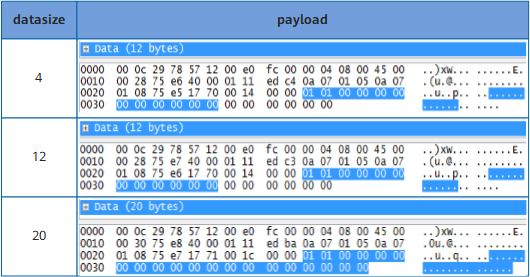
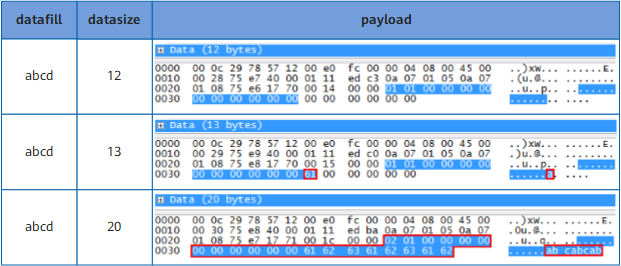
You can run the datafill command to adjust the padding field in the payload. The configuration takes effect only when the datasize value is greater than 12. For example, the Payload column in Figure 10 shows the payloads when datafill is set to abcd and datasize is set to 12, 13, and 20.
TCP Test
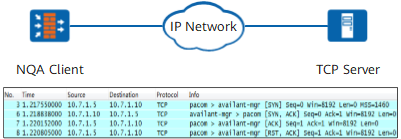
A TCP test measures the speed at which an NQA client sets up a TCP connection to a TCP server through a three-way handshake. The test procedure is as follows:
The NQA client sends a TCP SYN packet to the TCP server.
The TCP server sends a TCP SYN ACK packet to the client.
The client sends an ACK packet to the server. The connection is set up.
The NQA client calculates the difference between the time the client sent the TCP SYN packet and the time the client sent the ACK packet to obtain the TCP connection establishment period.
After the test is complete, the NQA client sends an RST packet to tear down the TCP connection to the server.
UDP Test
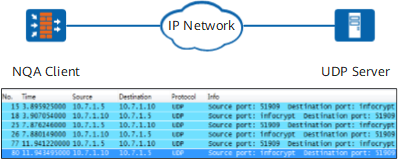
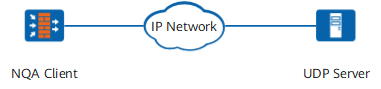
A UDP test checks connectivity between a client and a specified UDP port of the server and the round trip time of UDP packets. The test procedure is as follows:
The NQA client creates a UDP packet and sends it to the UDP server.
The UDP server sends the received UDP packet back to the client.
After receiving the packet, the client computes the difference between the time the packet was sent and the time the packet was received to obtain the communication period with the server.
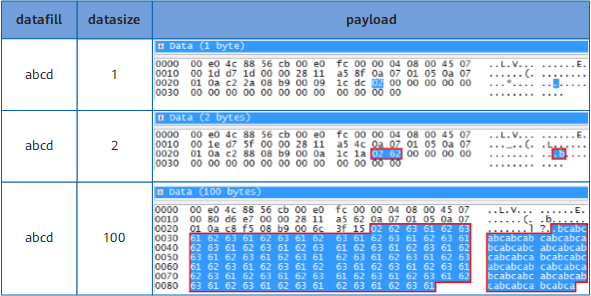
The default size of a UDP test packet created by the FW is 100 bytes. You can run the datasize command change the payload size. You can run the datafill command to configure the padding field. The first byte of the payload is 02, and the following bytes are padded using the datafill value. For example, the Payload column in Figure 13 shows the payloads when datafill is set to abcd and datasize is set to 1, 2, and 100.
UDP-jitter Test
Real-time services, such as audio and video services, have strict delay jitter requirements. A UDP-jitter test measures the delay jitter of a network to determine whether the network can carry real-time services.
The test procedure is as follows:
- The NQA client sends packets to the UDP server at a fixed interval.
- The UDP server adds a timestamp to each received packet and sends the packet back to the client.
- The client calculates the difference between the interval of receiving two consecutive packets and the interval of sending the two packets to obtain the delay jitter.
UDP-jitter tests measure the following values:
- Minimum, maximum, and average jitters of packets from the client to the server and from the server to the client
- Minimum, maximum, and average unidirectional delays from the client to the server and from the server to the client
You can run the probe-count command to set the number of probe times, the jitter-packetnum command to set the number of packets sent for each probe, the interval command to set the interval at which packets are sent, and the datasize command to set the payload size. If probe-count is set to 3, jitter-packetnum to 1000, interval to 20 ms, datasize to 172 bytes, you can simulate G.711 traffic for 1 minute.
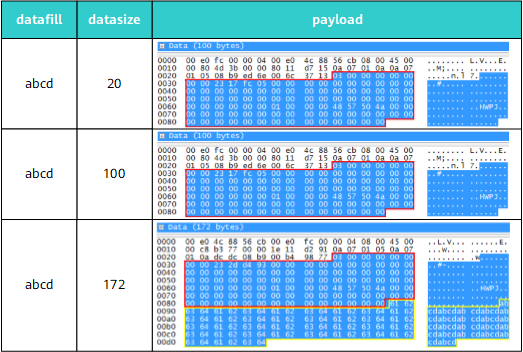
Actually, the payload size can only be 100 or 172 bytes for the UDP-jitter test packets created by the FW. If datasize is set to 172, the payload size is 172 bytes. For other datasize values, the payload size is 100 bytes. You can run the datafill command to configure the padding field. The first 100 bytes of the payload are fixed, and the following bytes are padded using the datafill value. For example, the Payload column in Figure 15 shows the payloads when datafill is set to abcd and datasize is set to 20, 100, and 172.