Example: Configuring a DNS Test
The FW serves as an NQA client to measure the domain name resolution speed of a DNS server.
Networking Requirements
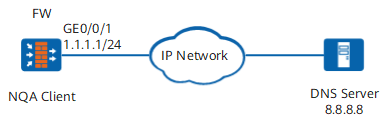
As shown in Figure 1, the FW serves as an NQA client to measure the domain name resolution speed of a DNS server.
Procedure
- Set an IP address for an interface and assign the interface to a security zone.
# Set an IP address for the interface.
<FW> system-view
[FW] interface GigabitEthernet 0/0/1
[FW-GigabitEthernet0/0/1] ip address 1.1.1.1 24
[FW-GigabitEthernet0/0/1] quit
# Assign the interface to the Untrust zone.
[FW] firewall zone untrust
[FW-untrust] add interface GigabitEthernet 0/0/1
[FW-untrust] quit
- Configure the DNS function and specify a DNS server.
[FW] dns resolve
[FW] dns server 8.8.8.8
- Configure a security policy.
[FW] security-policy
[FW-policy-security] rule name nqa
[FW-policy-security-rule-nqa] source-zone local
[FW-policy-security-rule-nqa] destination-zone untrust
[FW-policy-security-rule-nqa] destination-address 8.8.8.8 32
[FW-policy-security-rule-nqa] action permit
[FW-policy-security-rule-nqa] quit
[FW-policy-security] quit
- Configure a DNS NQA test instance.
[FW] nqa test-instance admin dns
[FW-nqa-admin-dns] test-type dns
[FW-nqa-admin-dns] dns-server ipv4 8.8.8.8
[FW-nqa-admin-dns] destination-address url www.example.com
- Immediately start the test.
[FW-nqa-admin-dns] start now
Verification
Run the display nqa results command to view the test results.
<FW> display nqa results
 NQA entry(admin, dns) :testflag is inactive ,testtype is dns
  1 . Test 1 result   The test is finished
   Send operation times: 1              Receive response times: 1
   Completion:success                   RTD OverThresholds number: 0
   Attempts number:1                    Drop operation number:0
   Disconnect operation number:0        Operation timeout number:0
   System busy operation number:0       Connection fail number:0
   Operation sequence errors number:0   RTT Status errors number:0
   Destination ip address:8.8.8.8
   Min/Max/Average Completion Time: 11/11/11
   Sum/Square-Sum  Completion Time: 11/121
   Last Good Probe Time: 2016-01-21 18:50:57.1
   Lost packet ratio: 0 %
Configuration Scripts
#
sysname FW
#
interface GigabitEthernet 0/0/1
 undo shutdown
 ip address 1.1.1.1 255.255.255.0
#
firewall zone untrust
 set priority 5
 add interface GigabitEthernet 0/0/1
#
security-policy
 rule name nqa
  source-zone local
  destination-zone untrust
  destination-address 8.8.8.8 32
  action permit
#
nqa test-instance admin dns
 test-type dns
 dns-server ipv4 8.8.8.8
 destination-address url www.example.com
 start now /*This command is a one-time action. Therefore, the result is not saved in the configuration file.*/