Example: Configuring a UDP-tracert Test
The FW serves as an NQA client to test the forwarding path to a destination server and the delay on each node along the path.
Networking Requirements
As shown in Figure 1, the FW serves as an NQA client to test the forwarding path to a destination server and the delay on each node along the path.
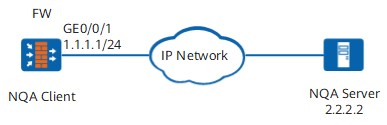
Procedure
- Set an IP address for an interface and assign the interface to a security zone.
# Set an IP address for the interface.
<FW> system-view
[FW] interface GigabitEthernet 0/0/1
[FW-GigabitEthernet0/0/1] ip address 1.1.1.1 24
[FW-GigabitEthernet0/0/1] quit
# Assign the interface to the Untrust zone.
[FW] firewall zone untrust
[FW-untrust] add interface GigabitEthernet 0/0/1
[FW-untrust] quit
- Configure a security policy.
[FW] security-policy
[FW-policy-security] rule name nqa
[FW-policy-security-rule-nqa] source-zone local
[FW-policy-security-rule-nqa] destination-zone untrust
[FW-policy-security-rule-nqa] destination-address 2.2.2.2 32
[FW-policy-security-rule-nqa] action permit
[FW-policy-security-rule-nqa] quit
[FW-policy-security] quit
- Configure a UDP-tracert NQA test instance.
[FW] nqa test-instance admin trace
[FW-nqa-admin-trace] test-type trace
[FW-nqa-admin-trace] destination-address ipv4 2.2.2.2
- Immediately start the test.
[FW-nqa-admin-trace] start now
Verification
Run the display nqa results command to view the test results.
<FW> display nqa results
 NQA entry(admin, trace) :testFlag is inactive ,testtype is trace
  1 . Test 1 result   The test is finished
   Completion:success                   Attempts number:1
   Disconnect operation number:0        Operation timeout number:1
   System busy operation number:0       Connection fail number:0
   Operation sequence errors number:0   RTT Status errors number:0
   Drop operation number:0
   Last good path Time:2016-01-21 14:38:58.5
   1 . Hop 1
    Send operation times: 3              Receive response times: 3
    Min/Max/Average Completion Time: 46/47/41
    Sum/Square-Sum  Completion Time: 125/5349
    OverThresholds number: 0
    Last Good Probe Time: 2016-01-21 14:38:58.3
    Destination ip address:1.1.1.254
   2 . Hop 2
    Send operation times: 3              Receive response times: 3
    Min/Max/Average Completion Time: 31/79/62
    Sum/Square-Sum  Completion Time: 188/13286
    RTD OverThresholds number: 0
    Last Good Probe Time: 2016-01-21 14:38:58.5
    Destination ip address:2.2.2.2
Configuration Scripts
#
sysname FW
#
interface GigabitEthernet 0/0/1
 undo shutdown
 ip address 1.1.1.1 255.255.255.0
#
firewall zone untrust
 set priority 5
 add interface GigabitEthernet 0/0/1
#
security-policy
 rule name nqa
  source-zone local
  destination-zone untrust
  destination-address 2.2.2.2 32
  action permit
#
nqa test-instance admin trace
 test-type trace
 destination-address ipv4 2.2.2.2
 start now  /*This command is a one-time action. Therefore, the result is not saved in the configuration file.*/