Example for Configuring Basic BGP Functions
After configuring basic BGP functions, you can build up a BGP network to use BGP to transmit routing information.
Networking Requirements
Multiple ASs exist in a region. To access each other, these ASs must exchange their local routes. As multiple routers exist in the ASs, there are a large number of routes that change frequently. How to transmit a great deal of routing information efficiently between ASs without consuming lots of bandwidth resources has become a problem. BGP can be used to solve this problem.
On the network shown in Figure 1, Router A is in AS 65008. FW, RouterC, and RouterD are in AS 65009. The routing tables of these devices store many routes, and the routes change frequently. After BGP is enabled on the devices, the devices can exchange routing information. When routes of one device changes, the device will send Update messages carrying only changed routing information to its peers, and will not send its entire routing table. This greatly reduces bandwidth consumption.
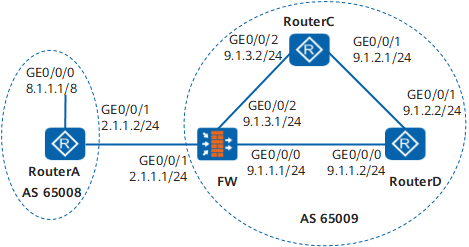
Configuration Roadmap
The configuration roadmap is as follows:
Establish IBGP connections between FW, Router C, and Router D so that these devices can exchange routing information.
Establish an EBGP connection between Router A and FW so that these devices can exchange routing information.
Run the network command to configure Router A to advertise route 8.1.1.1/8.
Configure FW to import direct routes and view the routing tables of Router A and Router C.
Data Preparation
To complete the configuration, you need the following data:
Router IDs 2.2.2.2, 3.3.3.3, and 4.4.4.4 and AS number 65009 of FW, Router C, and Router D respectively
Router ID 1.1.1.1 and AS number 65008 of Router A
Procedure
- Configure an IP address for each interface.
# Configure Router A.
<Router> system-view
[Router] sysname RouterA
[RouterA] interface GigabitEthernet0/0/0[RouterA-GigabitEthernet0/0/0] ip address 8.1.1.1 24[RouterA-GigabitEthernet0/0/0] quit[RouterA] interface GigabitEthernet0/0/1[RouterA-GigabitEthernet0/0/1] ip address 2.1.1.2 24[RouterA-GigabitEthernet0/0/1] quit# Configure FW.
<FW> system-view
[FW] sysname FW
[FW] interface GigabitEthernet 0/0/0
[FW-GigabitEthernet0/0/0] ip address 9.1.1.1 24
[FW-GigabitEthernet0/0/0] quit
[FW] interface GigabitEthernet 0/0/1
[FW-GigabitEthernet0/0/1] ip address 2.1.1.1 24
[FW-GigabitEthernet0/0/1] quit
[FW] interface GigabitEthernet 0/0/2
[FWC-GigabitEthernet0/0/2] ip address 9.1.3.1 24
[FWC-GigabitEthernet0/0/2] quit
# Configure Router C.
<Router> system-view
[Router] sysname RouterC
[RouterC] interface GigabitEthernet0/0/1[RouterC-GigabitEthernet0/0/1] ip address 9.1.2.1 24[RouterC-GigabitEthernet0/0/1] quit[RouterC] interface GigabitEthernet0/0/2[RouterC-GigabitEthernet0/0/2] ip address 9.1.3.2 24[RouterC-GigabitEthernet0/0/2] quit# Configure Router D.
<Router> system-view
[Router] sysname RouterD
[RouterD] interface GigabitEthernet0/0/0[RouterD-GigabitEthernet0/0/0] ip address 9.1.1.2 24[RouterD-GigabitEthernet0/0/0] quit[RouterD] interface GigabitEthernet0/0/1[RouterD-GigabitEthernet0/0/1] ip address 9.1.2.2 24[RouterD-GigabitEthernet0/0/1] quit - Assign FW interfaces to security zones and enable interzone security policies.
# Assign interfaces to security zones.
[FW] firewall zone trust
[FW-zone-trust] add interface GigabitEthernet0/0/1
[FW-zone-trust] add interface GigabitEthernet0/0/2
[FW-zone-trust] quit
[FW] firewall zone untrust
[FW-zone-untrust] add interface GigabitEthernet0/0/0
[FW-zone-untrust] quit
# Enable Trust->Untrust, Local->Untrust, and Untrust->Local interzone policies to ensure normal packet transmission.
 This section provides only required security policy parameters. Set other security policy parameters as required.
[FW] security-policy [FW-policy-security] rule name policy_sec_1 [FW-policy-security-rule-policy_sec_1] source-zone trust [FW-policy-security-rule-policy_sec_1] destination-zone untrust [FW-policy-security-rule-policy_sec_1] action permit [FW-policy-security-rule-policy_sec_1] quit [FW-policy-security] rule name policy_sec_2 [FW-policy-security-rule-policy_sec_2] source-zone local untrust [FW-policy-security-rule-policy_sec_2] destination-zone local untrust [FW-policy-security-rule-policy_sec_2] action permit [FW-policy-security-rule-policy_sec_2] quit [FW-policy-security] quit
- Establish IBGP connections.
# Configure FW.
[FW] bgp 65009[FW-bgp] router-id 2.2.2.2[FW-bgp] peer 9.1.1.2 as-number 65009[FW-bgp] peer 9.1.3.2 as-number 65009# Configure Router C.
[RouterC] bgp 65009
[RouterC-bgp] router-id 3.3.3.3
[RouterC-bgp] peer 9.1.3.1 as-number 65009
[RouterC-bgp] peer 9.1.2.2 as-number 65009
# Configure Router D.
[RouterD] bgp 65009
[RouterD-bgp] router-id 4.4.4.4
[RouterD-bgp] peer 9.1.1.1 as-number 65009
[RouterD-bgp] peer 9.1.2.1 as-number 65009
- Establish an EBGP connection.
# Configure Router A.
[RouterA] bgp 65008
[RouterA-bgp] router-id 1.1.1.1
[RouterA-bgp] peer 2.1.1.1 as-number 65009
# Configure FW.
[FW] display bgp peerBGP local router ID : 2.2.2.2
Local AS number : 65009
Total number of peers : 3 Peers in established state : 3
Peer V AS MsgRcvd MsgSent OutQ Up/Down State PrefRcv
9.1.1.2 4 65009 49 62 0 00:44:58 Established 0
9.1.3.2 4 65009 56 56 0 00:40:54 Established 0
2.1.1.2 4 65008 49 65 0 00:44:03 Established 1
The preceding command output shows that BGP connections have been established between FW and other Routers.
- Configure Router A to advertise a route.
# Configure Router A to advertise route 8.0.0.0/8.
[RouterA-bgp] ipv4-family unicast
[RouterA-bgp-af-ipv4] network 8.0.0.0 255.0.0.0
[RouterA-bgp-af-ipv4] quit
[RouterA-bgp] quit
# View the routing table of Router A.
[RouterA] display bgp routing-table
 BGP Local router ID is 1.1.1.1
 Status codes: * - valid, > - best, d - damped,
               h - history,  i - internal, s - suppressed, S - Stale
               Origin : i - IGP, e - EGP, ? - incomplete


 Total Number of Routes: 1
      Network            NextHop        MED        LocPrf    PrefVal Path/Ogn

 *>   8.0.0.0        0.0.0.0            0                     0      i
# View the routing table of Router B.
[RouterB] display bgp routing-table
 BGP Local router ID is 2.2.2.2
 Status codes: * - valid, > - best, d - damped,
               h - history,  i - internal, s - suppressed, S - Stale
               Origin : i - IGP, e - EGP, ? - incomplete


 Total Number of Routes: 1
      Network            NextHop        MED        LocPrf    PrefVal Path/Ogn

 *>   8.0.0.0        2.1.1.2          0                     0      65008i
# View the routing table of Router C.
[RouterC] display bgp routing-table
 BGP Local router ID is 3.3.3.3
 Status codes: * - valid, > - best, d - damped,
               h - history,  i - internal, s - suppressed, S - Stale
               Origin : i - IGP, e - EGP, ? - incomplete


 Total Number of Routes: 1
      Network            NextHop        MED        LocPrf    PrefVal Path/Ogn

   i  8.0.0.0        2.1.1.2          0          100        0      65008i
The preceding command output shows that Router C has learned the route to destination 8.0.0.0 in AS 65008. The route, however, is invalid because the next hop 2.1.1.2 of this route is unreachable.
- Configure BGP to import direct routes.
# Configure FW B.
[FW] bgp 65009[FW-bgp] ipv4-family unicast[FW-bgp-af-ipv4] import-route direct# View the routing table of Router A.
[RouterA] display bgp routing-table
 BGP Local router ID is 1.1.1.1
 Status codes: * - valid, > - best, d - damped,
               h - history,  i - internal, s - suppressed, S - Stale
               Origin : i - IGP, e - EGP, ? - incomplete


 Total Number of Routes: 7
      Network            NextHop        MED        LocPrf    PrefVal Path/Ogn

 *>   8.0.0.0            0.0.0.0       0                     0      i
 *>   9.1.1.0/24         2.1.1.1       0                     0      65009?
 *>   9.1.1.2/32         2.1.1.1       0                     0      65009?
 *>   9.1.3.0/24         2.1.1.1       0                     0      65009?
 *>   9.1.3.2/32         2.1.1.1       0                     0      65009?
 *>   2.1.1.0            2.1.1.1       0                     0      65009?
 *>   2.1.1.2/32         2.1.1.1       0                     0      65009?
# View the routing table of Router C.
[RouterC] display bgp routing-table
 BGP Local router ID is 3.3.3.3
 Status codes: * - valid, > - best, d - damped,
               h - history,  i - internal, s - suppressed, S - Stale
               Origin : i - IGP, e - EGP, ? - incomplete


 Total Number of Routes: 7
      Network            NextHop        MED        LocPrf    PrefVal Path/Ogn

 *>i  8.0.0.0          2.1.1.2         0          100        0      65008i
 *>i  9.1.1.0/24         9.1.3.1         0          100        0      ?
 *>i  9.1.1.2/32         9.1.3.1         0          100        0      ?
 *>i  9.1.3.0/24         9.1.3.1         0          100        0      ?
 *>i  9.1.3.2/32         9.1.3.1         0          100        0      ?
 *>i  2.1.1.0            9.1.3.1         0          100        0      ?
 *>i  2.1.1.2/32         9.1.3.1         0          100        0      ?
The preceding command output shows that the route to destination 8.0.0.0 becomes valid because the next-hop address of this route is the address of Router A.
# Run the ping 8.1.1.1 command on Router C.
[RouterC] ping 8.1.1.1
PING 8.1.1.1: 56 data bytes, press CTRL_C to break
Reply from 8.1.1.1: bytes=56 Sequence=1 ttl=254 time=31 ms
Reply from 8.1.1.1: bytes=56 Sequence=2 ttl=254 time=47 ms
Reply from 8.1.1.1: bytes=56 Sequence=3 ttl=254 time=31 ms
Reply from 8.1.1.1: bytes=56 Sequence=4 ttl=254 time=16 ms
Reply from 8.1.1.1: bytes=56 Sequence=5 ttl=254 time=31 ms
--- 8.1.1.1 ping statistics ---
5 packet(s) transmitted
5 packet(s) received
0.00% packet loss
round-trip min/avg/max = 16/31/47 ms
Configuration Files
Configuration file of Router A
#
sysname RouterA
#
interface GigabitEthernet0/0/0ip address 8.1.1.1 255.0.0.0
#
interface GigabitEthernet0/0/1ip address 2.1.1.2 255.255.255.0
#
bgp 65008
router-id 1.1.1.1
peer 2.1.1.1 as-number 65009
#
ipv4-family unicast
undo synchronization
network 8.0.0.0
peer 2.1.1.1 enable
#
return
Configuration file of the FW
#
sysname FW#
interface GigabitEthernet0/0/0ip address 9.1.1.1 255.255.255.0
#
interface GigabitEthernet0/0/1ip address 2.1.1.1 255.255.255.0
#
interface GigabitEthernet0/0/2ip address 9.1.3.1 255.255.255.0
#
firewall zone trust
 set priority 85
 add interface GigabitEthernet0/0/1
 add interface GigabitEthernet0/0/2
#
firewall zone untrust
 set priority 5
 add interface GigabitEthernet0/0/0
#
security-policy
  rule name policy_sec_1
    source-zone trust
    destination-zone untrust
    action permit
  rule name policy_sec_2
    source-zone local
    source-zone untrust
    destination-zone local
    destination-zone untrust
    action permit
  rule name policy_sec_3
    source-zone local
    source-zone trust
    destination-zone local
    destination-zone trust
    action permit
#
bgp 65009
router-id 2.2.2.2
peer 9.1.1.2 as-number 65009
peer 9.1.3.2 as-number 65009
peer 2.1.1.2 as-number 65008
#
ipv4-family unicast
undo synchronization
import-route direct
peer 9.1.1.2 enable
peer 9.1.3.2 enable
peer 2.1.1.2 enable
#
return
Configuration file of Router C
#
sysname RouterC
#
interface GigabitEthernet0/0/1ip address 9.1.2.1 255.255.255.0
#
interface GigabitEthernet0/0/2ip address 9.1.3.2 255.255.255.0
#
bgp 65009
router-id 3.3.3.3
peer 9.1.2.2 as-number 65009
peer 9.1.3.1 as-number 65009
#
ipv4-family unicast
undo synchronization
peer 9.1.2.2 enable
peer 9.1.3.1 enable
#
return
Configuration file of Router D
#
sysname RouterD
#
interface GigabitEthernet0/0/0ip address 9.1.1.2 255.255.255.0
#
interface GigabitEthernet0/0/1ip address 9.1.2.2 255.255.255.0
#
bgp 65009
router-id 4.4.4.4
peer 9.1.1.1 as-number 65009
peer 9.1.2.1 as-number 65009
#
ipv4-family unicast
undo synchronization
peer 9.1.1.1 enable
peer 9.1.2.1 enable
#
return