Example for Configuring AS_Path Filters
AS_Path filters can be used as needed to improve network performance.
Networking Requirements
Enterprises A, B, and C belong to different ASs. Enterprise B's network communicate with the networks of the other two enterprises through EBGP. Due to the competition relationship, enterprises A and C hope that the routes that they advertise to enterprise B are not learned by each other. An AS_Path filter is configured on enterprise B's network to address this problem.
On the network shown in Figure 1, FW establish EBGP connections with Routers A and C. To disable devices in AS 10 from communicating with devices in AS 30, you can configure an AS_Path filter on FW to prevent devices in AS 20 from advertising routes of AS 30 to AS 10 or routes of AS 10 to AS 30 in order to isolate AS 10 and AS 30.
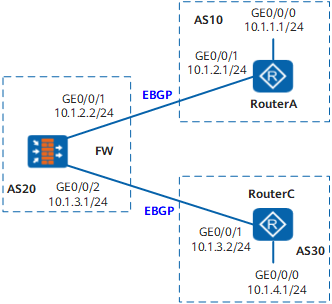
Configuration Roadmap
The configuration roadmap is as follows:
Establish EBGP connections between RouterA and FW and between FW and RouterC and configure these devices to import direct routes so that the ASs can communicate with each other through these EBGP connections.
Configure AS_Path filters on FW and use filtering rules to prevent AS 20 from advertising routes of AS 30 to AS 10 or routes of AS 10 to AS 30.
Data Preparation
To complete the configuration, you need the following data:
Router ID 1.1.1.1 and AS number 10 of RouterA
Router ID 2.2.2.2 and AS number 20 of FW
Router ID 3.3.3.3 and AS number 30 of RouterC
Procedure
- Set the IP addresses for the interfaces, add the interfaces
to security zones, and configure the security policy.
# Configure RouterA.
<Router> system-view
[Router] sysname RouterA
[RouterA] interface GigabitEthernet0/0/0[RouterA-GigabitEthernet0/0/0] ip address 10.1.1.1 24[RouterA-GigabitEthernet0/0/0] quit[RouterA] interface GigabitEthernet0/0/1[RouterA-GigabitEthernet0/0/1] ip address 10.1.2.1 24[RouterA-GigabitEthernet0/0/1] quit# Configure FW.
<FW> system-view[FW] sysname FW
[FW] interface GigabitEthernet 0/0/1
[FW-GigabitEthernet0/0/1] ip address 10.1.2.2 24
[FW-GigabitEthernet0/0/1] quit
[FW] interface GigabitEthernet 0/0/2
[FW-GigabitEthernet0/0/2] ip address 10.1.3.1 24
[FW-GigabitEthernet0/0/2] quit
[FW] firewall zone trust[FW-zone-trust] add interface GigabitEthernet 0/0/1
[FW-zone-trust] add interface GigabitEthernet 0/0/2
[FW-zone-trust] quit[FW] security-policy[FW-policy-security] rule name policy_sec_1[FW-policy-security-rule-policy_sec_1] source-zone trust local[FW-policy-security-rule-policy_sec_1] destination-zone local trust[FW-policy-security-rule-policy_sec_1] action permit[FW-policy-security-rule-policy_sec_1] quit# Configure RouterC.
<Router> system-view
[Router] sysname RouterC
[RouterC] interface GigabitEthernet0/0/0[RouterC-GigabitEthernet0/0/0] ip address 10.1.4.1 24[RouterC-GigabitEthernet0/0/0] quit[RouterC] interface GigabitEthernet0/0/1[RouterC-GigabitEthernet0/0/1] ip address 10.1.3.2 24[RouterC-GigabitEthernet0/0/1] quit - Establish EBGP connections.
# Configure RouterA.
[RouterA] bgp 10
[RouterA-bgp] router-id 1.1.1.1
[RouterA-bgp] peer 10.1.2.2 as-number 20
[RouterA-bgp] import-route direct
[RouterA-bgp] quit
# Configure FW.
[FW] bgp 20[FW-bgp] router-id 2.2.2.2[FW-bgp] peer 10.1.2.1 as-number 10[FW-bgp] peer 10.1.3.2 as-number 30[FW-bgp] import-route direct[FW-bgp] quit# Configure RouterC.
[RouterC] bgp 30
[RouterC-bgp] router-id 3.3.3.3
[RouterC-bgp] peer 10.1.3.1 as-number 20
[RouterC-bgp] import-route direct
[RouterC-bgp] quit
# View routes advertised by FW Routes advertised by FWto RouterC are used as an example. You can see that FW advertises the direct route imported by AS 10.
[FW] display bgp routing-table peer 10.1.3.2 advertised-routesBGP Local router ID is 2.2.2.2 Status codes: * - valid, > - best, d - damped, h - history, i - internal, s - suppressed, S - Stale Origin : i - IGP, e - EGP, ? - incomplete Total Number of Routes: 6 Network NextHop MED LocPrf PrefVal Path/Ogn *> 10.1.1.0/24 10.1.3.1 0 0 20 10? *> 10.1.4.0/24 10.1.3.1 0 20 30? *> 10.1.2.0 10.1.3.1 0 0 20? *> 10.1.2.1/32 10.1.3.1 0 0 20? *> 10.1.3.0 10.1.3.1 0 0 20? *> 10.1.3.2/32 10.1.3.1 0 0 20?View the routing table of RouterC. You can see that RouterC has learned the direct route from FW.
[RouterC] display bgp routing-table
BGP Local router ID is 3.3.3.3 Status codes: * - valid, > - best, d - damped, h - history, i - internal, s - suppressed, S - Stale Origin : i - IGP, e - EGP, ? - incomplete Total Number of Routes: 12 Network NextHop MED LocPrf PrefVal Path/Ogn *> 10.1.1.0/24 10.1.3.1 0 20 10? *> 10.1.4.0/24 0.0.0.0 0 0 ? *> 10.1.4.1/32 0.0.0.0 0 0 ? *> 127.0.0.0 0.0.0.0 0 0 ? *> 127.0.0.1/32 0.0.0.0 0 0 ? *> 10.1.2.0 10.1.3.1 0 0 20? *> 10.1.2.1/32 10.1.3.1 0 0 20? *> 10.1.3.0 0.0.0.0 0 0 ? * 10.1.3.1 0 0 20? *> 10.1.3.1/32 0.0.0.0 0 0 ? *> 10.1.3.2/32 0.0.0.0 0 0 ? * 2.1.3.1 0 0 20? - Configure AS_Path filters on FW and apply the
AS_Path filters to routes to be advertised by FW.
# Create AS_Path filter 1 to deny the routes carrying AS number 30. The regular expression "_30_" indicates any AS list that contains AS 30 and "*" matches any character.
[FW] ip as-path-filter path-filter1 deny _30_[FW] ip as-path-filter path-filter1 permit .*# Create AS_Path filter 2 to deny the routes carrying AS 10.
[FW] ip as-path-filter path-filter2 deny _10_[FW] ip as-path-filter path-filter2 permit .*# Apply the AS_Path filters to routes to be advertised by FW.
[FW] bgp 20[FW-bgp] peer 10.1.2.1 as-path-filter path-filter1 export[FW-bgp] peer 10.1.3.2 as-path-filter path-filter2 export[FW-bgp] quit - # View routes advertised by FW.
# View routes advertised by FW to AS 30. You can see that FW does not advertise the direct route imported by AS 10.
[FW] display bgp routing-table peer 10.1.3.2 advertised-routesBGP Local router ID is 2.2.2.2 Status codes: * - valid, > - best, d - damped, h - history, i - internal, s - suppressed, S - Stale Origin : i - IGP, e - EGP, ? - incomplete Total Number of Routes: 4 Network NextHop MED LocPrf PrefVal Path/Ogn *> 10.1.2.0 10.1.3.1 0 0 20? *> 10.1.2.1/32 10.1.3.1 0 0 20? *> 10.1.3.0 10.1.3.1 0 0 20? *> 10.1.3.2/32 10.1.3.1 0 0 20?The route does not exist in the BGP routing table of RouterC.
[RouterC] display bgp routing-table
 BGP Local router ID is 3.3.3.3
 Status codes: * - valid, > - best, d - damped,
               h - history,  i - internal, s - suppressed, S - Stale
               Origin : i - IGP, e - EGP, ? - incomplete

 Total Number of Routes: 11
      Network            NextHop        MED        LocPrf    PrefVal Path/Ogn

 *>   10.1.4.0/24        0.0.0.0         0                     0      ?
 *>   10.1.4.1/32        0.0.0.0         0                     0      ?
 *>   127.0.0.0          0.0.0.0         0                     0      ?
 *>   127.0.0.1/32       0.0.0.0         0                     0      ?
 *>   10.1.2.0          10.1.3.1       0                     0      20?
 *>   10.1.2.1/32       10.1.3.1       0                     0      20?
 *>   10.1.3.0          0.0.0.0         0                     0      ?
 *                       10.1.3.1       0                     0      20?
 *>   10.1.3.1/32       0.0.0.0         0                     0      ?
 *>   10.1.3.2/32       0.0.0.0         0                     0      ?
 *                       10.1.3.1       0                     0      20?
# View routes advertised by FW to AS 10. You can see that FW does not advertise the direct route imported by AS 30.
[FW] display bgp routing-table peer 10.1.2.1 advertised-routesBGP Local router ID is 2.2.2.2 Status codes: * - valid, > - best, d - damped, h - history, i - internal, s - suppressed, S - Stale Origin : i - IGP, e - EGP, ? - incomplete Total Number of Routes: 4 Network NextHop MED LocPrf PrefVal Path/Ogn *> 10.1.2.0 10.1.2.2 0 0 20? *> 10.1.2.1/32 10.1.2.2 0 0 20? *> 10.1.3.0 10.1.2.2 0 0 20? *> 10.1.3.2/32 10.1.2.2 0 0 20?The route does not exist in the BGP routing table of RouterA.
[RouterA] display bgp routing-table
 BGP Local router ID is 1.1.1.1
 Status codes: * - valid, > - best, d - damped,
               h - history,  i - internal, s - suppressed, S - Stale
               Origin : i - IGP, e - EGP, ? - incomplete

 Total Number of Routes: 11
      Network            NextHop        MED        LocPrf    PrefVal Path/Ogn

 *>   10.1.1.0/24         0.0.0.0         0                     0      ?
 *>   10.1.1.1/32         0.0.0.0         0                     0      ?
 *>   127.0.0.0          0.0.0.0         0                     0      ?
 *>   127.0.0.1/32       0.0.0.0         0                     0      ?
 *>   10.1.2.0          0.0.0.0         0                     0      ?
 *                       10.1.2.2       0                     0      20?
 *>   10.1.2.1/32       0.0.0.0         0                     0      ?
 *                       10.1.2.2       0                     0      20?
 *>   10.1.2.2/32       0.0.0.0         0                     0      ?
 *>   10.1.3.0          10.1.2.2       0                     0      20?
 *>   10.1.3.2/32       10.1.2.2       0                     0      20?
Configuration Files
Configuration file of RouterA
#
sysname RouterA
#
interface GigabitEthernet0/0/0ip address 10.1.1.1 255.255.255.0
#
interface GigabitEthernet0/0/1ip address 10.1.2.1 255.255.255.0
#
bgp 10
router-id 1.1.1.1
peer 10.1.2.2 as-number 20
#
ipv4-family unicast
undo synchronization
import-route direct
peer 10.1.2.2 enable
#
return
Configuration file of FW
#
sysname FW#
interface GigabitEthernet0/0/1ip address 10.1.2.2 255.255.255.0
#
interface GigabitEthernet0/0/2ip address 10.1.3.1 255.255.255.0
#
firewall zone trust
 set priority 85
 add interface GigabitEthernet0/0/1
 add interface GigabitEthernet0/0/2
#
security-policy
  rule name policy_sec_1
    source-zone local
    source-zone trust
    destination-zone local
    destination-zone trust
    action permit
#
bgp 20
router-id 2.2.2.2
peer 10.1.2.1 as-number 10
peer 10.1.3.2 as-number 30
#
ipv4-family unicast
undo synchronization
import-route direct
peer 10.1.2.1 enable
peer 10.1.2.1 as-path-filter path-filter1 export
peer 10.1.3.2 enable
peer 10.1.3.2 as-path-filter path-filter2 export
#
ip as-path-filter path-filter1 deny _30_
ip as-path-filter path-filter1 permit .*
ip as-path-filter path-filter2 deny _10_
ip as-path-filter path-filter2 permit .*
#
return
Configuration file of RouterC
#
sysname RouterC
#
interface GigabitEthernet0/0/0ip address 10.1.4.1 255.255.255.0
#
interface GigabitEthernet0/0/1ip address 10.1.3.2 255.255.255.0
#
bgp 30
router-id 3.3.3.3
peer 10.1.3.1 as-number 20
#
ipv4-family unicast
undo synchronization
import-route direct
peer 10.1.3.1 enable
#
return