Example for Configuring MED Attributes to Control BGP Route Selection
Multi_Exit Discriminator (MED) attributes can be used to control BGP route selection.
Networking Requirements
The MED attribute equals a metric used in an IGP, and is used to determine the optimal route for traffic that enters an AS. When a BGP device obtains multiple routes to the same destination address but with different next hops from EBGP peers, the route with the smallest MED value is selected as the optimal route.
On the network shown in Figure 1, BGP is configured on all devices. FW is in AS 65008. RouterB and RouterC are in AS 65009. FW establishes EBGP connections with RouterB and RouterC. RouterB establishes an IBGP connection with RouterC. Traffic sent by FW to destination 10.1.3.0 can enter AS 65009 through RouterB or RouterC. If the attributes excluding the MED values of the routes advertised by RouterB and RouterC to FW are the same, you can change the MED value of the route to be advertised by RouterB or RouterC to FW in order to determine the device through which traffic will enter AS 65009.
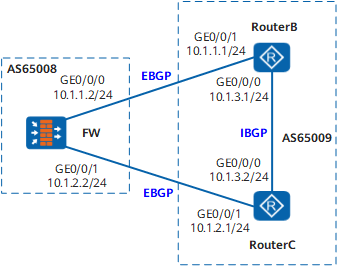
Configuration Roadmap
The configuration roadmap is as follows:
Establish EBGP connections between FW and RouterB and between FW and RouterC, and establish an IBGP connection between RouterB and RouterC.
Apply a routing policy to increase the MED value of the route sent by RouterB to FW so that FW will send traffic to AS 65009 through RouterC.
Data Preparation
To complete the configuration, you need the following data:
Router ID 1.1.1.1 and AS number 65008 of FW
Router IDs 2.2.2.2 and 3.3.3.3, and AS numbers 65009 of RouterB and RouterC respectively
New MED value 100 of the route on RouterB
Procedure
- Set the IP addresses for the interfaces, add the interfaces
to security zones, and configure the security policy.
# Configure FW.
<FW> system-view[FW] sysname FW
[FW] interface GigabitEthernet 0/0/0
[FW-GigabitEthernet0/0/0] ip address 10.1.1.2 24
[FW-GigabitEthernet0/0/0] quit
[FW] interface GigabitEthernet 0/0/1
[FW-GigabitEthernet0/0/1] ip address 10.1.2.2 24
[FW-GigabitEthernet0/0/1] quit
[FW] firewall zone trust[FW-zone-trust] add interface GigabitEthernet 0/0/0
[FW-zone-trust] add interface GigabitEthernet 0/0/1
[FW-zone-trust] quit[FW] security-policy[FW-policy-security] rule name policy_sec_1[FW-policy-security-rule-policy_sec_1] source-zone trust local[FW-policy-security-rule-policy_sec_1] destination-zone local trust[FW-policy-security-rule-policy_sec_1] action permit[FW-policy-security-rule-policy_sec_1] quit# Configure RouterB.
<Router> system-view
[Router] sysname RouterB
[RouterB] interface GigabitEthernet0/0/0[RouterB-GigabitEthernet0/0/0] ip address 10.1.3.1 24[RouterB-GigabitEthernet0/0/0] quit[RouterB] interface GigabitEthernet0/0/1[RouterB-GigabitEthernet0/0/1] ip address 10.1.1.1 24[RouterB-GigabitEthernet0/0/1] quit# Configure RouterC.
<Router> system-view
[Router] sysname RouterC
[RouterC] interface GigabitEthernet0/0/0[RouterC-GigabitEthernet0/0/0] ip address 10.1.3.2 24[RouterC-GigabitEthernet0/0/0] quit[RouterC] interface GigabitEthernet0/0/1[RouterC-GigabitEthernet0/0/1] ip address 10.1.2.1 24[RouterC-GigabitEthernet0/0/1] quit - Establish BGP connections.
# Configure FW.
[FW] bgp 65008[FW-bgp] router-id 1.1.1.1[FW-bgp] peer 10.1.1.1 as-number 65009[FW-bgp] peer 10.1.2.1 as-number 65009[FW-bgp] quit# Configure RouterB.
[RouterB] bgp 65009
[RouterB-bgp] router-id 2.2.2.2
[RouterB-bgp] peer 10.1.1.2 as-number 65008
[RouterB-bgp] peer 10.1.3.2 as-number 65009
[RouterB-bgp] ipv4-family unicast
[RouterB-bgp-af-ipv4] network 10.1.3.0 255.255.255.0
[RouterB-bgp-af-ipv4] quit
[RouterB-bgp] quit
# Configure RouterC.
[RouterC] bgp 65009
[RouterC-bgp] router-id 3.3.3.3
[RouterC-bgp] peer 10.1.2.2 as-number 65008
[RouterC-bgp] peer 10.1.3.1 as-number 65009
[RouterC-bgp] ipv4-family unicast
[RouterC-bgp-af-ipv4] network 10.1.3.0 255.255.255.0
[RouterC-bgp-af-ipv4] quit
[RouterC-bgp] quit
# View the routing table of FW.
[FW] display bgp routing-table 10.1.3.0 24

 BGP local router ID : 1.1.1.1
 Local AS number : 65008
 Paths:   2 available, 1 best, 1 select
 BGP routing table entry information of 10.1.3.0/24:
 From: 10.1.1.1 (2.2.2.2)
 Route Duration: 0d00h00m56s
 Direct Out-interface: GigabitEthernet0/0/0
 Original nexthop: 10.1.1.1
 Qos information : 0x0
 AS-path 65009, origin igp, MED 0, pref-val 0, valid, external, best, select, pre 255
 Advertised to such 2 peers:
    10.1.1.1
    10.1.2.1

 BGP routing table entry information of 10.1.3.0/24:
 From: 10.1.2.1 (3.3.3.3)
 Route Duration: 0d00h00m06s
 Direct Out-interface: GigabitEthernet0/0/1
 Original nexthop: 10.1.2.1
 Qos information : 0x0
 AS-path 65009, origin igp, MED 0, pref-val 0, valid, external, pre 255, not selected for router ID
 Not advertised to any peers yet
The preceding command output shows that there are two valid routes to destination 10.1.3.0/24. The route with the next-hop address of 10.1.1.1 is the optimal route because the router ID of RouterB is smaller.
- Set MED attributes for routes.
# Apply a routing policy to set an MED value for the route advertised by RouterB to FW (the default MED value of a route is 0).
[RouterB] route-policy policy10 permit node 10
[RouterB-route-policy] apply cost 100
[RouterB-route-policy] quit
[RouterB] bgp 65009
[RouterB-bgp] peer 10.1.1.2 route-policy policy10 export
# View the routing table of FW.
[FW] display bgp routing-table 10.1.3.0 24

BGP local router ID : 1.1.1.1
 Local AS number : 65008
 Paths:   2 available, 1 best, 1 select
 BGP routing table entry information of 10.1.3.0/24:
 From: 10.1.2.1 (3.3.3.3)
 Route Duration: 0d00h07m45s
 Direct Out-interface: GigabitEthernet0/0/1
 Original nexthop: 10.1.2.1
 Qos information : 0x0
 AS-path 65009, origin igp, MED 0, pref-val 0, valid, external, best, select, pre 255
 Advertised to such 2 peers:
    10.1.1.1
    10.1.2.1

 BGP routing table entry information of 10.1.3.0/24:
 From: 10.1.1.1 (2.2.2.2)
 Route Duration: 0d00h00m08s
 Direct Out-interface: GigabitEthernet0/0/0
 Original nexthop: 10.1.1.1
 Qos information : 0x0
 AS-path 65009, origin igp, MED 100, pref-val 0, valid, external, pre 255, not selected for MED
 Not advertised to any peers yet
The preceding command output shows that the MED value of the route with the next-hop address of 10.1.1.1 (RouterB) is 100 and the MED value of the route with the next-hop address of 10.1.2.1 is 0. The route with the smaller MED value is selected.
Configuration Files
Configuration file of FW
#
sysname FW#
interface GigabitEthernet0/0/0ip address 10.1.1.2 255.255.255.0
#
interface GigabitEthernet0/0/1ip address 10.1.2.2 255.255.255.0
#
firewall zone trust
 set priority 85
 add interface GigabitEthernet0/0/0
 add interface GigabitEthernet0/0/1
#
security-policy
  rule name policy_sec_1
    source-zone local
    source-zone trust
    destination-zone local
    destination-zone trust
    action permit
#
bgp 65008
router-id 1.1.1.1
peer 10.1.1.1 as-number 65009
peer 10.1.2.1 as-number 65009
#
ipv4-family unicast
peer 10.1.1.1 enable
peer 10.1.2.1 enable
#
return
Configuration file of RouterB
#
sysname RouterB
#
interface GigabitEthernet0/0/0ip address 10.1.3.1 255.255.255.0
#
interface GigabitEthernet0/0/1ip address 10.1.1.1 255.255.255.0
#
bgp 65009
router-id 2.2.2.2
peer 10.1.3.2 as-number 65009
peer 10.1.1.2 as-number 65008
#
ipv4-family unicast
undo synchronization
network 10.1.3.0 255.255.255.0
peer 10.1.3.2 enable
peer 10.1.1.2 enable
peer 10.1.1.2 route-policy policy10 export
#
route-policy policy10 permit node 10
apply cost 100
#
return
Configuration file of RouterC
#
sysname RouterC
#
interface GigabitEthernet0/0/0ip address 10.1.3.2 255.255.255.0
#
interface GigabitEthernet0/0/1ip address 10.1.2.1 255.255.255.0
#
bgp 65009
router-id 3.3.3.3
peer 10.1.3.1 as-number 65009
peer 10.1.2.2 as-number 65008
#
ipv4-family unicast
undo synchronization
network 10.1.3.0 255.255.255.0
peer 10.1.3.1 enable
peer 10.1.2.2 enable
#
return