Example for Configuring BGP Load Balancing
Proper use of BGP load balancing better utilizes network resources and reduces network congestion.
Networking Requirements
On the network shown in Figure 1, BGP is configured on all devices. FW is in AS 100. RouterB and RouterC are in AS 300. RouterD is in AS 200. FW establishes EBGP connections with RouterB and RouterC and RouterD establishes EBGP connections with RouterB and RouterC. FW has two BGP routes destined for destination 10.1.5.0/24. Traffic can reach destination 10.1.5.0/24 through either RouterB or RouterC. BGP load balancing can be configured to better utilize network resources and reduce network congestion.
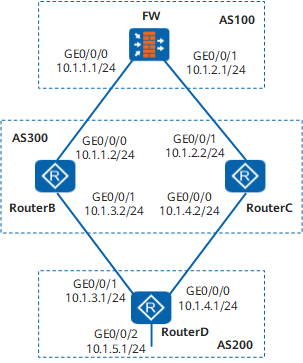
Precautions
When configuring BGP load balancing, note the following point:
Load balancing can be implemented by configuring BGP attributes, for example, ignoring the comparison of IGP metrics. Ensure that no routing loops occur when configuring BGP attributes to implement load balancing.
Configuration Roadmap
The configuration roadmap is as follows:
Establish EBGP connections between FW and RouterB and between FW and RouterC to enable ASs to communicate with each other using BGP.
Establish EBGP connections between RouterD and RouterB and between RouterD and RouterC to enable ASs to communicate with each other using BGP.
Configuring load balancing on FW so that FW can send traffic to RouterD through either RouterB or RouterC.
Data Preparation
To complete the configuration, you need the following data:
Router ID 1.1.1.1 and AS number 100 of FW
Router IDs 2.2.2.2 and 3.3.3.3, and AS numbers 300 of RouterB and RouterC respectively
Router ID 4.4.4.4 and AS number 200 of RouterD
Number of BGP routes that implement load balancing (two BGP routes implement load balancing in this example)
Procedure
- Set the IP addresses for the interfaces, add the interfaces
to security zones, and configure the security policy.
# Configure FW.
<FW> system-view[FW] sysname FW
[FW] interface GigabitEthernet 0/0/0
[FW-GigabitEthernet0/0/0] ip address 10.1.1.1 24
[FW-GigabitEthernet0/0/0] quit
[FW] interface GigabitEthernet 0/0/1
[FW-GigabitEthernet0/0/1] ip address 10.1.2.1 24
[FW-GigabitEthernet0/0/1] quit
[FW] interface LoopBack0[FW-LoopBack0] ip address 1.1.1.1 24[FW-LoopBack0] quit[FW] firewall zone trust[FW-zone-trust] add interface GigabitEthernet 0/0/0
[FW-zone-trust] add interface GigabitEthernet 0/0/1
[FW-zone-trust] quit[FW] security-policy[FW-policy-security] rule name policy_sec_1[FW-policy-security-rule-policy_sec_1] source-zone trust local[FW-policy-security-rule-policy_sec_1] destination-zone local trust[FW-policy-security-rule-policy_sec_1] action permit[FW-policy-security-rule-policy_sec_1] quit# Configure RouterB.
<Router> system-view
[Router] sysname RouterB
[RouterB] interface GigabitEthernet0/0/0[RouterB-GigabitEthernet0/0/0] ip address 10.1.1.2 24[RouterB-GigabitEthernet0/0/0] quit[RouterB] interface GigabitEthernet0/0/1[RouterB-GigabitEthernet0/0/1] ip address 10.1.3.2 24[RouterB-GigabitEthernet0/0/1] quit[RouterB] interface LoopBack0
[RouterB-LoopBack0] ip address 2.2.2.2 24
[RouterB-LoopBack0] quit
# Configure RouterC.
<Router> system-view
[Router] sysname RouterC
[RouterC] interface GigabitEthernet0/0/0[RouterC-GigabitEthernet0/0/0] ip address 10.1.4.2 24[RouterC-GigabitEthernet0/0/0] quit[RouterC] interface GigabitEthernet0/0/1[RouterC-GigabitEthernet0/0/1] ip address 10.1.2.2 24[RouterC-GigabitEthernet0/0/1] quit[RouterC] interface LoopBack0
[RouterC-LoopBack0] ip address 3.3.3.3 24
[RouterC-LoopBack0] quit
# Configure RouterD.
<Router> system-view
[Router] sysname RouterD
[RouterD] interface GigabitEthernet0/0/0[RouterD-GigabitEthernet0/0/0] ip address 10.1.4.1 24[RouterD-GigabitEthernet0/0/0] quit[RouterD] interface GigabitEthernet0/0/1[RouterD-GigabitEthernet0/0/1] ip address 10.1.3.1 24[RouterD-GigabitEthernet0/0/1] quit[RouterD] interface GigabitEthernet0/0/2[RouterD-GigabitEthernet0/0/2] ip address 10.1.5.1 24[RouterD-GigabitEthernet0/0/2] quit[RouterD] interface LoopBack0
[RouterD-LoopBack0] ip address 4.4.4.4 24
[RouterD-LoopBack0] quit
- Establish BGP connections.
# Configure FW
[FW] bgp 100[FW-bgp] router-id 1.1.1.1[FW-bgp] peer 10.1.1.2 as-number 300[FW-bgp] peer 10.1.2.2 as-number 300[FW-bgp] quit# Configure RouterB.
[RouterB] bgp 300
[RouterB-bgp] router-id 2.2.2.2
[RouterB-bgp] peer 10.1.1.1 as-number 100
[RouterB-bgp] peer 10.1.3.1 as-number 200
[RouterB-bgp] quit
# Configure RouterC.
[RouterC] bgp 300
[RouterC-bgp] router-id 3.3.3.3
[RouterC-bgp] peer 10.1.2.1 as-number 100
[RouterC-bgp] peer 10.1.4.1 as-number 200
[RouterC-bgp] quit
# Configure RouterD.
[RouterD] bgp 200
[RouterD-bgp] router-id 4.4.4.4
[RouterD-bgp] peer 10.1.3.2 as-number 300
[RouterD-bgp] peer 10.1.4.2 as-number 300
[RouterD-bgp] ipv4-family unicast
[RouterD-bgp-af-ipv4] network 10.1.5.0 255.255.255.0
[RouterD-bgp-af-ipv4] quit
[RouterD-bgp] quit
# View the routing table of FW.
[FW] display bgp routing-table 10.1.5.0 24

 BGP local router ID : 1.1.1.1
 Local AS number : 100
 Paths : 2 available, 1 best, 1 select
 BGP routing table entry information of 10.1.5.0/24:
 From: 10.1.1.2 (2.2.2.2)
 Route Duration: 0d00h00m50s
 Direct Out-interface: GigabitEthernet0/0/0
 Original nexthop: 10.1.1.2
 Qos information : 0x0
 AS-path 200 300, origin igp, pref-val 0, valid, external, best, select, pre 255
 Advertised to such 2 peers:
    10.1.1.2
    10.1.2.2

 BGP routing table entry information of 10.1.5.0/24:
 From: 10.1.2.2 (3.3.3.3)
 Route Duration: 0d00h00m51s
 Direct Out-interface: GigabitEthernet0/0/1
 Original nexthop: 10.1.2.2
 Qos information : 0x0
 AS-path 200 300, origin igp, pref-val 0, valid, external, pre 255, not selected for router ID
 Not advertised to any peers yet
The preceding command output shows that there are two valid routes from FW to destination 10.1.5.0/24. The route with the next-hop address of 10.1.1.2 is the optimal route because the router ID of RouterB is smaller.
- Configure BGP load balancing.
# Configure load balancing on FW.
[FW] bgp 100[FW-bgp] ipv4-family unicast[FW-bgp-af-ipv4] maximum load-balancing 2[FW-bgp-af-ipv4] quit[FW-bgp] quit - Verify the configuration.
# View the routing table of FW.
[FW] display bgp routing-table 10.1.5.0 24

 BGP local router ID : 1.1.1.1
 Local AS number : 100
 Paths : 2 available, 1 best, 2 select
 BGP routing table entry information of 10.1.5.0/24:
 From: 10.1.1.2 (2.2.2.2)
 Route Duration: 0d00h03m55s
 Direct Out-interface: GigabitEthernet0/0/0
 Original nexthop: 10.1.1.2
 Qos information : 0x0
 AS-path 200 300, origin igp, pref-val 0, valid, external, best, select, pre 255
 Advertised to such 2 peers
    10.1.1.2
    10.1.2.2

 BGP routing table entry information of 10.1.5.0/24:
 From: 10.1.2.2 (3.3.3.3)
 Route Duration: 0d00h03m56s
 Direct Out-interface: GigabitEthernet0/0/1
 Original nexthop: 10.1.2.2
 Qos information : 0x0
 AS-path 200 300, origin igp, pref-val 0, valid, external, select, pre 255, not selected for router ID
 Not advertised to any peers yet
The preceding command output shows that BGP route 10.1.5.0/24 has two next hops: 10.1.1.2 and 10.1.2.2. Both of them are optimal routes.
Configuration Files
Configuration file of FW
#
sysname FW#
interface GigabitEthernet0/0/0ip address 10.1.1.1 255.255.255.0
#
interface GigabitEthernet0/0/1ip address 10.1.2.1 255.255.255.0
#
interface LoopBack0
ip address 1.1.1.1 255.255.255.255
#
firewall zone trust
 set priority 85
 add interface GigabitEthernet0/0/0
 add interface GigabitEthernet0/0/1
#
security-policy
  rule name policy_sec_1
    source-zone local
    source-zone trust
    destination-zone local
    destination-zone trust
    action permit
#
bgp 100
router-id 1.1.1.1
peer 10.1.1.2 as-number 300
peer 10.1.2.2 as-number 300
#
ipv4-family unicast
maximum load-balancing 2
peer 10.1.1.2 enable
peer 10.1.2.2 enable
#
return
Configuration file of RouterB
#
sysname RouterB
#
interface GigabitEthernet0/0/0ip address 10.1.1.2 255.255.255.0
#
interface GigabitEthernet0/0/1ip address 10.1.3.2 255.255.255.0
#
interface LoopBack0
ip address 2.2.2.2 255.255.255.255
#
bgp 300
router-id 2.2.2.2
peer 10.1.1.1 as-number 100
peer 10.1.3.1 as-number 200
#
ipv4-family unicast
undo synchronization
peer 10.1.1.1 enable
peer 10.1.3.1 enable
#
return
Configuration file of RouterC
#
sysname RouterC
#
interface GigabitEthernet0/0/0ip address 10.1.4.2 255.255.255.0
#
interface GigabitEthernet0/0/1ip address 10.1.2.2 255.255.255.0
#
interface LoopBack0
ip address 3.3.3.3 255.255.255.255
#
bgp 300
router-id 3.3.3.3
peer 10.1.2.1 as-number 100
peer 10.1.4.1 as-number 200
#
ipv4-family unicast
undo synchronization
peer 10.1.2.1 enable
peer 10.1.4.1 enable
#
return
Configuration file of RouterD
#
sysname RouterD
#
interface GigabitEthernet0/0/0ip address 10.1.4.1 255.255.255.0
#
interface GigabitEthernet0/0/1ip address 10.1.3.1 255.255.255.0
#
interface GigabitEthernet0/0/2ip address 10.1.5.1 255.255.255.0
#
interface LoopBack0
ip address 4.4.4.4 255.255.255.255
#
bgp 200
router-id 4.4.4.4
peer 10.1.3.2 as-number 300
peer 10.1.4.2 as-number 300
#
ipv4-family unicast
undo synchronization
network 10.1.5.0 255.255.255.0
peer 10.1.3.2 enable
peer 10.1.4.2 enable
#
return