Example for Configuring BGP/OSPF Routes in the Virtual System Networking
This section provides an example for configuring basic functions of BGP/OSPF routes in the virtual system networking.
Networking Requirements
As shown in Figure1 BGP/OSPF networking in virtual system deployment, the FW is divided into two virtual systems, each of which is isolated with routes. Requirements are as follows:
- The FW, Router A, and Router B belong to AS 65009, with IBGP running.
- The FW, Router C, and Router D belong to OSPF Area 0, with OSPF running.
- Router A, vsysa, and Router C need to be reachable to each other, so do Router B, vsysb, and Router D.
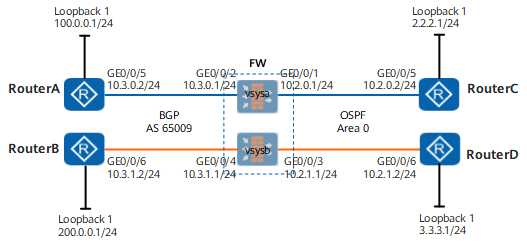
Configuration Roadmap
- Use the root system administrator account to create virtual systems vsysa and vsysb and assign interface and system resources.
- The FW does not support dynamic routing for virtual systems. Configure dynamic routing in the root system and bind the VPN instance with the same name as the virtual system to implement route isolation.
- In this example, BGP and OSPF routes run on the two sides of the FW respectively. Therefore, mutual import of different types of routes is involved.
Procedure
- Use the root system administrator account to create vsysa and vsysb and assign system resources.
# Use the root system administrator account to log in to the FW.
# Enable the virtual system function.
[FW] vsys enable# Configure a resource class.
[FW] resource-class r1
[FW-resource-class-r1] resource-item-limit session reserved-number 10000 maximum 50000
[FW-resource-class-r1] resource-item-limit bandwidth 20 entire
[FW-resource-class-r1] quit

When the FW has a virtual system created, a VPN instance with the same name as the virtual system is automatically generated. To configure virtual system dynamic routing, bind the corresponding VPN instance.
# Create the virtual system and assign resources to it.
[FW] vsys name vsysa
[FW-vsys-vsysa] assign resource-class r1
[FW-vsys-vsysa] assign interface GigabitEthernet 0/0/1
[FW-vsys-vsysa] assign interface GigabitEthernet 0/0/2
[FW-vsys-vsysa] quit
[FW] vsys name vsysb
[FW-vsys-vsysb] assign resource-class r1
[FW-vsys-vsysb] assign interface GigabitEthernet 0/0/3
[FW-vsys-vsysb] assign interface GigabitEthernet 0/0/4
[FW-vsys-vsysb] quit
- Configure interfaces of vsysa.
[FW] switch vsys vsysa
<FW-vsysa> system-view
[FW-vsysa] interface GigabitEthernet 0/0/1
[FW-vsysa-GigabitEthernet0/0/1] ip address 10.2.0.1 24
[FW-vsysa-GigabitEthernet0/0/1] quit
[FW-vsysa] interface GigabitEthernet 0/0/2
[FW-vsysa-GigabitEthernet0/0/2] ip address 10.3.0.1 24
[FW-vsysa-GigabitEthernet0/0/2] quit
[FW-vsysa] firewall zone trust
[FW-vsysa-zone-trust] add interface GigabitEthernet 0/0/2
[FW-vsysa-zone-trust] quit
[FW-vsysa] firewall zone untrust
[FW-vsysa-zone-untrust] add interface GigabitEthernet 0/0/1
[FW-vsysa-zone-untrust] quit
- Configure security policies of vsysa.
# Configure a security policy to allow route learning.
[FW-vsysa] security-policy
[FW-vsysa-policy-security] rule name route1
[FW-vsysa-policy-security-rule-route1] source-zone trust local
[FW-vsysa-policy-security-rule-route1] destination-zone trust local
[FW-vsysa-policy-security-rule-route1] action permit
[FW-vsysa-policy-security-rule-route1] quit
[FW-vsysa-policy-security] rule name route2
[FW-vsysa-policy-security-rule-route2] source-zone untrust local
[FW-vsysa-policy-security-rule-route2] destination-zone untrust local
[FW-vsysa-policy-security-rule-route2] action permit
[FW-vsysa-policy-security-rule-route2] quit
# Configure a security policy to allow mutual access traffic to pass through the FW.
[FW-vsysa] security-policy
[FW-vsysa-policy-security] rule name access
[FW-vsysa-policy-security-rule-access] source-zone trust untrust
[FW-vsysa-policy-security-rule-access] destination-zone trust untrust
[FW-vsysa-policy-security-rule-access] action permit
[FW-vsysa-policy-security-rule-access] quit
[FW-vsysa-policy-security] quit
[FW-vsysa] quit
<FW-vsysa> quit
- Configure vsysa route connectivity in the root system. The procedure for configuring router interface IP addresses is omitted.
# Configure IBGP on the FW. Bind the VPN instance with the same name as the virtual system.
[FW] ip vpn-instance vsysa
[FW-vpn-instance-vsysa] ipv4-family
[FW-vpn-instance-vsysa-af-ipv4] route-distinguisher 100:1
[FW-vpn-instance-vsysa-af-ipv4] quit
[FW-vpn-instance-vsysa] quit
[FW] bgp 65009
[FW-bgp] ipv4-family vpn-instance vsysa
[FW-bgp-vsysa] router-id 10.3.0.1
[FW-bgp-vsysa] peer 10.3.0.2 as-number 65009
[FW-bgp-vsysa] quit
[FW-bgp] quit
# Configure IBGP peer relationship on Router A and import the network segment to be advertised to the BGP routing table. In this example, the network segment where Loopback1 resides is used.
[RouterA] bgp 65009
[RouterA-bgp] router-id 10.3.0.2
[RouterA-bgp] peer 10.3.0.1 as-number 65009
[RouterA-bgp] network 100.0.0.0 255.255.255.0
# Check the connectivity of the BGP peer on the FW. If the status is Established, the peer relationship is successfully established.
<FW> display bgp vpnv4 vpn-instance vsysa peer
 BGP local router ID : 0.0.0.0
 Local AS number : 65009

 VPN-Instance vsysa, Router ID 10.3.0.1:
 Total number of peers : 1		  Peers in established state : 1

  Peer            V          AS  MsgRcvd  MsgSent  OutQ  Up/Down       State          PrefRcv

  10.3.0.2        4       65009      260      255     0 04:08:39      Established      1
# Check the BGP routing table on the FW. You can see that the route to the network segment 100.0.0.0/24 has been learned.
<FW> display bgp vpnv4 vpn-instance vsysa routing-table
BGP Local router ID is 0.0.0.0
 Status codes: * - valid, > - best, d - damped,
               h - history,  i - internal, s - suppressed, S - Stale
               Origin : i - IGP, e - EGP, ? - incomplete

 VPN-Instance vsysa, Router ID 10.3.0.1:

 Total Number of Routes: 1
      Network            NextHop        MED        LocPrf    PrefVal Path/Ogn

 *>i  100.0.0.0/24       10.3.0.2        0          100        0      i
# Configure OSPF on the FW.
[FW] ospf 10 router-id 10.2.0.1 vpn-instance vsysa
[FW-ospf-10] area 0
[FW-ospf-10-area-0.0.0.0] network 10.2.0.0 0.0.0.255
[FW-ospf-10-area-0.0.0.0] quit
[FW-ospf-10] quit
# Configure OSPF on Router C.
[RouterC] ospf 10 router-id 10.2.0.2
[RouterC-ospf-10] area 0
[RouterC-ospf-10-area-0.0.0.0] network 10.2.0.0 0.0.0.255
[RouterC-ospf-10-area-0.0.0.0] network 2.2.2.0 0.0.0.255
[RouterC-ospf-10-area-0.0.0.0] quit
[RouterC-ospf-10] quit
# Check the status of the OSPF neighbor relationship on the FW. If the value is Full, the neighbor relationship is successfully set up.
<FW> display ospf 10 peer
  OSPF Process 10 with Router ID 10.2.0.1
		 Neighbors

 Area 0.0.0.0 interface 10.2.0.1(GigabitEthernet0/0/1)'s neighbors
 Router ID: 10.2.0.2         Address: 10.2.0.2
   State: Full  Mode:Nbr is  Master  Priority: 1
   DR: 10.2.0.2  BDR: 10.2.0.1  MTU: 0
   Dead timer due in 37  sec
   Retrans timer interval: 5
   Neighbor is up for 04:11:51
   Authentication Sequence: [ 0 ]
# Configure route import.
[FW] ospf 10
[FW-ospf-10] import-route bgp permit-ibgp
[FW] bgp 65009
[FW-bgp] ipv4-family vpn-instance vsysa
[FW-bgp-vsysa] import-route ospf 10
- Configure interfaces, security policies, and route connectivity of vsysb. The configuration procedure is similar to that of vsysa.
Verification
Take vsysa as an example. Check the routing table of each device. The command output shows that route connectivity is normal.
<FW> display ip routing-table vpn-instance vsysa
  Route Flags: R - relay, D - download to fib
------------------------------------------------------------------------------
Routing Tables: vsysa
         Destinations : 6        Routes : 6

Destination/Mask    Proto   Pre  Cost      Flags NextHop         Interface

        2.2.2.1/32  OSPF  10   1           D   10.2.0.2        GigabitEthernet0/0/1
       10.2.0.0/24  Direct  0    0           D   10.2.0.1        GigabitEthernet0/0/1
       10.2.0.1/32  Direct  0    0           D   127.0.0.1       GigabitEthernet0/0/1
       10.3.0.0/24  Direct  0    0           D   10.3.0.1        GigabitEthernet0/0/2
       10.3.0.1/32  Direct  0    0           D   127.0.0.1       GigabitEthernet0/0/2
      100.0.0.0/24  IBGP  255  0          RD   10.3.0.2        GigabitEthernet0/0/2

<RouterA> display ip routing-table
Route Flags: R - relay, D - download to fib
------------------------------------------------------------------------------
Routing Tables: Public
         Destinations : 8        Routes : 8

Destination/Mask    Proto   Pre  Cost      Flags NextHop         Interface

2.2.2.1/32  IBGP  255  2          RD   10.3.0.1        GigabitEthernet0/0/5
10.2.0.0/24  IBGP   255  0          RD   10.3.0.1        GigabitEthernet0/0/5
10.3.0.0/24  Direct  0   0           D   10.3.0.2        GigabitEthernet0/0/5
10.3.0.2/32  Direct  0   0           D   127.0.0.1       GigabitEthernet0/0/5
100.0.0.0/24  Direct  0    0         D   100.0.0.1       LoopBack1
100.0.0.1/32  Direct  0    0         D   127.0.0.1       LoopBack1
127.0.0.0/8   Direct  0    0         D   127.0.0.1       InLoopBack0
127.0.0.1/32  Direct  0    0         D   127.0.0.1       InLoopBack0

<RouterC> display ip routing-tableRoute Flags: R - relay, D - download to fib
------------------------------------------------------------------------------
Routing Tables: Public
         Destinations : 7        Routes : 7

Destination/Mask    Proto   Pre  Cost      Flags NextHop         Interface

        2.2.2.0/24  Direct  0    0           D   2.2.2.1         LoopBack1
        2.2.2.1/32  Direct  0    0           D   127.0.0.1       LoopBack1
       10.2.0.0/24  Direct  0    0           D   10.2.0.2        GigabitEthernet0/0/5
       10.2.0.2/32  Direct  0    0           D   127.0.0.1       GigabitEthernet0/0/5
      100.0.0.0/24 O_ASE   150  1           D   10.2.0.1        GigabitEthernet0/0/5
      127.0.0.0/8   Direct  0    0           D   127.0.0.1       InLoopBack0
      127.0.0.1/32  Direct  0    0           D   127.0.0.1       InLoopBack0
Ping the IP address of Router C's Loopback1 interface on Router A.
<RouterA> ping -a 100.0.0.1 2.2.2.1
  PING 2.2.2.1: 56  data bytes, press CTRL_C to break
    Reply from 2.2.2.1: bytes=56 Sequence=1 ttl=254 time=110 ms
    Reply from 2.2.2.1: bytes=56 Sequence=2 ttl=254 time=30 ms
    Reply from 2.2.2.1: bytes=56 Sequence=3 ttl=254 time=50 ms
    Reply from 2.2.2.1: bytes=56 Sequence=4 ttl=254 time=50 ms
    Reply from 2.2.2.1: bytes=56 Sequence=5 ttl=254 time=40 ms

  --- 2.2.2.1 ping statistics ---
    5 packet(s) transmitted
    5 packet(s) received
    0.00% packet loss
    round-trip min/avg/max = 30/56/110 ms
Configuration Scripts
Configuration script of the root system:
#
 sysname FW
#
 vsys enable
#
resource-class r1
 resource-item-limit session reserved-number 10000 maximum 50000
 resource-item-limit bandwidth 20 entire
#
vsys name vsysa 1
 assign resource-class r1
 assign interface GigabitEthernet0/0/1
 assign interface GigabitEthernet0/0/2
#
vsys name vsysb 2
 assign resource-class r1
 assign interface GigabitEthernet0/0/3
 assign interface GigabitEthernet0/0/4
#
ip vpn-instance vsysa
 ipv4-family
  route-distinguisher 100:1
#
ip vpn-instance vsysb
 ipv4-family
  route-distinguisher 100:2
#
bgp 65009
 ipv4-family unicast
 undo synchronization
#
ipv4-family vpn-instance vsysa
 router-id 10.3.0.1
 import-route ospf 10
 peer 10.3.0.2 as-number 65009
#
ipv4-family vpn-instance vsysb
 router-id 10.3.1.1
 peer 10.3.1.2 as-number 65009
 import-route ospf 20
#
ospf 10 router-id 10.2.0.1 vpn-instance vsysa
 import-route bgp permit-ibgp
 area 0.0.0.0
  network 10.2.0.0 0.0.0.255
#
ospf 20 router-id 10.2.1.1 vpn-instance vsysb
 import-route bgp permit-ibgp
 area 0.0.0.0
  network 10.2.1.0 0.0.0.255
return
Configuration script of vsysa:
#
interface GigabitEthernet0/0/2
 ip address 10.3.0.1 255.255.255.0
 ip binding vpn-instance vsysa
#
interface GigabitEthernet0/0/1
 ip address 10.2.0.1 255.255.255.0
 ip binding vpn-instance vsysa
#
firewall zone trust
 set priority 85
 add interface GigabitEthernet0/0/2
#
firewall zone untrust
 set priority 5
 add interface GigabitEthernet0/0/1
#
security-policy
 rule name route1
  source-zone local
  source-zone trust
  destination-zone local
  destination-zone trust
  action permit
 rule name access
  source-zone trust
  source-zone untrust
  destination-zone untrust
  destination-zone trust
  action permit
 rule name route2
  disable
  source-zone local
  source-zone untrust
  destination-zone local
  destination-zone untrust
  action permit
#
return
Configuration script of vsysb:
#
interface GigabitEthernet0/0/4
 ip address 10.3.1.1 255.255.255.0
 ip binding vpn-instance vsysb
#
interface GigabitEthernet0/0/3
 ip address 10.2.1.1 255.255.255.0
 ip binding vpn-instance vsysb
#
firewall zone trust
 set priority 85
 add interface GigabitEthernet0/0/4
#
firewall zone untrust
 set priority 5
 add interface GigabitEthernet0/0/3
#
security-policy
 rule name route1
  source-zone local
  source-zone trust
  destination-zone local
  destination-zone trust
  action permit
 rule name access
  source-zone trust
  source-zone untrust
  destination-zone untrust
  destination-zone trust
  action permit
 rule name route2
  disable
  source-zone local
  source-zone untrust
  destination-zone local
  destination-zone untrust
  action permit
#
return