Failure in Establishing BGP Peers
For the typical BGP networking, this describes the flow and detailed steps for the failure of BGP peer establishment troubleshooting.
Symptom
On the network as shown in Figure 1, after FWs are configured, BGP peers cannot be established.
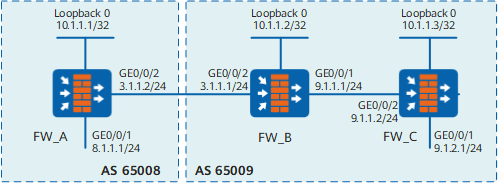
In the previous networking diagram:
- FW_A belongs to AS domain 65008, and FW_B and FW_C belong to AS domain 65009. The IP addresses of the physical interface and loopback0 are shown in the figure respectively.
- An EBGP connection is established between FW_A and FW_B. Set loopback0 IP address to the IP address of the peer mutually.
- An IBGP connection is established between FW_B and FW_C. Set the IP address of GE directly-connected interface to that of the peer mutually.
Possible Causes
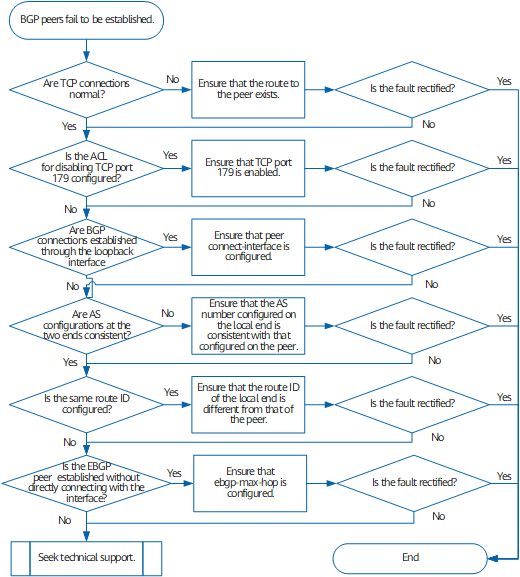
- Cause one: TCP connections are abnormal.
- Cause two: The ACL is configured to disable TCP port 179.
- Cause three: BGP connections are established through the loopback interface; however, peer connect-interface is not adopted for configuring the interface for connections.
- Cause four: The AS configurations of the local and peer are inconsistent.
- Cause five: The same router ID is configured on both ends.
- Cause six: The neighbor is the EBGP peer and ebgp-max-hop is not configured.
Procedure
- Cause one: TCP connections are abnormal.
Run the ping ip-address command to check whether the route is normal. You need to run the following command on FW_B:
ping 10.1.1.1
The following information indicates that the route is abnormal. You need to find the reason through the following procedure.
PING 10.1.1.1: 56 data bytes, press CTRL_C to break Request time out Request time out Request time out Request time out Request time out --- 10.1.1.1 ping statistics --- 5 packet(s) transmitted 0 packet(s) received 100.00% packet loss - Cause two: The ACL is configured to disable TCP port 179.
Check whether the ACL for disabling TCP port 179 is configured.
Run the display current-configuration command or the display acl all command to check whether the router is configured with the ACL for disabling TCP port 179. Port 179 is the listening port for the BGP peer to establish TCP connections. If port 179 is disabled, TCP connections cannot be established.
- Cause three: BGP connections are established through the
loopback interface; however, the peer connect-interface command is not adopted for configuring the interface
for connections.
Run the display current-configuration configuration bgp command to view the BGP configuration information. Take FW_A as an example, you can check whether the peer 10.1.1.2 connect-interface LoopBack0 configuration is included.
- Cause four: The AS configurations of the local and peer
are inconsistent.
Run the debugging bgp ipv4-address all command to enable the debugging of a certain peer. For example, connections cannot be established between FW_B and FW_A. You can run the debugging bgp 10.1.1.2 all command to enable the BGP debugging on FW_B, thus finding out the reason that FW_A cannot establish connections with FW_B.
- If Send/Receive NOTIFICATION Err/SubErr: 2/2 (OPEN Message Error/Bad Peer AS) is displayed, it indicates that AS configurations are incorrect. You need to check whether the ASs on FW_A and FW_B are identical with those specified on peers.
- Cause five: The same router ID is configured on both ends.
Run the debugging bgp ipv4-address all command to enable the debugging of a certain peer. For example, connections cannot be established between FW_B and FW_A. You can run the debugging bgp 10.1.1.2 all command to enable the BGP debugging on FW_B, thus finding out the reason that FW_A cannot establish connections with FW_B.
- If Send/Receive NOTIFICATION Err/SubErr: 2/3 (OPEN Message Error/Bad BGP Identifier) is displayed, it indicates that router ID configurations are incorrect. You need to check whether router IDs on FW_A FW_B are configured the same.
- Cause six: The neighbor is the EBGP peer and ebgp-max-hop is not configured.
If prompt information Might miss configing ebgp-max-hop for ebgp multi-hop peer is displayed, it indicates that EBGP peer is established without directly connecting with the interface; however, Ebgp-Max-Hop is not configured.
- If the fault persists, contact technical support personnel.