Route Loss During the Exchange of Update Messages Between BGP Peers
This section describes how to troubleshoot route loss during the exchange of Update messages between BGP peers on typical BGP networks.
Symptom
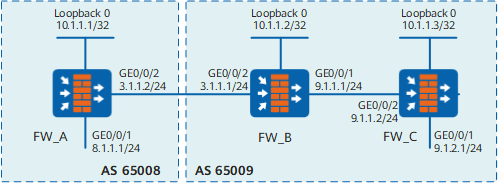
On the network shown in Figure 1, BGP peers are configured for all FWs. However, route loss occurs during the exchange of Update messages between BGP peers.
Possible Causes
- Cause one: The sender does not send any route.
- Cause two: The recipient does not receive any route.
Procedure
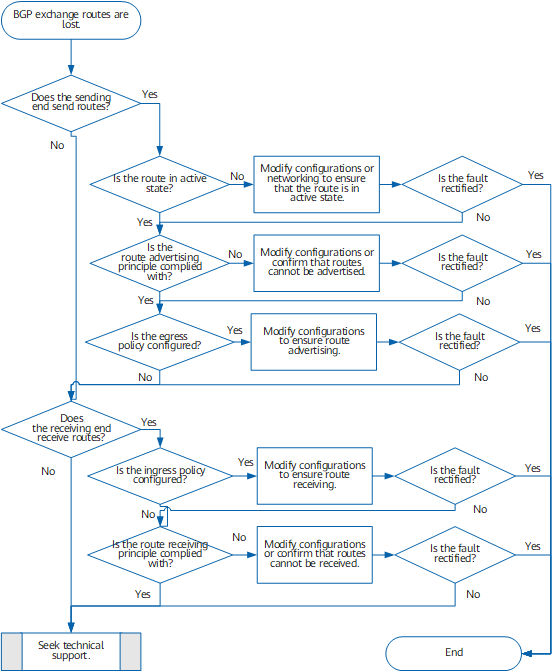
- Cause one: The sender does not send any route.
Run the display bgp routing-table peer peer-address advertised-routes command on the sender to check whether a route is sent.
If the sender does not send any route, perform the following operations:
- Check whether the local route is in active state.
Run the display bgp routing-table command to check whether the route is in active state. That is, check whether tag *> is labeled on the route. If the local route is in inactive state, the next hop is unreachable or other preferred routes exist on the local.
- Check whether the principle of advertising routes fails
to meet requirements.
- The suppressed aggregation routes are not advertised. Run the display bgp routing-table command to check whether routes contain the S tag.
- Routes suppressed through dampening are not advertised. Run the display bgp routing-table command to check whether routes contain the D tag.
- Routes learned from IBGP peers are not forwarded to the IBGP peers.
- Check whether an egress policy is configured to filter
out the routes to be advertised.
The following filters are available for BGP:
- IP prefix list filter: IP-Prefix List
- Path list filter: AS_Path Filter
- Community attribute list filter: Community Filter
- Route-Policy
These filters are applicable to routing information received from IBGP peers or advertised to IBGP peers.
Run the display current-configuration configuration bgp command to view the configuration information.
- Check whether the local route is in active state.
- Cause two: The recipient does not receive any route.
Run the display bgp routing-table peer peer-address received-routes command on the recipient to check whether a route is received.
If the recipient does not receive any route, perform the following operations:
- Check whether an ingress policy is configured to filter
out the routes to be received.
Run the display current-configuration configuration bgp command to view the configuration information.
- Check whether the principle of receiving routes fails
to meet requirements.
Routes that meet the following conditions are denied:
- The peer allow-as-loop command is not configured and the local AS number is in the AS_Path attribute of the received route.
- The peer allow-as-loop [ number ] command is configured. In the AS_Path attribute of the received route, the number of the repeated appearance times of the local AS number is greater than the specified value. (The default value is 1.)
- The first AS number in the AS_Path attribute of the route received from the EBGP peer is not that of the peer.
- The originator ID is identical with the local router ID, or the ID is specified as invalid value 0.0.0.0.
- The cluster list of a route received by the reflector contains the local cluster ID.
- The aggregator is specified as invalid value 0.0.0.0.
- The IP address of the next hop is that of the local interface.
- The next hop for the route received from the directly connected EBGP peer is unreachable.
- After the peer route-limit alert-only command is configured and the specified number is exceeded, all routes to be received are denied.
- Check whether an ingress policy is configured to filter
out the routes to be received.
- If the fault persists, contact technical support engineers.